> For the complete documentation index, see [llms.txt](https://docs.cherryai.com.cn/llms.txt). Markdown versions of documentation pages are available by appending `.md` to page URLs; this page is available as [Markdown](https://docs.cherryai.com.cn/pre-basic/settings/websearch.md).
# 联网模式
如何在 Cherry Studio 使用联网模式
{% hint style="info" %}
联网模式让 AI 在回答前先去搜索最新内容,适合以下场景:
* **时效性信息**:今日 / 本周 / 刚刚发生的新闻、价格、汇率等
* **实时数据**:天气、股价、商品库存等动态数值
* **新兴知识**:刚出现的工具、概念、技术
{% endhint %}
## 如何开启联网
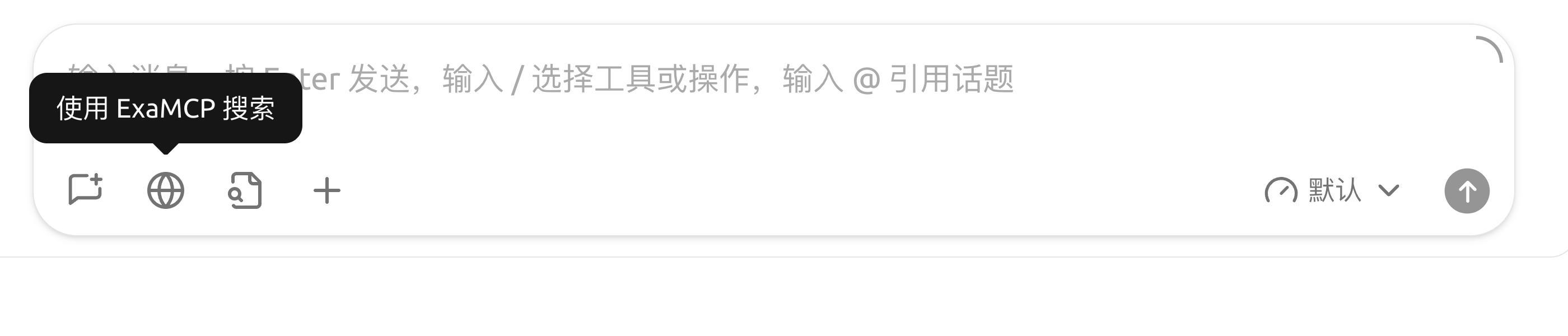
在对话输入框的工具栏中点击 🌐 **小地球** 图标,即可对当前对话开启联网。
## 相关配置
默认的 Exa MCP 免密钥即可用;想换用其他服务或深入配置,见下面几篇:
* [免费联网模式](/pre-basic/settings/websearch/free-search.md) —— 不花钱也能用上搜索能力
* [Tavily 联网登录注册教程](/pre-basic/settings/websearch/tavily.md) —— 换用 Tavily 时,如何注册并获取密钥
* [SearXNG 本地部署与配置](/pre-basic/settings/websearch/searxng.md) —— 自托管、完全本地化
* [网络搜索黑名单配置](/pre-basic/settings/websearch/blacklist.md) —— 屏蔽不想要的网站
## 工作机制
无论走哪种方式,对话流程都是:
1. 你问“今天上海天气怎么样?”
2. Cherry Studio 把问题先发给搜索服务
3. 搜索服务返回相关网页摘要
4. Cherry Studio 把这些摘要拼到提示词里发给 AI 模型
5. AI 基于实时数据回答你
***
### 获取帮助与提交反馈
如果您在配置或使用过程中遇到任何疑问、Bug 或有功能改进建议,请参考 [反馈与建议](/question-contact/suggestions.md) 中提供的官方渠道。
---
# Agent Instructions
This documentation is published with GitBook. GitBook is the documentation platform designed so that both humans and AI agents can read, navigate, and reason over technical content effectively. Learn more at gitbook.com.
## Querying This Documentation
If you need additional information that is not directly available in this page, you can query the documentation by asking a question.
Perform an HTTP GET request on the following URL with the `ask` and `goal` query parameters:
```
GET https://docs.cherryai.com.cn/pre-basic/settings/websearch.md?ask=&goal=
```
`ask` is the immediate question: it should be specific, self-contained, and written in natural language.
`goal` is what the user is ultimately trying to achieve, the reason they need the answer. Sharing it helps GitBook give you a better, more relevant answer. A goal is most helpful when it describes the outcome the user wants rather than restating the question. For example, with `ask=how do I create an API token`, a goal like `automate deployments from our CI pipeline` lets GitBook tailor the answer to that use case.
The response will contain a direct answer to the question and relevant excerpts and sources from the documentation.
Use this mechanism when the answer is not explicitly present in the current page, you need clarification or additional context, or you want to retrieve related documentation sections.