> For the complete documentation index, see [llms.txt](https://docs.cherryai.com.cn/llms.txt). Markdown versions of documentation pages are available by appending `.md` to page URLs; this page is available as [Markdown](https://docs.cherryai.com.cn/pre-basic/settings/usage.md).
# 用量统计
用量统计把你在 Cherry Studio 里的 **模型调用情况汇总成可视化面板**:花了多少钱、用了多少 Token、发了多少请求、哪个模型用得最多,一目了然。它帮你估算成本、发现异常消耗,也方便对不同模型的使用做取舍。
打开 `设置 → 用量统计`。页面分 **概览 / 探索 / 请求** 三块,右上角可切换 **最近 30 天 / 最近 90 天 / 最近一年**,所有数据按所选区间统计。
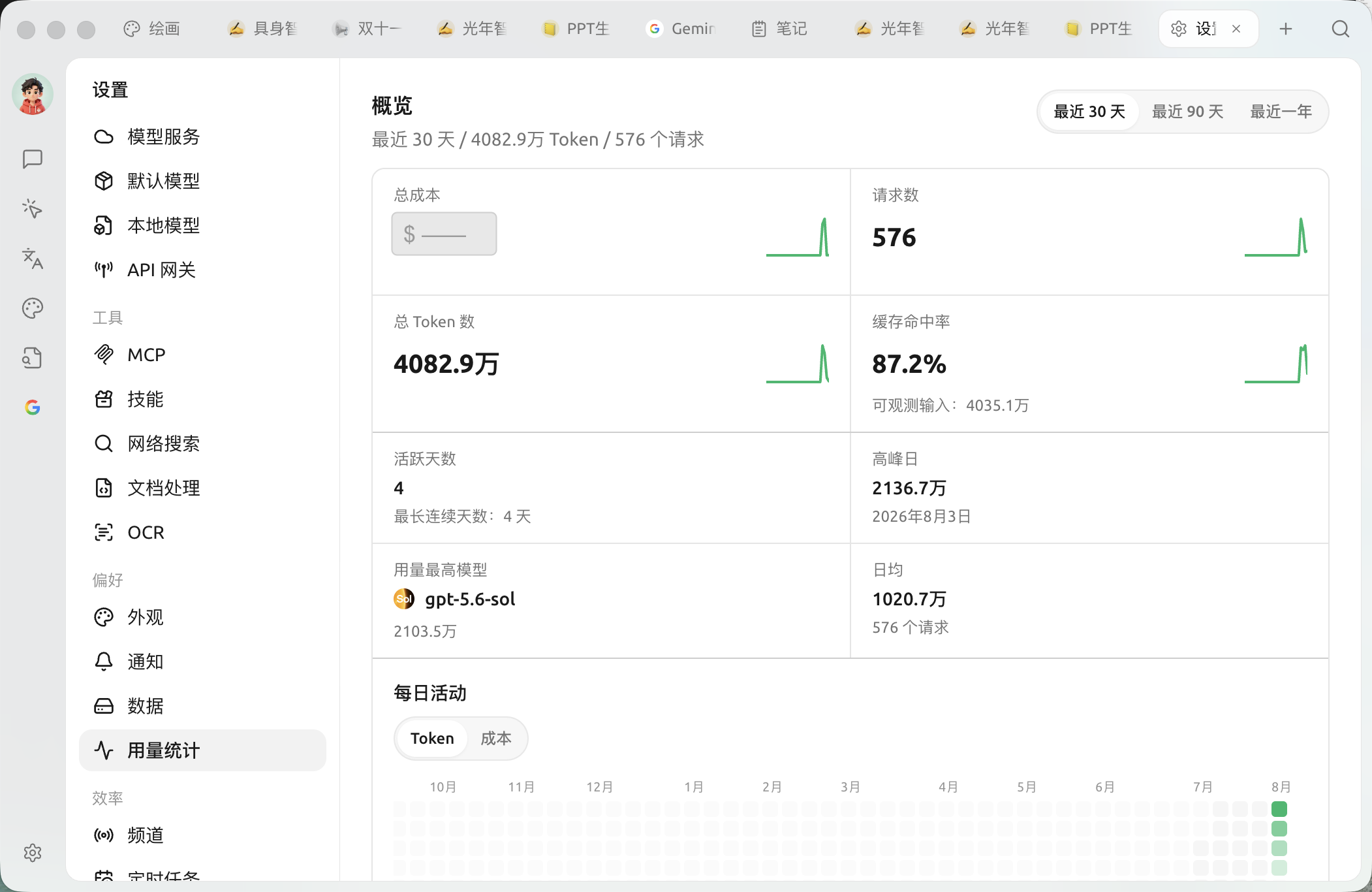
用量统计【概览】:顶部指标卡 + 下方每日活动热力图(图中总成本已隐去)
### 概览
顶部一组指标卡:
| 指标 | 含义 |
| ----------------- | --------------------------------- |
| **总成本** | 区间内的估算花费(按各模型公开定价折算,仅供参考) |
| **请求数** | 发起的请求总次数 |
| **总 Token 数** | 输入 + 输出的 Token 总量 |
| **缓存命中率** | 命中提示词缓存的比例(命中的缓存读取 ÷ 可观测输入),越高越省钱 |
| **活跃天数 / 最长连续天数** | 有使用记录的天数与连续使用的天数 |
| **高峰日** | 单日用量最高的日期及其 Token 量 |
| **用量最高模型** | 区间内消耗最多的模型 |
| **日均** | 平均每天的 Token 量与请求数 |
下方的 **每日活动** 热力图按天展示用量强度,可在 **Token / 成本** 两个维度间切换,颜色越深代表当天用得越多。
### 探索 / 分析
切到 **探索** 可对用量做拆分分析:按 **分组**(供应商 / 模型 / API 密钥 / 助手·Agent)拆开,选一个 **指标**,再用 **柱状图 / 折线图 / 饼图 / 分段** 等图表查看分布与趋势。
### 请求明细
**请求** 列出逐条请求记录,便于定位是哪些请求产生了主要消耗。
> 想按某天看?在概览的 **每日活动** 热力图上点选某一天,探索区(分析 + 请求)会 **下钻** 到当天、标题变为"某日 明细";点「清除日期筛选」返回。
{% hint style="info" %}
成本为 **估算值**:它按模型的公开定价折算,实际计费仍以各模型服务商的账单为准。免费模型、本地模型不产生费用。
{% endhint %}
***
### 获取帮助与提交反馈
如果您在配置或使用过程中遇到任何疑问、Bug 或有功能改进建议,请参考 [反馈与建议](/question-contact/suggestions.md) 中提供的官方渠道。
---
# Agent Instructions
This documentation is published with GitBook. GitBook is the documentation platform designed so that both humans and AI agents can read, navigate, and reason over technical content effectively. Learn more at gitbook.com.
## Querying This Documentation
If you need additional information that is not directly available in this page, you can query the documentation by asking a question.
Perform an HTTP GET request on the following URL with the `ask` and `goal` query parameters:
```
GET https://docs.cherryai.com.cn/pre-basic/settings/usage.md?ask=&goal=
```
`ask` is the immediate question: it should be specific, self-contained, and written in natural language.
`goal` is what the user is ultimately trying to achieve, the reason they need the answer. Sharing it helps GitBook give you a better, more relevant answer. A goal is most helpful when it describes the outcome the user wants rather than restating the question. For example, with `ask=how do I create an API token`, a goal like `automate deployments from our CI pipeline` lets GitBook tailor the answer to that use case.
The response will contain a direct answer to the question and relevant excerpts and sources from the documentation.
Use this mechanism when the answer is not explicitly present in the current page, you need clarification or additional context, or you want to retrieve related documentation sections.