> For the complete documentation index, see [llms.txt](https://docs.cherryai.com.cn/llms.txt). Markdown versions of documentation pages are available by appending `.md` to page URLs; this page is available as [Markdown](https://docs.cherryai.com.cn/pre-basic/settings/ocr.md).
# OCR
OCR(Optical Character Recognition,光学字符识别)负责把 **图片里的文字变成可复制、可被 AI 读取的文本**。下面这些事都依赖它:
* 把一张截图 / 扫描件拖进对话框,想让 AI 读懂里面的文字
* 把图片格式的发票、资料放进 [知识库](/knowledge-base/knowledge-base.md),希望以后能搜到
* [智能体](/cherry-studio/preview/agent.md) 打开本地某张图片进行分析
OCR 是一页独立的设置。你在 【设置】→【OCR】 里配一次识别引擎,所有用到图片识字的地方都会用同一套配置。
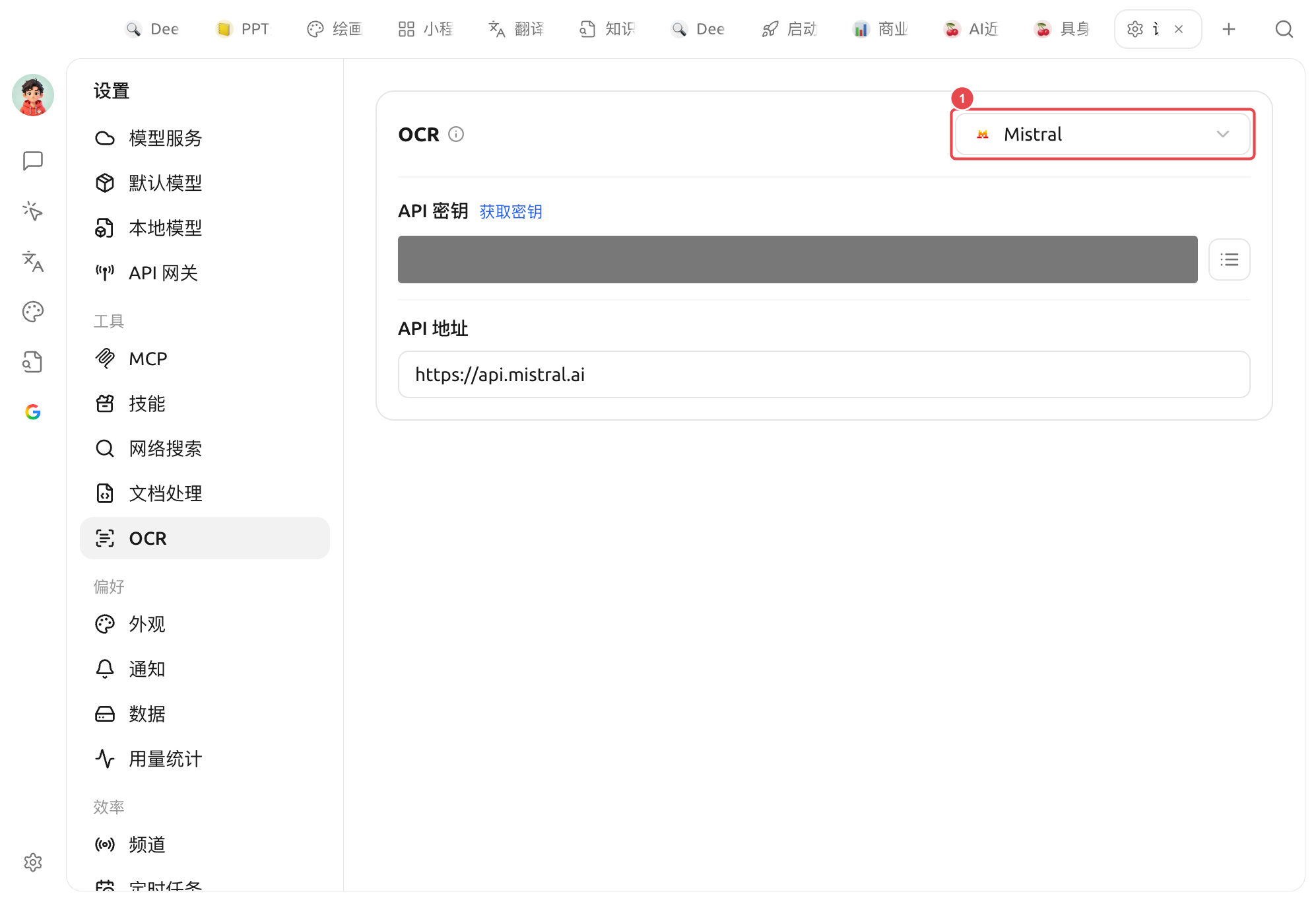
OCR 设置:① 右上角下拉选择识别引擎(图示为 Mistral),下方填入所选引擎的 API 密钥与 API 地址
### 选择识别引擎
面板右上角的下拉框用于切换 OCR 引擎,**选中的引擎即作为默认**。内置引擎:
| 引擎 | 接入 / 运行方式 | 适合谁 |
| ----------------- | ------------------------------------------------------------------------------------ | --------------------------------------------------------------- |
| **System OCR** | 离线、免配置 | 借用系统自带识别(macOS Live Text / Windows OCR),开箱即用、速度最快 |
| **PaddleOCR** | 填 API 密钥([飞桨星河社区](https://aistudio.baidu.com/paddleocr/));如自部署则把 API 地址指向你的服务。可选解析模型 | 不想占本地资源、又想要 Paddle 的识别效果 |
| **本地 PaddleOCR** | 离线,需先在【设置】→【本地模型】下载本地 OCR 模型(约 140MB) | 中文识别效果好且完全在本机运行,隐私优先 |
| **Tesseract OCR** | 离线、已内置 | 经典开源 OCR,支持多语言,可作为兜底 |
| **Mistral** | Mistral API 密钥 | 借助多模态大模型识别,复杂版式 / 手写体等更智能 |
| **Intel OV OCR** | 本地运行(Intel OpenVINO,NPU 加速) | **仅在 Windows + Intel 酷睿 Ultra(带 NPU)、且已部署 OV 模型时才出现**,其余设备看不到此项 |
{% hint style="success" %}
不确定选哪个?先用 **System OCR**——绝大多数截图、清晰扫描件都能直接搞定,且无需任何配置。识别效果不理想时再换 本地 PaddleOCR 或 Mistral。
{% endhint %}
选中 System OCR 时,面板会显示 检测到 macOS Live Text / Windows OCR 引擎可用(系统不支持时,该项不会出现在下拉里)。
{% hint style="warning" %}
* 选择「本地 PaddleOCR」前,请先在【设置】→【本地模型】下载「本地 OCR 模型」,否则无法调用。
* **Tesseract**(及 Windows 上的 System OCR)可在面板的「语言」下拉里勾选要识别的语种。
{% endhint %}
### 与文档处理的区别
很多人会把 OCR 和 [文档处理](/pre-basic/settings/doc-process.md) 搞混,一句话区分:
* **OCR**:管 **图片 / 扫描件** 里的文字识别(图 → 字)。
* **文档处理**:管 **PDF / 复杂版式文档** 的结构化解析(带表格、多栏的 PDF → 规整文本)。
两者相互独立、各配各的。纯文本 PDF、`.md`/`.txt`/`.docx` 里的文字段落两者都不经过,直接读即可。
***
### 获取帮助与提交反馈
如果您在配置或使用过程中遇到任何疑问、Bug 或有功能改进建议,请参考 [反馈与建议](/question-contact/suggestions.md) 中提供的官方渠道。
---
# Agent Instructions
This documentation is published with GitBook. GitBook is the documentation platform designed so that both humans and AI agents can read, navigate, and reason over technical content effectively. Learn more at gitbook.com.
## Querying This Documentation
If you need additional information that is not directly available in this page, you can query the documentation by asking a question.
Perform an HTTP GET request on the following URL with the `ask` and `goal` query parameters:
```
GET https://docs.cherryai.com.cn/pre-basic/settings/ocr.md?ask=&goal=
```
`ask` is the immediate question: it should be specific, self-contained, and written in natural language.
`goal` is what the user is ultimately trying to achieve, the reason they need the answer. Sharing it helps GitBook give you a better, more relevant answer. A goal is most helpful when it describes the outcome the user wants rather than restating the question. For example, with `ask=how do I create an API token`, a goal like `automate deployments from our CI pipeline` lets GitBook tailor the answer to that use case.
The response will contain a direct answer to the question and relevant excerpts and sources from the documentation.
Use this mechanism when the answer is not explicitly present in the current page, you need clarification or additional context, or you want to retrieve related documentation sections.