> For the complete documentation index, see [llms.txt](https://docs.cherryai.com.cn/llms.txt). Markdown versions of documentation pages are available by appending `.md` to page URLs; this page is available as [Markdown](https://docs.cherryai.com.cn/pre-basic/settings/env-dependencies.md).
# 环境依赖
环境依赖用来 **管理 Cherry Studio 运行部分高级功能所需的二进制工具和运行时**。像 [MCP 服务](/advanced-basic/extensions/mcp.md)、[技能](/advanced-basic/extensions/skills.md)、[Agent](/cherry-studio/preview/agent.md) 的一些能力,底层要调用 `uv`、`bun` 等命令行工具。Cherry Studio 把它们集中在这里,让你不必手动去命令行安装配置。
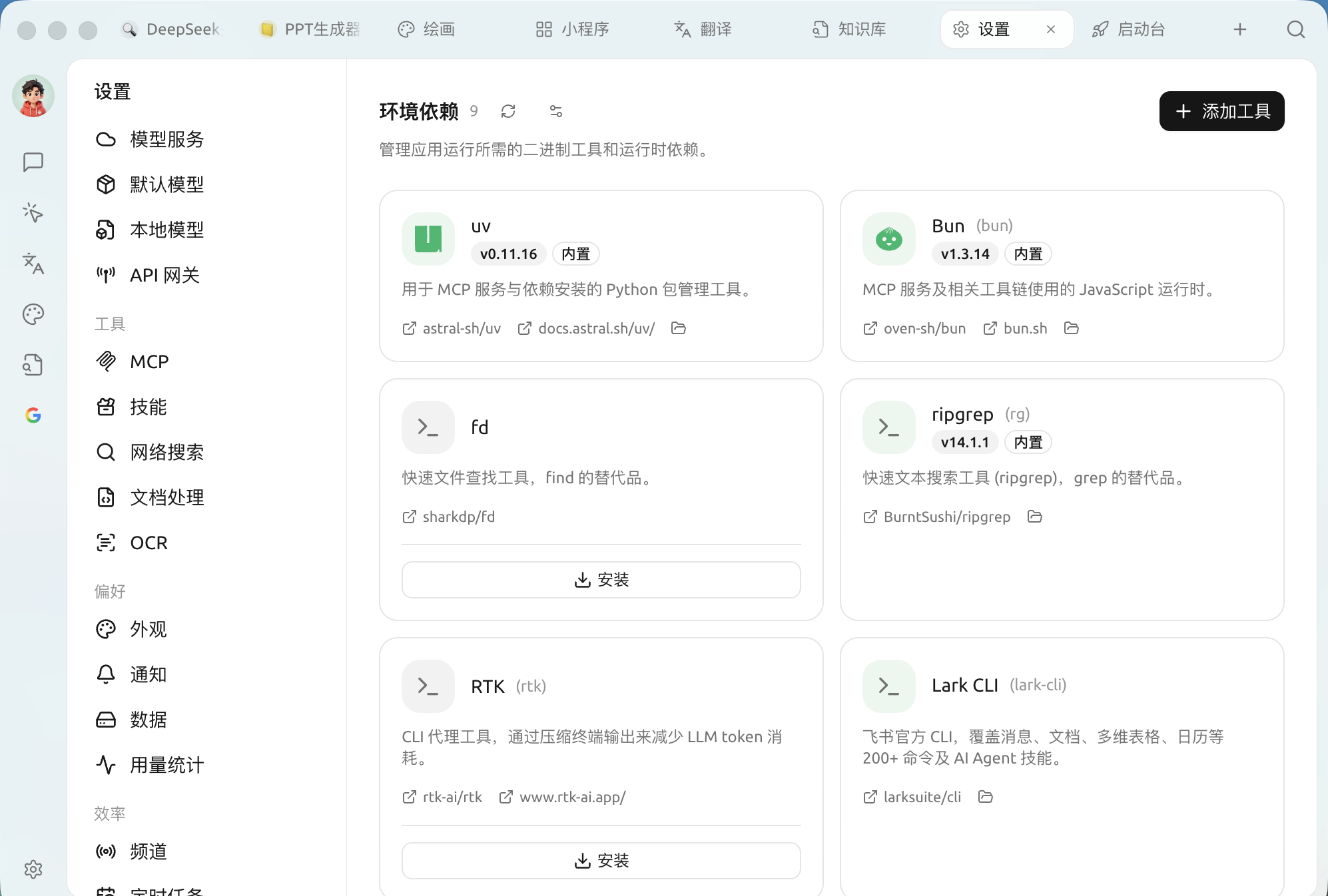
打开 `设置 → 环境依赖`:
环境依赖:内置与可安装的工具
### 内置与可安装
每个工具以卡片形式展示,并标注状态:
* 标有 **内置** 的工具随 Cherry Studio 一起分发,开箱即用,无需操作。
* 未安装的工具卡片上会出现 **安装** 按钮,点击即可由 Cherry Studio 自动下载安装到应用目录,不污染你的系统环境。
* 卡片上提供源码仓库、官方文档链接,以及打开本地安装目录的入口。
常见工具一览:
| 工具 | 作用 |
| ---------------- | --------------------------------------- |
| **uv** | 用于 MCP 服务与依赖安装的 Python 包管理工具 |
| **Bun** | MCP 服务及相关工具链使用的 JavaScript 运行时 |
| **fd** | 快速文件查找工具,`find` 的替代品 |
| **ripgrep (rg)** | 快速文本搜索工具,`grep` 的替代品 |
| **RTK** | 压缩终端输出、减少 LLM token 消耗的 CLI 代理工具 |
| **Lark CLI** | 飞书官方 CLI,覆盖消息 / 文档 / 多维表格 / 日历等 200+ 命令 |
页面还以卡片列出 `gh`(GitHub CLI)、`ntn`(Notion CLI)、`pi` 等工具,可按需一键安装。(编程类 CLI 如 Claude Code / Codex 在 [编码搭档](/cherry-studio/preview/code-cli.md) 页管理,不在此页。)
### 添加工具
页面右上角的「**添加工具**」可用 mise 工具键,加入内置清单以外的工具(例如 `github:sharkdp/fd`、`uv`、`bun`)。
### 高级安装设置
点右上角的设置图标打开「**高级安装设置**」,微调工具的下载方式(字段均可留空用默认):
* **GitHub 镜像**:给 GitHub Release 下载加代理前缀(如 `https://ghfast.top`),直连不畅时用。
* **GitHub 令牌**:提高工具查询时的 GitHub API 速率限制(明文保存在本地)。
* **npm 镜像源 / pip 索引地址**:给 `npm:` / `pipx:` 类工具设镜像(留空则在中国大陆自动选镜像)。
* **校验工具签名**:校验工具的 Sigstore / SLSA 签名,一般保持开启。
{% hint style="info" %}
普通用户一般无需在这里操作——需要某个工具时,相关功能(如安装某个 MCP 服务)通常会引导你回到这里一键安装。这个页面更像是一个"运行环境体检与补齐"的入口。
{% endhint %}
{% hint style="warning" %}
如果某个 MCP 服务或技能报错提示"找不到 uv / bun / 命令不存在",先来这里确认对应工具是否已安装或为"内置"状态(安装状态会自动刷新;右上角那个按钮是 **检查更新**,用于拉取工具的最新版本)。
{% endhint %}
***
### 获取帮助与提交反馈
如果您在配置或使用过程中遇到任何疑问、Bug 或有功能改进建议,请参考 [反馈与建议](/question-contact/suggestions.md) 中提供的官方渠道。
---
# Agent Instructions
This documentation is published with GitBook. GitBook is the documentation platform designed so that both humans and AI agents can read, navigate, and reason over technical content effectively. Learn more at gitbook.com.
## Querying This Documentation
If you need additional information that is not directly available in this page, you can query the documentation by asking a question.
Perform an HTTP GET request on the following URL with the `ask` and `goal` query parameters:
```
GET https://docs.cherryai.com.cn/pre-basic/settings/env-dependencies.md?ask=&goal=
```
`ask` is the immediate question: it should be specific, self-contained, and written in natural language.
`goal` is what the user is ultimately trying to achieve, the reason they need the answer. Sharing it helps GitBook give you a better, more relevant answer. A goal is most helpful when it describes the outcome the user wants rather than restating the question. For example, with `ask=how do I create an API token`, a goal like `automate deployments from our CI pipeline` lets GitBook tailor the answer to that use case.
The response will contain a direct answer to the question and relevant excerpts and sources from the documentation.
Use this mechanism when the answer is not explicitly present in the current page, you need clarification or additional context, or you want to retrieve related documentation sections.