> For the complete documentation index, see [llms.txt](https://docs.cherryai.com.cn/llms.txt). Markdown versions of documentation pages are available by appending `.md` to page URLs; this page is available as [Markdown](https://docs.cherryai.com.cn/docs/zhong-wen-fan-ti/pre-basic/settings/general.md).
# 系統
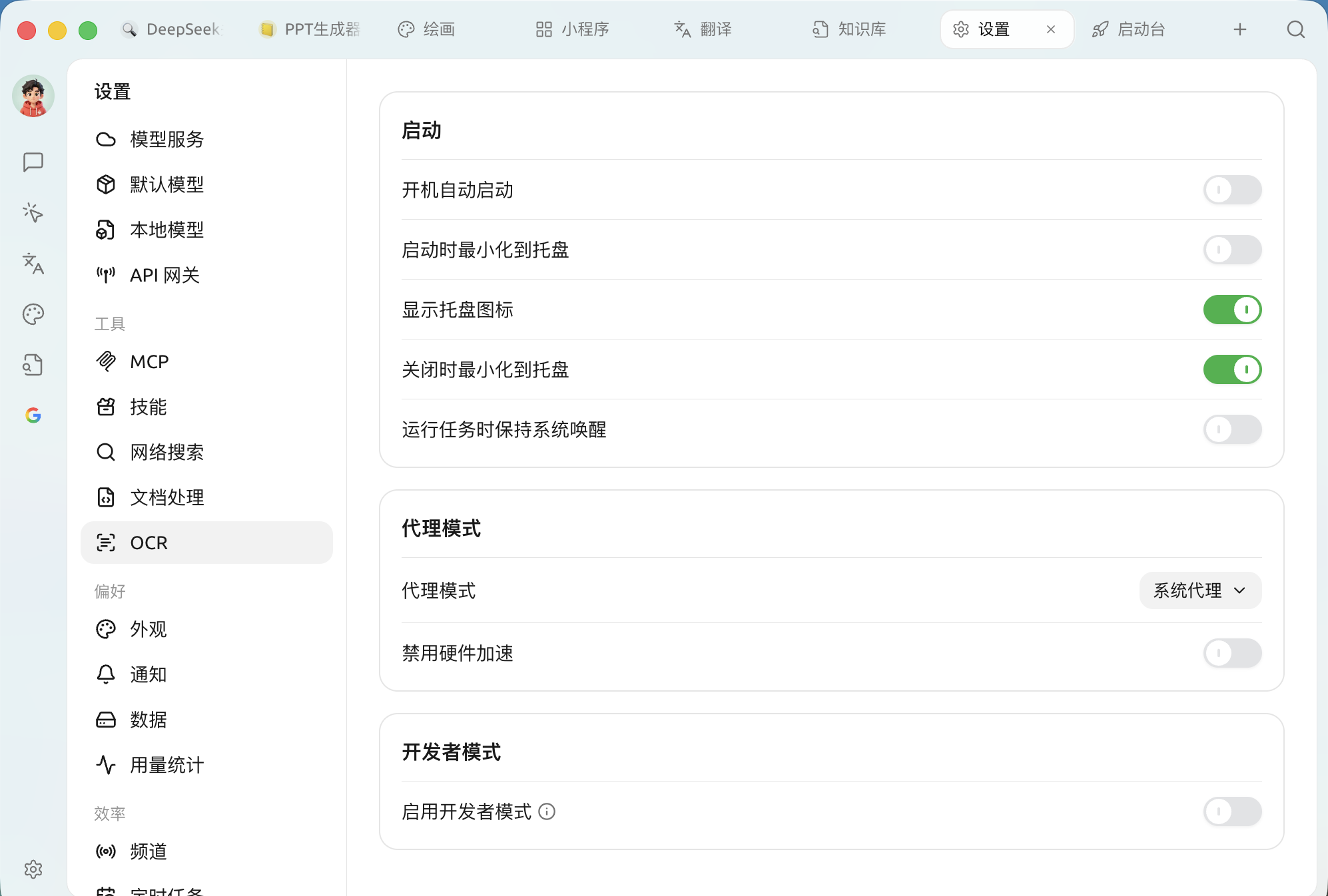
系統設定決定 Cherry Studio **點樣跟電腦啟動、點樣連網、同埋要唔要開放除錯能力**。開啟 `設定 → 系統`,共分三部分:
系統設定:啟動、代理模式、開發者模式
### 啟動
決定 Cherry Studio 係似微信咁長駐背景,定係普通軟件用完即走。
| 設定項 | 作用 | 建議 |
| --------------- | ------------------------- | ------------------------ |
| **開機自動啟動** | 開機時自動拉起 Cherry Studio | 主力工具可以開啟,開機即用 |
| **啟動時最小化到系統匣** | 開機自啟時靜靜入後台,唔彈主視窗 | 配合「開機自啟」使用,保持桌面整潔 |
| **顯示系統匣圖示** | 喺系統匣顯示圖示 | 建議開啟,方便快速叫出同查看狀態 |
| **關閉時最小化到系統匣** | 點 `X` 時縮到系統匣而唔係退出 | 強烈建議開啟:下次「秒開」,正在進行嘅對話唔中斷 |
| **執行任務時保持系統喚醒** | 有背景任務(如定時任務、長回覆)運行時阻止系統休眠 | 需要長時間冇人看守跑任務時開啟 |
{% hint style="info" %}
關閉 **關閉時最小化到系統匣** 後,點 `X` 就係徹底退出進程。若你希望每次都完全退出,先需要關咗佢。
{% endhint %}
### 代理模式
Cherry Studio 成日要調用海外模型 API,網絡走向由呢度決定。
| 選項 | 說明 |
| ------------ | --------------------------------------------------------------------------------------------------------------------------------- |
| **系統代理**(預設) | 跟隨作業系統嘅網絡/代理設定。電腦上開咗全局加速器時會自動使用 |
| **自訂代理** | 手動填寫代理地址(如 `http://127.0.0.1:7890`);仲可以設 **代理繞過規則**——邊啲地址唔行代理,預設 `localhost,127.0.0.1,::1`,支援 `*.test.com`、`192.168.0.0/16` 等模糊配對 |
| **唔使用代理** | 強制直連 |
* **停用硬件加速**:正常保持關閉。只係當界面出現 **黑畫面、白畫面、閃爍、字體撕裂** 或者明顯卡頓時,開啟並重啟軟件排查(強制改用 CPU 渲染)。
{% hint style="warning" %}
遇到「連線超時」「API 請求失敗」等紅色報錯時,先確認你嘅加速器已開啟,並檢查呢度係咪為 **系統代理**——呢個係最常見嘅原因。
{% endhint %}
### 開發者模式
* **啟用開發者模式**:開啟後可使用 **調用鏈** 功能,查看模型調用過程嘅數據流,方便排查問題;更改會喺 **重新啟動應用後** 生效。普通用戶一般唔需要開啟。
{% hint style="info" %}
介面語言、拼字檢查喺 [外觀](/docs/zhong-wen-fan-ti/pre-basic/settings/display.md) 入面設定;訊息同備份提醒喺 [通知](/docs/zhong-wen-fan-ti/pre-basic/settings/notification.md) 入面設定。
{% endhint %}
***
### 攞幫助同提交意見
如果您喺配置或使用過程中遇到任何疑問、Bug 或有功能改善建議,請參考 [反饋與建議](/docs/zhong-wen-fan-ti/question-contact/suggestions.md) 入面提供嘅官方渠道。
---
# Agent Instructions
This documentation is published with GitBook. GitBook is the documentation platform designed so that both humans and AI agents can read, navigate, and reason over technical content effectively. Learn more at gitbook.com.
## Querying This Documentation
If you need additional information that is not directly available in this page, you can query the documentation dynamically by asking a question.
Perform an HTTP GET request on the current page URL with the `ask` query parameter, and the optional `goal` query parameter:
```
GET https://docs.cherryai.com.cn/docs/zhong-wen-fan-ti/pre-basic/settings/general.md?ask=&goal=
```
`ask` is the immediate question: it should be specific, self-contained, and written in natural language.
`goal` is optional and describes the broader end goal you are ultimately trying to accomplish on behalf of the user. GitBook uses it to tailor the answer towards what is most useful for that goal.
The response will contain a direct answer to the question and relevant excerpts and sources from the documentation.
Use this mechanism when the answer is not explicitly present in the current page, you need clarification or additional context, or you want to retrieve related documentation sections.