> For the complete documentation index, see [llms.txt](https://docs.cherryai.com.cn/llms.txt). Markdown versions of documentation pages are available by appending `.md` to page URLs; this page is available as [Markdown](https://docs.cherryai.com.cn/docs/zhong-wen-fan-ti/cherry-studio/preview/translation.md).
# 翻譯
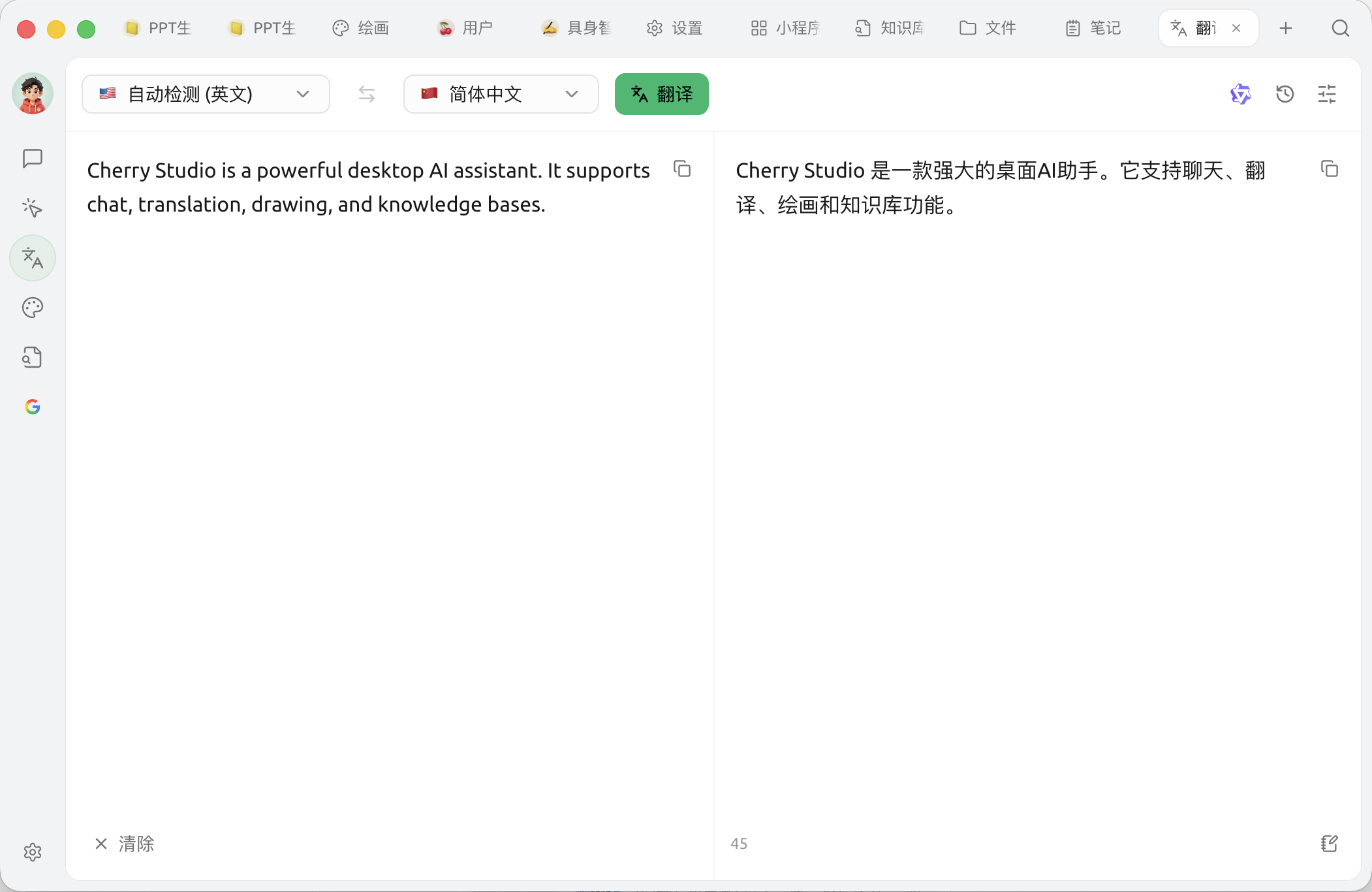
Cherry Studio 嘅翻譯功能為你提供快速、準確嘅文本翻譯服務,支援多種語言之間互譯。
### 介面概覽
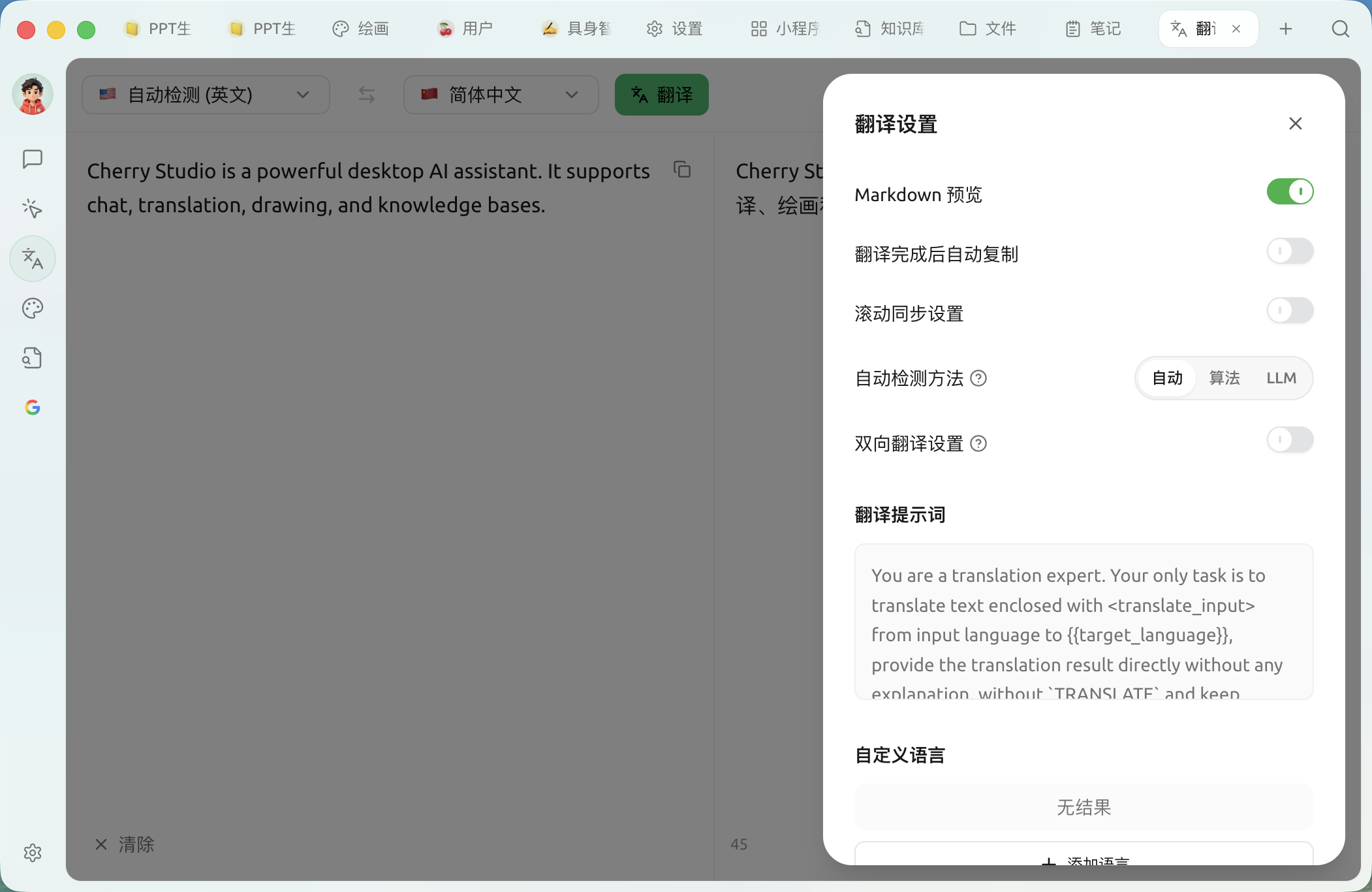
* **Markdown 預覽**:開啟後翻譯結果會按 Markdown 渲染
* **翻譯完成後自動複製**:結果一生成就複製到剪貼簿
* **滾動同步設定**:左右兩欄滾動聯動
* **自動偵測方法**:自動/算法(franc 本地)/LLM——LLM 偵測更準但會消耗少量 token
* **雙向翻譯設定**:開啟後只喺指定嘅兩種語種之間互譯,頂部語言欄會合併做一個「源 ⇆ 目標」語言對;下方可揀語種對
* **翻譯提示詞**:自訂翻譯用嘅系統提示詞,改動後可以一鍵恢復預設
* **自訂語言**:喺內置語言之外新增、編輯或刪除語言(填寫語言名同語言代碼,如 `zh-cn`)
### 常見問題解答 (FAQ)
* **Q: 翻譯唔準確點算?**
* A: AI 翻譯雖然強大,但並非完美。對於專業領域或者複雜語境嘅文本,建議做人手校對。你亦可以試吓切換唔同嘅模型。
* **Q: 支援邊啲語言?**
* A: Cherry Studio 翻譯功能支援多種主流語言,具體支援嘅語言列表請參考 Cherry Studio 嘅官方網站或者應用內說明。
* **Q: 可以翻譯成個檔案/圖片嗎?**
* A: 可以。輸入框支援直接 **拖入或者撳上傳** 圖片同文件:圖片會經 OCR 識別後再翻譯,PDF / Word / PPT / Excel 等文件會抽取正文後翻譯。若文件特別長,都可以入到對話頁面,將文件做附件發畀翻譯助手處理。
* **Q: 翻譯速度慢點算?**
* A: 翻譯速度可能受網絡連線、文本長度、伺服器負載等因素影響。請確保你嘅網絡連線穩定,並耐心等待。
***
### 攞幫助同提交意見
如果您喺配置或使用過程中遇到任何疑問、Bug 或有功能改善建議,請參考 [反饋與建議](/docs/zhong-wen-fan-ti/question-contact/suggestions.md) 入面提供嘅官方渠道。
---
# Agent Instructions
This documentation is published with GitBook. GitBook is the documentation platform designed so that both humans and AI agents can read, navigate, and reason over technical content effectively. Learn more at gitbook.com.
## Querying This Documentation
If you need additional information that is not directly available in this page, you can query the documentation dynamically by asking a question.
Perform an HTTP GET request on the current page URL with the `ask` query parameter, and the optional `goal` query parameter:
```
GET https://docs.cherryai.com.cn/docs/zhong-wen-fan-ti/cherry-studio/preview/translation.md?ask=&goal=
```
`ask` is the immediate question: it should be specific, self-contained, and written in natural language.
`goal` is optional and describes the broader end goal you are ultimately trying to accomplish on behalf of the user. GitBook uses it to tailor the answer towards what is most useful for that goal.
The response will contain a direct answer to the question and relevant excerpts and sources from the documentation.
Use this mechanism when the answer is not explicitly present in the current page, you need clarification or additional context, or you want to retrieve related documentation sections.