> For the complete documentation index, see [llms.txt](https://docs.cherryai.com.cn/llms.txt). Markdown versions of documentation pages are available by appending `.md` to page URLs; this page is available as [Markdown](https://docs.cherryai.com.cn/docs/zhong-wen-fan-ti/advanced-basic/extensions/mcp.md).
# MCP 同外部工具
MCP 係令 Agent 使用外部工具同資源嘅連接方式。Cherry Studio 可以管理 MCP 伺服器、內置伺服器、服務市場同部分服務商入口,再將已連接嘅伺服器綁定俾指定 Agent。
### 幾時需要 MCP
* Agent 需要調用 Cherry Studio 內置工具以外嘅服務;
* 團隊已經有提供 MCP 介面嘅資料庫、瀏覽器或者業務系統;
* 希望同一套外部能力可以俾多個 Agent 重用;
* 需要將工具、資源或者提示詞以統一方式提供俾模型。
淨係需要固定流程時用技能,淨係需要檢索 Cherry Studio 知識庫時直接綁定知識庫,唔使為咗「更高級」而額外搭建 MCP。
### 添加伺服器
路徑:【設定】→【MCP】→【MCP 伺服器】→【添加】。
{% stepper %}
{% step %}
#### 1. 確認連接方式
本地命令通常使用標準輸入輸出方式;遠端服務通常提供 SSE 或可串流傳輸嘅 HTTP 地址。按照服務提供方俾出嘅配置填寫,唔好憑名稱估。
{% endstep %}
{% step %}
#### 2. 填寫配置並檢查權限
本地伺服器需要命令、參數同環境變數;遠端伺服器需要 URL,部分服務仲需要授權。儲存前確認命令來源同數據範圍。
{% endstep %}
{% step %}
#### 3. 啟動並查看工具
啟用伺服器,等狀態正常,再打開詳情檢查佢提供嘅工具、資源同提示詞。連接失敗時先睇伺服器日誌。
喺工具列表入面展開某個工具,可以查看完整嘅 Markdown 說明,以及按層級展示嘅參數、類型、必填標記同枚舉值。調用前先核對必填參數;對象或陣列參數應該逐層展開查看,避免只按工具名稱估輸入格式。
{% endstep %}
{% step %}
#### 4. 綁定到 Agent
打開【工作】→ Agent 選單→【編輯】→【MCP】,啟用該伺服器。未啟動嘅伺服器無法正常綁定使用。
{% endstep %}
{% endstepper %}
### 內置伺服器與服務市場
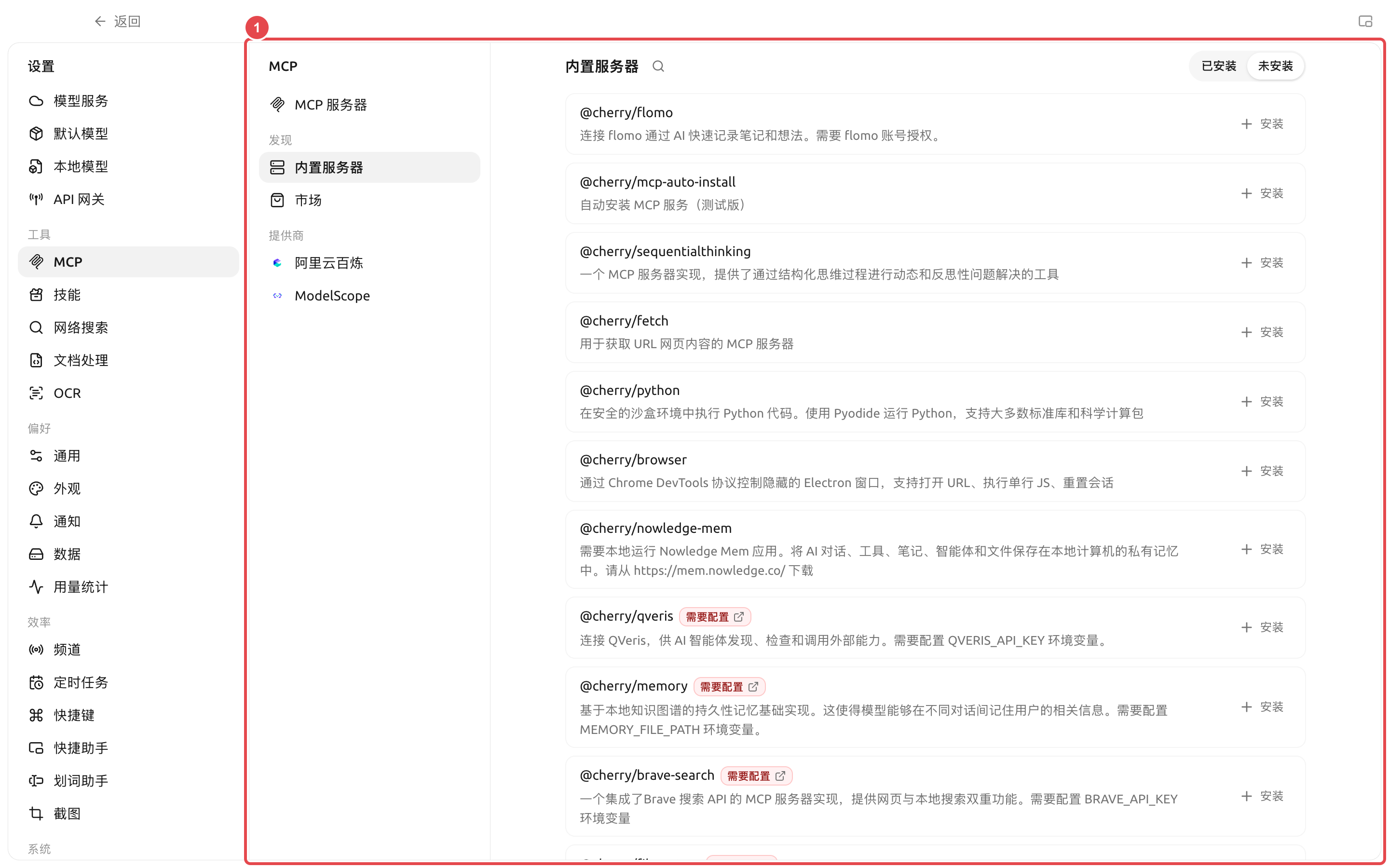
【內置 MCP】提供可以直接安裝或啟用嘅常用能力;【服務市場】用嚟管理第三方市場來源。安裝前仍然要睇說明、命令、環境變數同權限,內置入口唔代表外部服務嘅所有操作都冇風險。
① 內置列表會標明係咪需要帳號、API Key 或目錄配置;安裝後仍然要完成配置並驗證連接。
QVeris 位於【內置伺服器】入面,用嚟俾 Agent 發現、檢查同調用外部能力。安裝後需要配置 `QVERIS_API_KEY`;唔好將密鑰寫入 Agent 提示詞、技能或者公開截圖。
### 喺輸入區使用 MCP 提示詞同資源
伺服器除咗工具之外,仲可能提供「提示詞」同「資源」。伺服器已經綁定到目前助手或 Agent 後,打開輸入區【+】面板:
* 選擇【MCP 提示詞】,將伺服器模板插入輸入框;模板入面嘅必填參數會顯示為可填寫項;
* 選擇【MCP 資源】,由已綁定伺服器中揀選文件、記錄或其他資源;
* 較短嘅文本資源會直接插入輸入框;較大或二進制資源會作為引用,由支援工具調用嘅模型喺需要時讀取。
{% hint style="info" %}
面板只顯示當前對話範圍內已連接、而且真正提供對應能力嘅伺服器。睇唔到【MCP 提示詞】或【MCP 資源】時,先喺伺服器詳情檢查對應標籤頁,再確認目前助手或 Agent 已經綁定咗該伺服器。
{% endhint %}
### 配置建議
| 配置項 | 產品預設值 | 建議起點 | 作用 | 適用場景 | 注意事項 |
| -------- | -------------- | ----------------- | --------- | ------------- | ------------- |
| 伺服器狀態 | 新增後按配置決定 | 一次只啟用一個並驗證 | 控制伺服器係咪可用 | 首次接入、排錯 | 多個服務同時失敗時好難定位 |
| Agent 綁定 | 唔自動綁定所有伺服器 | 只綁定當前 Agent 所需伺服器 | 控制能力範圍 | 多 Agent 分工 | 避免無關工具佔用上下文 |
| 環境變數 | 唔預填密鑰 | 使用服務要求嘅最小權限憑證 | 提供認證或運行參數 | 私有服務 | 截圖同導出前遮擋敏感內容 |
| 工具批准 | 由 Agent 權限模式決定 | 寫入或計費工具保持確認 | 防止意外操作 | 資料庫、文件、外部 API | 頻道入口可以使用更嚴格模式 |
### 用戶案例:將項目資料庫接畀分析 Agent
管理員提供只讀 MCP 連接,用戶喺【設定】→【MCP】驗證伺服器正常,再只綁定畀「數據分析」Agent。Agent 使用只讀工具攞取數據,將報告寫入工作目錄;涉及更新數據嘅工具唔啟用。咁樣即使提示詞出現誤解,都唔會直接修改業務庫。
MCP 同 API 網關有咩分別?
MCP 係將外部工具接入 Cherry Studio;API 網關係將 Cherry Studio 嘅模型能力以兼容 API 嘅方式提供俾其他程式。數據流方向相反。
伺服器顯示已連接,Agent 仍然搵唔到工具點算?
檢查 Agent 係咪已綁定該伺服器、工具係咪被關閉、權限請求係咪仲待處理。修改 Agent 配置後,發一條新消息等運行時載入新工具。
伺服器顯示已連接,Agent 仍然搵唔到工具點算?
檢查 Agent 係咪已綁定該伺服器、工具係咪被關閉、權限請求係咪仲待處理。修改 Agent 配置後,發一條新消息等運行時載入新工具。
---
# Agent Instructions
This documentation is published with GitBook. GitBook is the documentation platform designed so that both humans and AI agents can read, navigate, and reason over technical content effectively. Learn more at gitbook.com.
## Querying This Documentation
If you need additional information that is not directly available in this page, you can query the documentation dynamically by asking a question.
Perform an HTTP GET request on the current page URL with the `ask` query parameter, and the optional `goal` query parameter:
```
GET https://docs.cherryai.com.cn/docs/zhong-wen-fan-ti/advanced-basic/extensions/mcp.md?ask=&goal=
```
`ask` is the immediate question: it should be specific, self-contained, and written in natural language.
`goal` is optional and describes the broader end goal you are ultimately trying to accomplish on behalf of the user. GitBook uses it to tailor the answer towards what is most useful for that goal.
The response will contain a direct answer to the question and relevant excerpts and sources from the documentation.
Use this mechanism when the answer is not explicitly present in the current page, you need clarification or additional context, or you want to retrieve related documentation sections.