> For the complete documentation index, see [llms.txt](https://docs.cherryai.com.cn/llms.txt). Markdown versions of documentation pages are available by appending `.md` to page URLs; this page is available as [Markdown](https://docs.cherryai.com.cn/docs/zhong-wen-fan-ti/advanced-basic/cases/notes-weekly-report.md).
# 筆記生成週報
項目負責人喺一星期內累積咗會議筆記、進度更新同零散待辦,希望喺星期五整理成結構穩定、事實可核對嘅周報。關鍵係先統一記錄方式,再交俾 Agent 匯總,而唔係畀佢估缺失狀態。
按同一結構持續記錄,周末整理時更容易核對狀態同負責人。
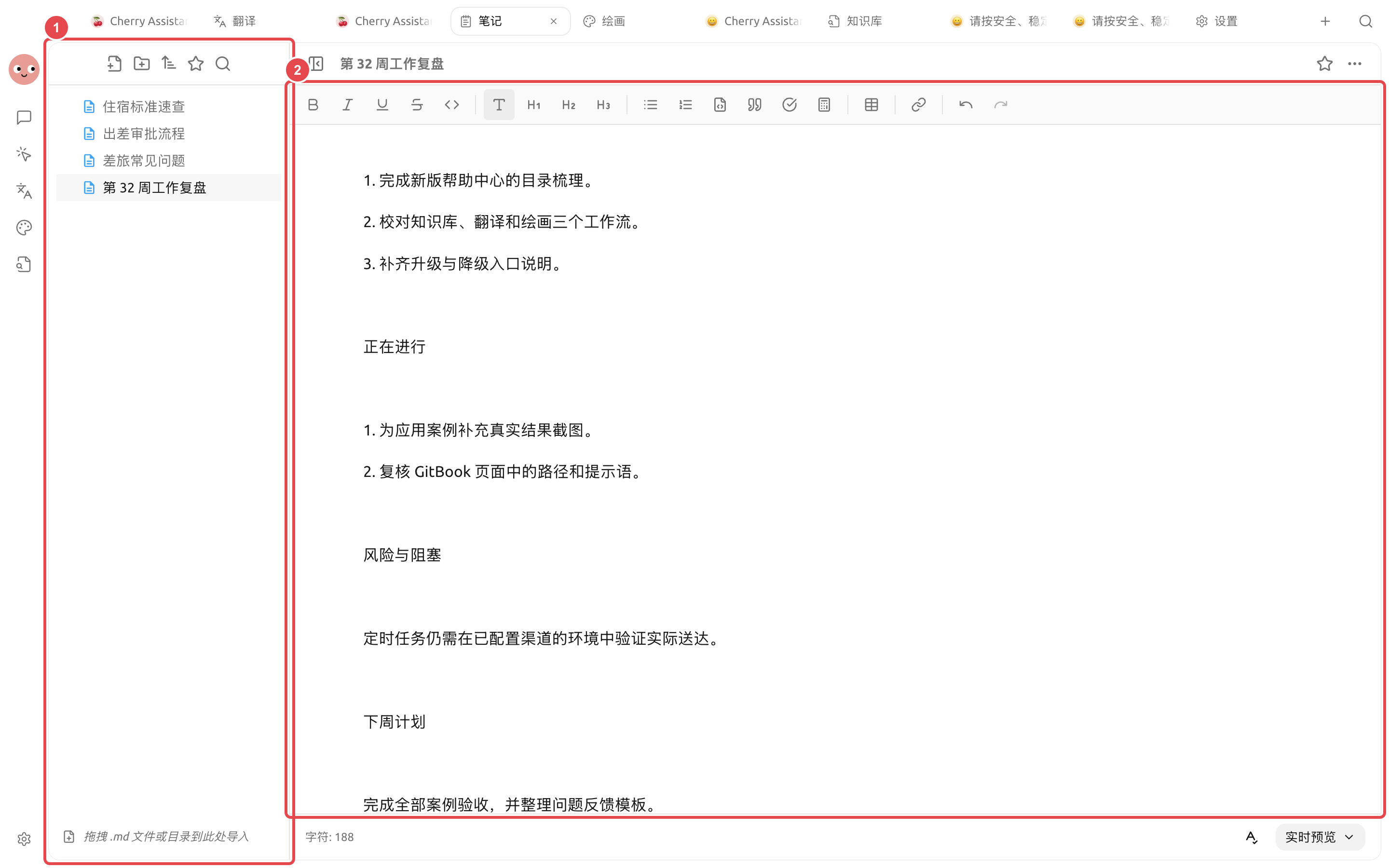
① 左側保留原始記錄同本週復盤;② 右側周報已經有真實內容,可以繼續人工修改、預覽同導出。
## 操作流程
{% stepper %}
{% step %}
### 1. 統一記錄方式
每日喺同一個筆記文件夾記錄事項,至少包含日期、結果、負責人同狀態。未完成事項唔好寫成已經交付。
{% endstep %}
{% step %}
### 2. 星期五先人工整理
合併重複事項,補齊關鍵數字同連結。長期背景放入知識庫,本週變化留喺而家呢份筆記。
{% endstep %}
{% step %}
### 3. 交俾 Agent 生成草稿
要求按「本週完成、進行中、風險、下週計劃」輸出,並喺資料缺失時列出待補項。
{% endstep %}
{% step %}
### 4. 檢查同導出
確認狀態、數字同責任人,再喺【筆記】入面定稿並導出。穩定格式可以整成技能,下星期繼續復用。
{% endstep %}
{% endstepper %}
## 示例任務
```
讀取本週筆記,生成周報草稿。合併同一事項,但保留唔同日期嘅狀態變化;唔推測完成情況。缺少負責人、數字或者下一步時列到「待補充」。
```
## 建議組合同完成標準
| 項目 | 建議做法 |
| ----- | ------------------------------------- |
| 日常輸入 | 筆記按日期或者項目記錄,只寫事實同待辦 |
| Agent | 用固定嘅周報結構,讀取本週筆記之後再生成 |
| 輸出 | 周報寫入獨立文件,唔覆蓋原始筆記 |
| 完成標準 | 每條進展都可以追溯返原筆記;未完成事項有負責人或者下一步;唔會憑空增加數據 |
適合將已經記錄嘅工作整理成周報,唔適合畀 Agent 根據零散記憶估一星期成果。
{% hint style="info" %}
喺固定時間自動生成周報之前,先手動跑幾星期。只有輸入格式穩定、缺失資訊處理可靠之後,先再建立定時任務。
{% endhint %}
---
# Agent Instructions
This documentation is published with GitBook. GitBook is the documentation platform designed so that both humans and AI agents can read, navigate, and reason over technical content effectively. Learn more at gitbook.com.
## Querying This Documentation
If you need additional information that is not directly available in this page, you can query the documentation by asking a question.
Perform an HTTP GET request on the following URL with the `ask` and `goal` query parameters:
```
GET https://docs.cherryai.com.cn/docs/zhong-wen-fan-ti/advanced-basic/cases/notes-weekly-report.md?ask=&goal=
```
`ask` is the immediate question: it should be specific, self-contained, and written in natural language.
`goal` is what the user is ultimately trying to achieve, the reason they need the answer. Sharing it helps GitBook give you a better, more relevant answer. A goal is most helpful when it describes the outcome the user wants rather than restating the question. For example, with `ask=how do I create an API token`, a goal like `automate deployments from our CI pipeline` lets GitBook tailor the answer to that use case.
The response will contain a direct answer to the question and relevant excerpts and sources from the documentation.
Use this mechanism when the answer is not explicitly present in the current page, you need clarification or additional context, or you want to retrieve related documentation sections.