> For the complete documentation index, see [llms.txt](https://docs.cherryai.com.cn/llms.txt). Markdown versions of documentation pages are available by appending `.md` to page URLs; this page is available as [Markdown](https://docs.cherryai.com.cn/docs/zhong-wen-fan-ti/advanced-basic/cases/long-document-review.md).
# 長文件審閱
產品經理收到一份篇幅幾長嘅方案,需要搵出事實問題、結構缺口同可執行修改,同時保留原稿同人工確認過程。下面呢種做法適合報告、制度、投標材料同產品方案。
## 推薦組合
* 【對話】:快速比較唔同模型嘅審閱角度;
* 【工作】Agent:讀取工作目錄並生成修訂稿;
* 知識庫:提供制度、術語或歷史資料;
* 右側【文件】:檢查原稿同產物。
制度、術語同歷史資料可以做知識庫來源,原稿仍然放喺獨立工作目錄。
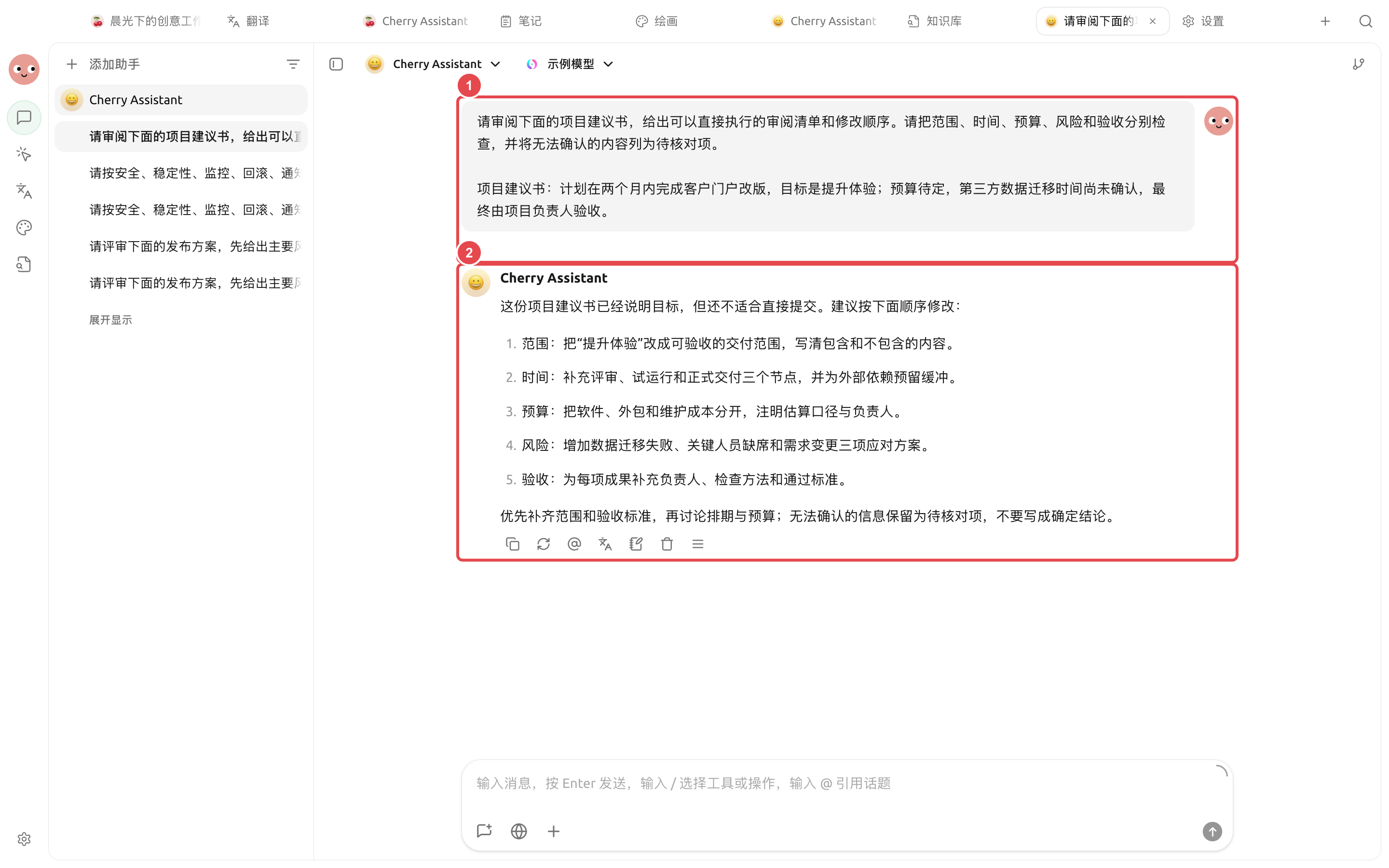
① 輸入原文同審閱標準;② 實際結果逐項指出缺口,並將不能確認嘅資訊保留做待核對項。
## 操作流程
{% stepper %}
{% step %}
### 1. 準備原稿同審閱標準
將原稿放入獨立工作目錄,再整一份簡短嘅審閱說明,寫清讀者、目的、唔可以改動嘅事實同交付格式。
{% endstep %}
{% step %}
### 2. 先做小範圍校準
揀一個章節,畀 Agent 按「問題、原文位置、影響、建議」輸出。確認尺度合適之後再處理全文。
{% endstep %}
{% step %}
### 3. 分開事實同表達
要求 Agent 將需要查證嘅事實單獨列出,唔好用語言潤飾去掩蓋唔確定內容。關鍵數字返去原資料核對。
{% endstep %}
{% step %}
### 4. 生成新文件並人工定稿
要求保留原文件,喺 `review/` 下面生成問題清單同修訂稿。用右側【文件】逐段檢查,再匯出或分享。
{% endstep %}
{% endstepper %}
## 示例任務
```
審閱當前目錄中嘅 proposal.docx。先按章節列出事實問題、結構缺口同表達問題,註明原文位置。唔好改動原文件;確認清單之後,喺 review/ 下生成修訂稿同待核對事項。
```
## 使用前準備同完成標準
| 項目 | 建議準備 |
| ---- | -------------------------------- |
| 檔案 | 原文、審閱要求同輸出目錄分開擺放 |
| 推薦組合 | 專用 Agent + 只含本項目文件嘅工作目錄 + 【逐次確認】 |
| 抽查方式 | 先抽查一章,確認引用格式同判斷尺度 |
| 完成標準 | 每條意見帶原文位置;未讀取部分明確標記;原文件冇被覆蓋 |
適合合約、報告、論文或規範嘅結構化審閱;涉及法律、醫療、財務結論時,輸出只可以作為輔助材料。
{% hint style="info" %}
文件好長嗰陣,唔好喺一個對話入面反覆貼全文。畀 Agent 直接讀取工作目錄,並按章節留低中間產物,會更容易複核同恢復。
{% endhint %}
---
# Agent Instructions
This documentation is published with GitBook. GitBook is the documentation platform designed so that both humans and AI agents can read, navigate, and reason over technical content effectively. Learn more at gitbook.com.
## Querying This Documentation
If you need additional information that is not directly available in this page, you can query the documentation dynamically by asking a question.
Perform an HTTP GET request on the current page URL with the `ask` query parameter, and the optional `goal` query parameter:
```
GET https://docs.cherryai.com.cn/docs/zhong-wen-fan-ti/advanced-basic/cases/long-document-review.md?ask=&goal=
```
`ask` is the immediate question: it should be specific, self-contained, and written in natural language.
`goal` is optional and describes the broader end goal you are ultimately trying to accomplish on behalf of the user. GitBook uses it to tailor the answer towards what is most useful for that goal.
The response will contain a direct answer to the question and relevant excerpts and sources from the documentation.
Use this mechanism when the answer is not explicitly present in the current page, you need clarification or additional context, or you want to retrieve related documentation sections.