> For the complete documentation index, see [llms.txt](https://docs.cherryai.com.cn/llms.txt). Markdown versions of documentation pages are available by appending `.md` to page URLs; this page is available as [Markdown](https://docs.cherryai.com.cn/docs/zhong-wen-fan-ti/advanced-basic/cases/brand-image-kit.md).
# 品牌配圖套裝
內容團隊要為同一場活動製作橫版、方形同直版配圖,並保持主體、色調同品牌規則一致。先確定主視覺,再擴展尺寸,比每張圖由頭生成更容易保持統一。
先配置同驗證繪畫模型,Agent 嘅【生成圖片】同【繪畫】工作流先會有可用連接。
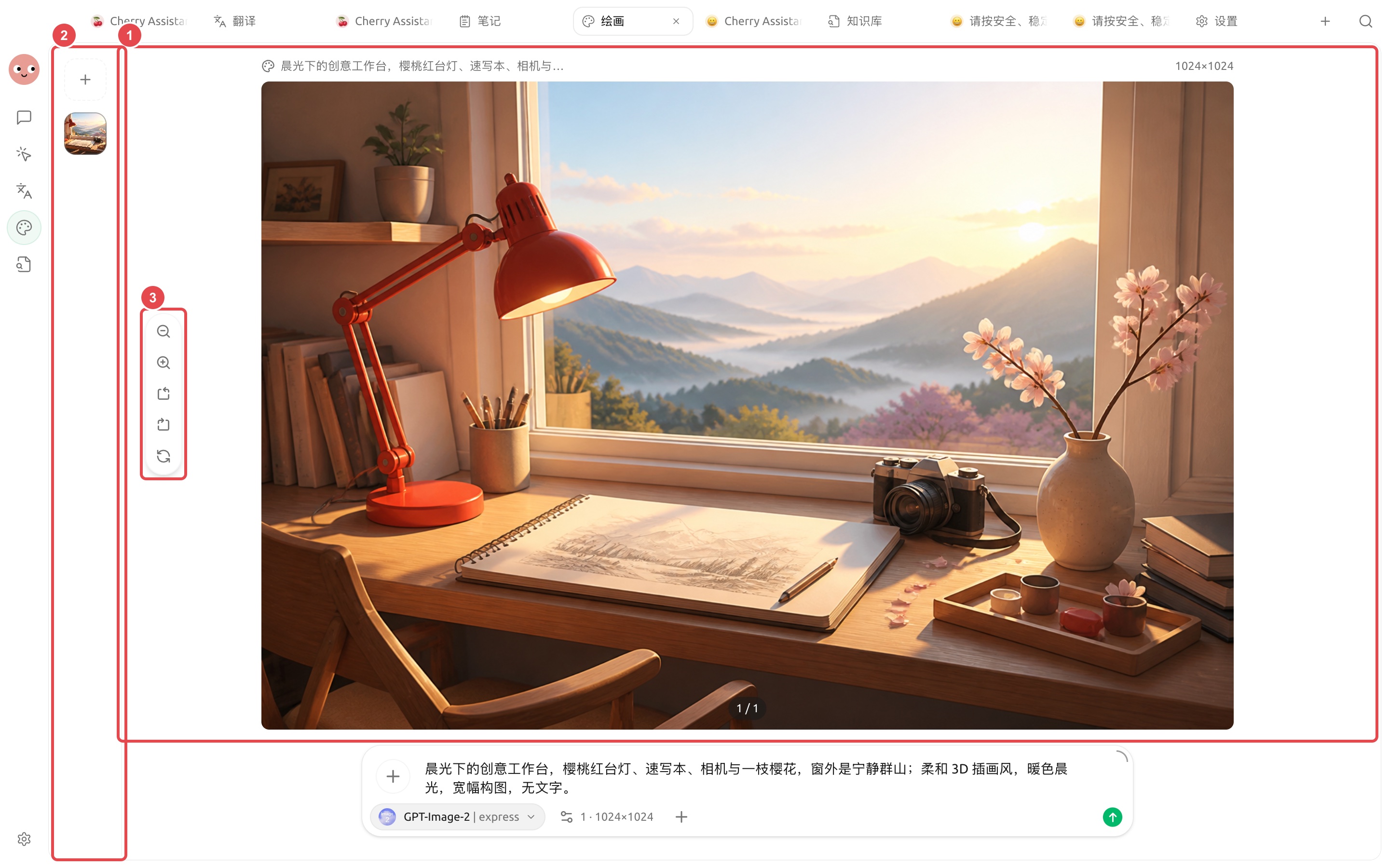
先畀 Agent 生成一張樣圖確認方向,再進入批量製作。
先將呢張實際成圖作為主視覺樣稿,確認主體、光線同色調後,再擴展方形同直版尺寸。
## 準備材料
* 內容主題同使用平台;
* 允許使用嘅品牌色同參考圖;
* 唔可以出現嘅文字、標誌同元素;
* 三種圖片比例同留白要求。
## 操作流程
{% stepper %}
{% step %}
### 1. 叫 Agent 提煉視覺方向
將文章或活動說明放入工作目錄,叫 Agent 只輸出主體、場景、色調、鏡頭同留白建議,先唔生成圖片。
{% endstep %}
{% step %}
### 2. 喺【繪畫】入面驗證主視覺
選擇合適模板同模型,先生成橫版小樣。檢查產品外觀、人物細節同品牌風險。
{% endstep %}
{% step %}
### 3. 用參考圖擴展尺寸
揀定主視覺之後,將佢作為參考,分別生成方形同直版。每次說明必須保留嘅主體同可調整嘅構圖。
{% endstep %}
{% step %}
### 4. 局部修正同增強
只對有問題嘅區域使用編輯或蒙版,最終版本再做增強。文件名包含用途同比例,避免混淆。
{% endstep %}
{% endstepper %}
## 結果檢查
* 三張圖嘅色調同主體一致;
* 唔包含模型生成嘅錯誤文字;
* 唔會意外出現品牌標誌、人物或敏感資訊;
* 尺寸符合發布平台要求;
* 參考圖嘅使用已獲授權。
## 推薦組合同完成標準
| 項目 | 建議做法 |
| ---- | ------------------------------- |
| 繪畫模型 | 先用 Agent 生成一張樣圖驗證連接,再儲存繪畫模板 |
| 輸入材料 | 品牌色、字體、尺寸、參考圖同禁用元素放喺同一項目目錄 |
| 批量方式 | 先確認一張,再生成同系列圖片 |
| 完成標準 | 尺寸正確、文字可讀、品牌元素一致、冇多餘標識,原參考圖仍然保留 |
適合文章封面、社交媒體配圖同活動素材;需要精確排版嘅最終海報,建議喺設計工具中做最後校對。
{% hint style="info" %}
如果想直接喺 Agent 對話入面出圖,先配置全局【繪畫模型】並啟用 Agent 嘅【生成圖片】工具。需要細緻編輯時,仍然建議返去【繪畫】頁面。
{% endhint %}
---
# Agent Instructions
This documentation is published with GitBook. GitBook is the documentation platform designed so that both humans and AI agents can read, navigate, and reason over technical content effectively. Learn more at gitbook.com.
## Querying This Documentation
If you need additional information that is not directly available in this page, you can query the documentation dynamically by asking a question.
Perform an HTTP GET request on the current page URL with the `ask` query parameter, and the optional `goal` query parameter:
```
GET https://docs.cherryai.com.cn/docs/zhong-wen-fan-ti/advanced-basic/cases/brand-image-kit.md?ask=&goal=
```
`ask` is the immediate question: it should be specific, self-contained, and written in natural language.
`goal` is optional and describes the broader end goal you are ultimately trying to accomplish on behalf of the user. GitBook uses it to tailor the answer towards what is most useful for that goal.
The response will contain a direct answer to the question and relevant excerpts and sources from the documentation.
Use this mechanism when the answer is not explicitly present in the current page, you need clarification or additional context, or you want to retrieve related documentation sections.