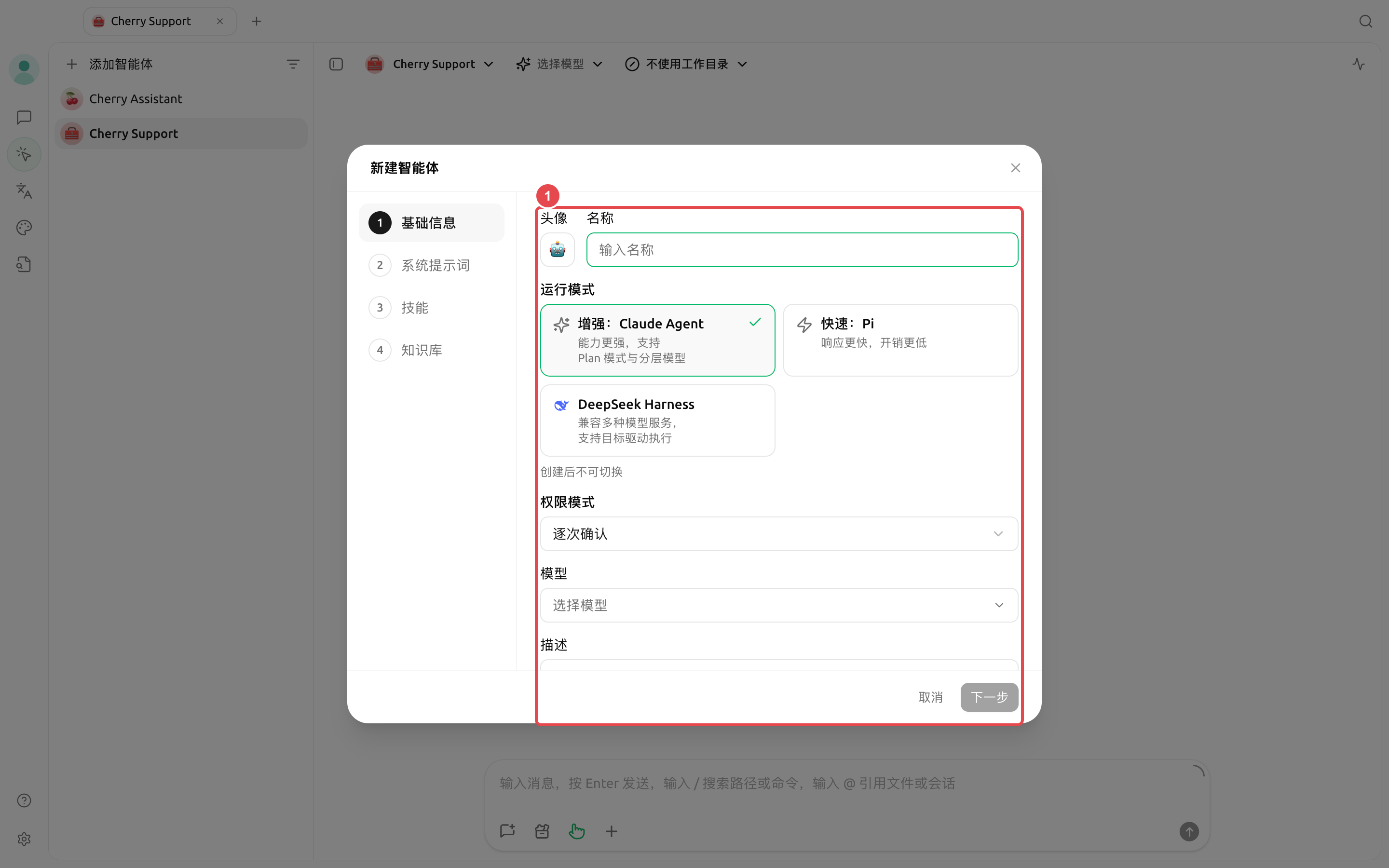
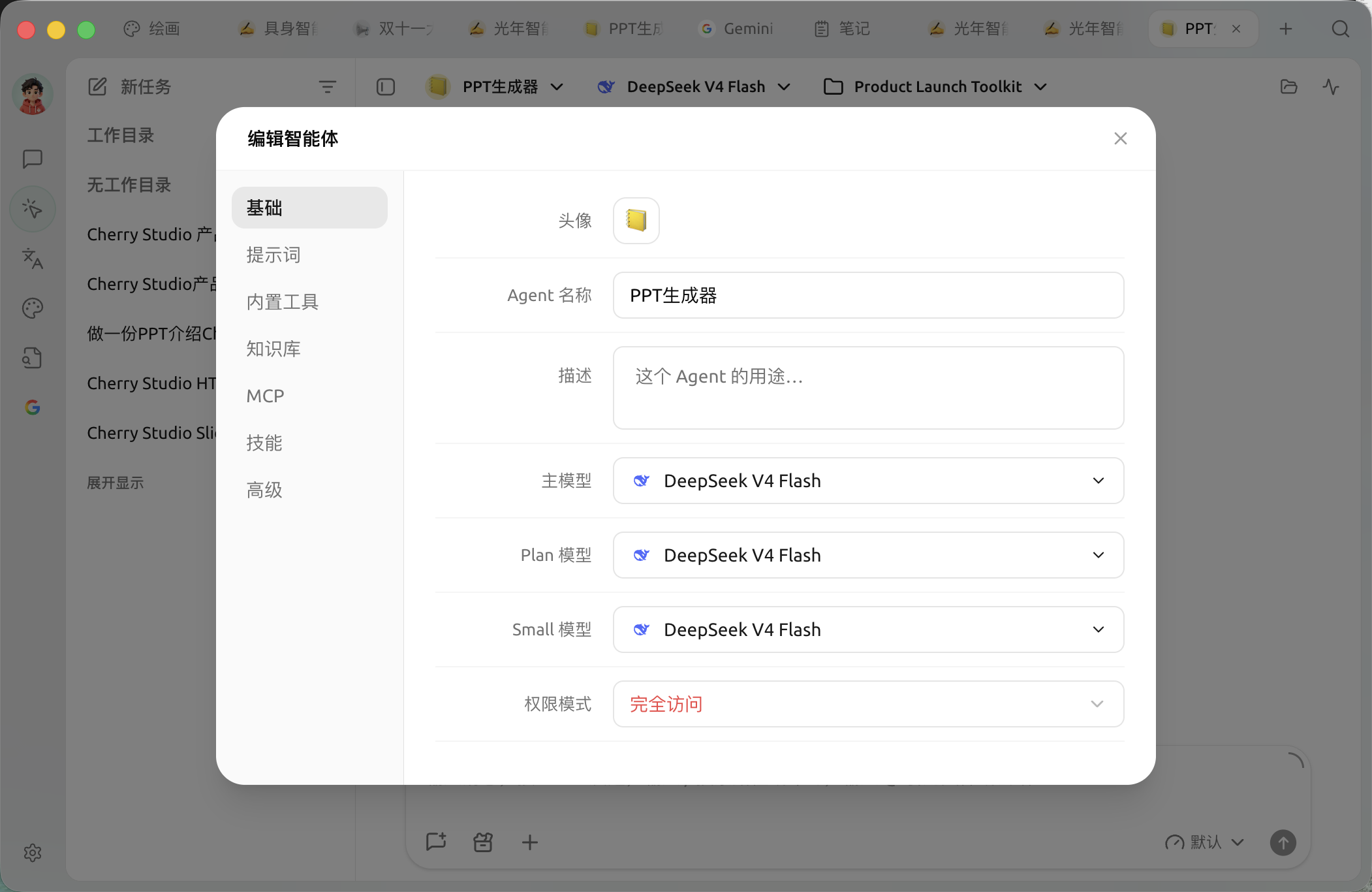
先揀好主模型;只有任務真係需要規劃分工或者輕量處理時,先再配置 Plan 模型同 Small 模型。
### 建立後繼續配置
喺 Agent 列表打開選單並揀編輯,可以調整以下內容:
* 【基本】:查看運行模式,並調整該模式支援嘅模型、權限同心跳設定;
* 【提示詞】:角色說明、處理規則同行為邊界;
* 【內置工具】:文件、搜尋、圖片、通知、定時任務、記憶、子智能體同工作流等;
* 【知識庫】:限制 Agent 可以存取嘅知識庫;
* 【MCP】:綁定已經連接嘅 MCP 伺服器;
* 【技能】:揀選已安裝技能;
* 【高級】:為真係需要嘅工具設定環境變數。
{% hint style="info" %}
而家編輯視窗會自動儲存修改。關閉視窗前如果仲有待儲存內容,應用會先完成儲存;儲存失敗時視窗會保持打開並顯示錯誤。
{% endhint %}
### 推薦起點
| 配置項 | 產品預設值 | 建議起點 | 作用 | 適用場景 | 注意事項 |
| --------------- | ----------------------------- | ----------------------- | -------------- | ------------------ | ---------------------------------- |
| 運行模式 | 【增強:Claude Agent】 | 唔確定時先用【增強:Claude Agent】 | 決定模型分工、權限同工具範圍 | 所有 Agent | 建立後唔可以切換 |
| 主模型 | 使用建立時揀嘅模型 | 揀一個已驗證可以穩定調用工具嘅模型 | 主要推理同執行 | 所有 Agent | 選擇器會按運行模式過濾唔兼容模型 |
| Plan / Small 模型 | 同主模型相同 | 先保持同主模型一致 | 任務拆解、簡單判斷同格式化 | 僅【增強:Claude Agent】 | Pi 同 DeepSeek Harness 唔會顯示呢兩個欄位 |
| 權限模式 | Claude/DSH 係【逐次確認】;Pi 係【智能批准】 | 真實項目目錄優先使用【逐次確認】 | 決定工具使唔使批准 | 文件、終端同網絡任務 | 【完全存取】可能刪除文件或者存取網絡 |
| 心跳檢測 | 支援嘅運行模式初始開啟,間隔 30 分鐘 | 冇持續任務時可以關閉 | 等 Agent 定期檢查工作 | Claude Agent、Pi | DeepSeek Harness 唔提供心跳檢測;固定時間用定時任務 |
### 用戶案例:合約檢查 Agent
建立「合約檢查」Agent,主模型揀已經驗證嘅模型,喺提示詞入面要求按「風險條款、原文位置、影響、建議」輸出,綁定公司制度知識庫,權限保持【逐次確認】。每份合約新建一個任務並揀對應文件目錄,避免唔同客戶資料混埋喺同一上下文入面。
點解建立時冇見到 MCP 同權限嘅完整設定?
建立嚮導只保留常用步驟。建立完成後打開 Agent 編輯視窗,可喺【基本】【內置工具】【知識庫】【MCP】【技能】同【高級】入面繼續配置;具體標籤會隨運行模式能力變化。
---
# Agent Instructions
This documentation is published with GitBook. GitBook is the documentation platform designed so that both humans and AI agents can read, navigate, and reason over technical content effectively. Learn more at gitbook.com.
## Querying This Documentation
If you need additional information that is not directly available in this page, you can query the documentation by asking a question.
Perform an HTTP GET request on the following URL with the `ask` and `goal` query parameters:
```
GET https://docs.cherryai.com.cn/docs/zhong-wen-fan-ti/advanced-basic/agent-workspace/create-agent.md?ask=&goal=
```
`ask` is the immediate question: it should be specific, self-contained, and written in natural language.
`goal` is what the user is ultimately trying to achieve, the reason they need the answer. Sharing it helps GitBook give you a better, more relevant answer. A goal is most helpful when it describes the outcome the user wants rather than restating the question. For example, with `ask=how do I create an API token`, a goal like `automate deployments from our CI pipeline` lets GitBook tailor the answer to that use case.
The response will contain a direct answer to the question and relevant excerpts and sources from the documentation.
Use this mechanism when the answer is not explicitly present in the current page, you need clarification or additional context, or you want to retrieve related documentation sections.