> For the complete documentation index, see [llms.txt](https://docs.cherryai.com.cn/llms.txt). Markdown versions of documentation pages are available by appending `.md` to page URLs; this page is available as [Markdown](https://docs.cherryai.com.cn/docs/russian/pre-basic/providers/github-copilot.md).
# GitHub Copilot
Для использования GitHub Copilot сначала нужно иметь аккаунт GitHub и оформить подписку на сервис GitHub Copilot. Подписка на free-версию тоже подойдет, но free-версия не поддерживает новейшую модель Claude 3.7; подробности см. [Официальный сайт GitHub Copilot](https://github.com/features/copilot).
## Получение Device Code
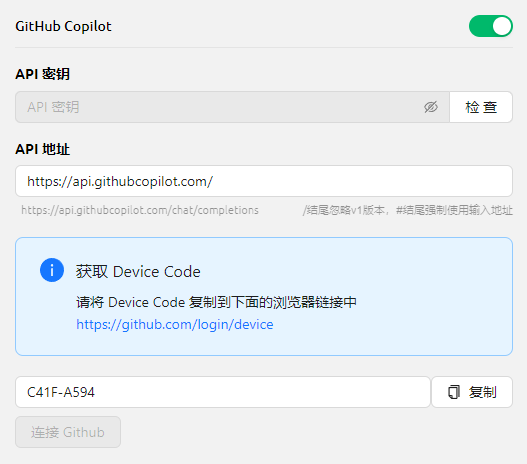
Нажмите «Войти в GitHub», получите Device Code и скопируйте его.
Получение Device Code
## Введите Device Code в браузере и дайте разрешение
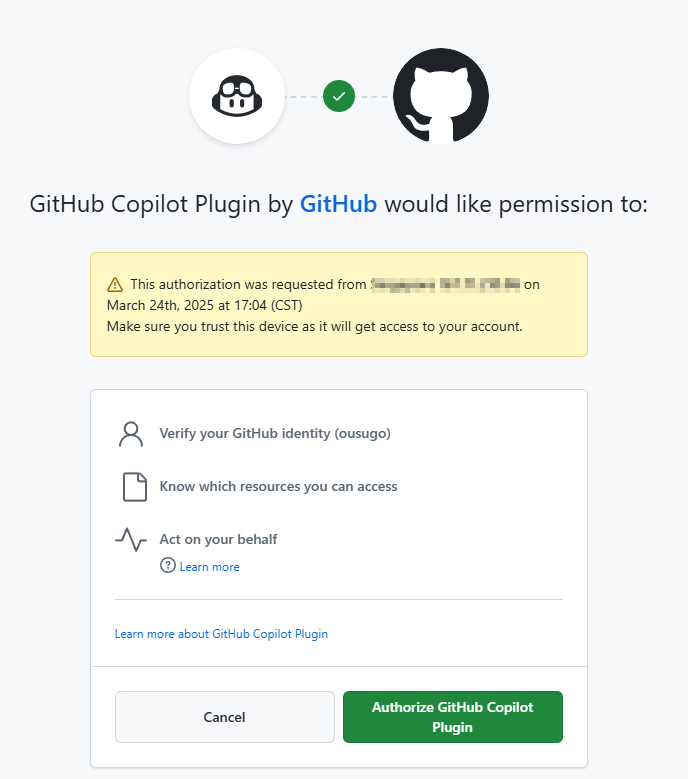
После успешного получения Device Code нажмите ссылку, чтобы открыть браузер, войдите в аккаунт GitHub в браузере, введите Device Code и дайте разрешение.
Авторизация GitHub
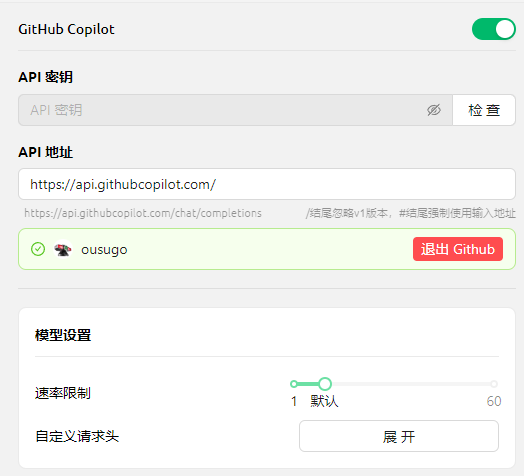
После успешной авторизации вернитесь в Cherry Studio, нажмите «Подключить GitHub», и после успеха отобразятся имя пользователя GitHub и аватар.
GitHub подключен успешно
## Нажмите «Управление», чтобы получить список моделей
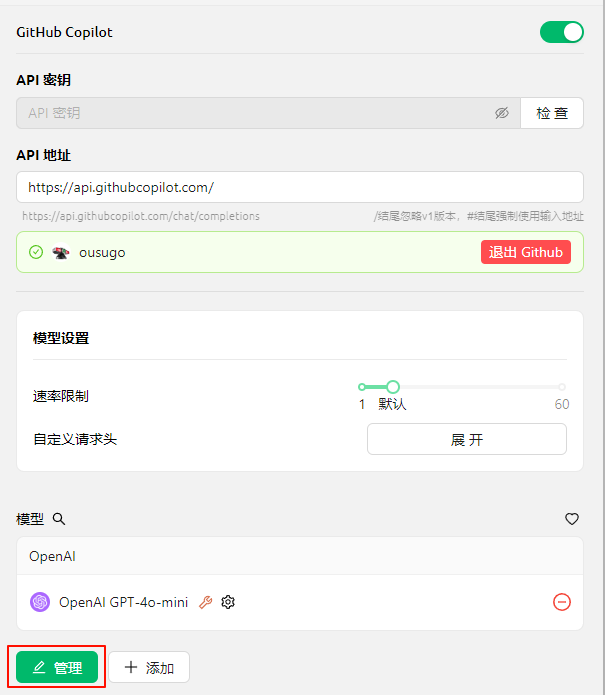
Нажмите кнопку «Управление» ниже, и список текущих поддерживаемых моделей будет автоматически получен из сети.
Получить список моделей
## Частые вопросы
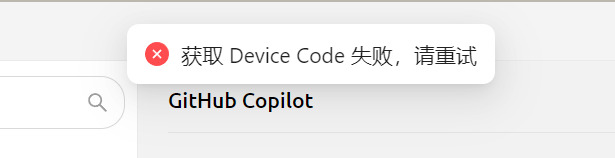
### Не удалось получить Device Code, попробуйте снова
Не удалось получить Device Code
В настоящее время запросы формируются с использованием Axios; Axios не поддерживает SOCKS-прокси, поэтому используйте системный прокси или HTTP-прокси, либо вообще не настраивайте прокси в CherryStudio, а используйте глобальный прокси. Сначала убедитесь, что ваше сетевое соединение работает нормально, чтобы избежать ситуации, когда не удается получить Device Code.
***
### Получить помощь и отправить отзыв
Если в процессе настройки или использования у вас возникнут вопросы, баги или предложения по улучшению функций, пожалуйста, обратитесь к [Обратная связь и предложения](/docs/russian/question-contact/suggestions.md) официальным каналам, указанным в
---
# Agent Instructions
This documentation is published with GitBook. GitBook is the documentation platform designed so that both humans and AI agents can read, navigate, and reason over technical content effectively. Learn more at gitbook.com.
## Querying This Documentation
If you need additional information that is not directly available in this page, you can query the documentation dynamically by asking a question.
Perform an HTTP GET request on the current page URL with the `ask` query parameter, and the optional `goal` query parameter:
```
GET https://docs.cherryai.com.cn/docs/russian/pre-basic/providers/github-copilot.md?ask=&goal=
```
`ask` is the immediate question: it should be specific, self-contained, and written in natural language.
`goal` is optional and describes the broader end goal you are ultimately trying to accomplish on behalf of the user. GitBook uses it to tailor the answer towards what is most useful for that goal.
The response will contain a direct answer to the question and relevant excerpts and sources from the documentation.
Use this mechanism when the answer is not explicitly present in the current page, you need clarification or additional context, or you want to retrieve related documentation sections.