> For the complete documentation index, see [llms.txt](https://docs.cherryai.com.cn/llms.txt). Markdown versions of documentation pages are available by appending `.md` to page URLs; this page is available as [Markdown](https://docs.cherryai.com.cn/docs/russian/pre-basic/providers/doubao.md).
# Volcano Engine
* Войти [Volcano Engine](https://console.volcengine.com/)
* Нажмите напрямую [Сюда для перехода](https://console.volcengine.com/ark/region:ark+cn-beijing/openManagement?LLM=%7B%7D)
### Получить API Key
* Нажмите на нижнюю часть боковой панели [Управление API Key](https://console.volcengine.com/ark/region:ark+cn-beijing/apiKey)
* Создать API Key
* После успешного создания нажмите на значок глаза рядом с созданным API Key, чтобы открыть и скопировать его.
* После того как скопируете API Key, вставьте его в CherryStudio и включите переключатель поставщика услуг.
### Подключить и добавить модель
* В самом низу боковой панели консоли Ark [Управление подключением](https://console.volcengine.com/ark/region:ark+cn-beijing/openManagement?LLM=%7B%7D\&OpenTokenDrawer=false) Подключите нужные модели; здесь можно по необходимости подключить модели серии Doubao и DeepSeek и т. п.
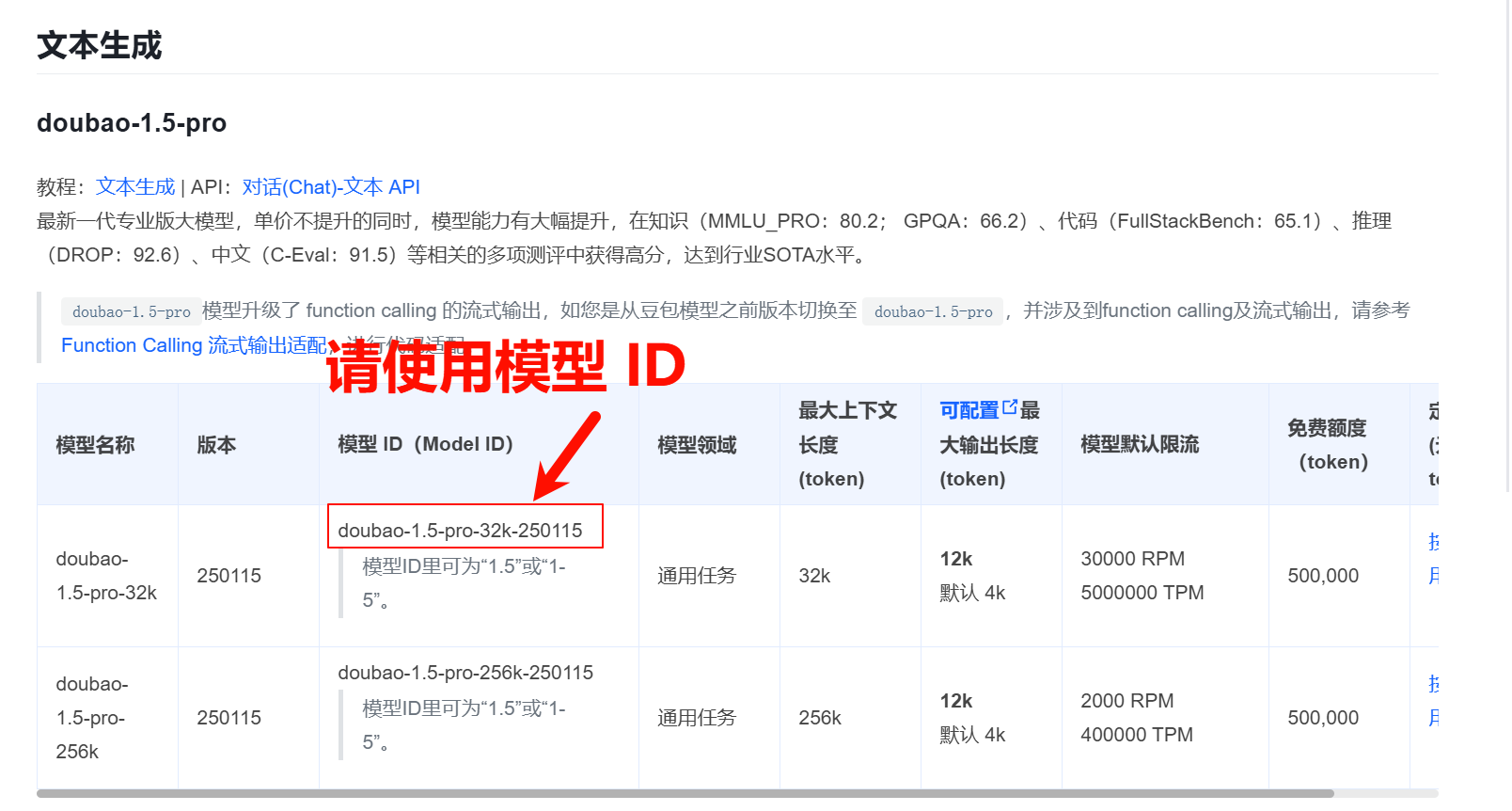
* в [Документация со списком моделей](https://www.volcengine.com/docs/82379/1330310#%E6%96%87%E6%9C%AC%E7%94%9F%E6%88%90) В ней найдите Model ID, соответствующий нужной модели.
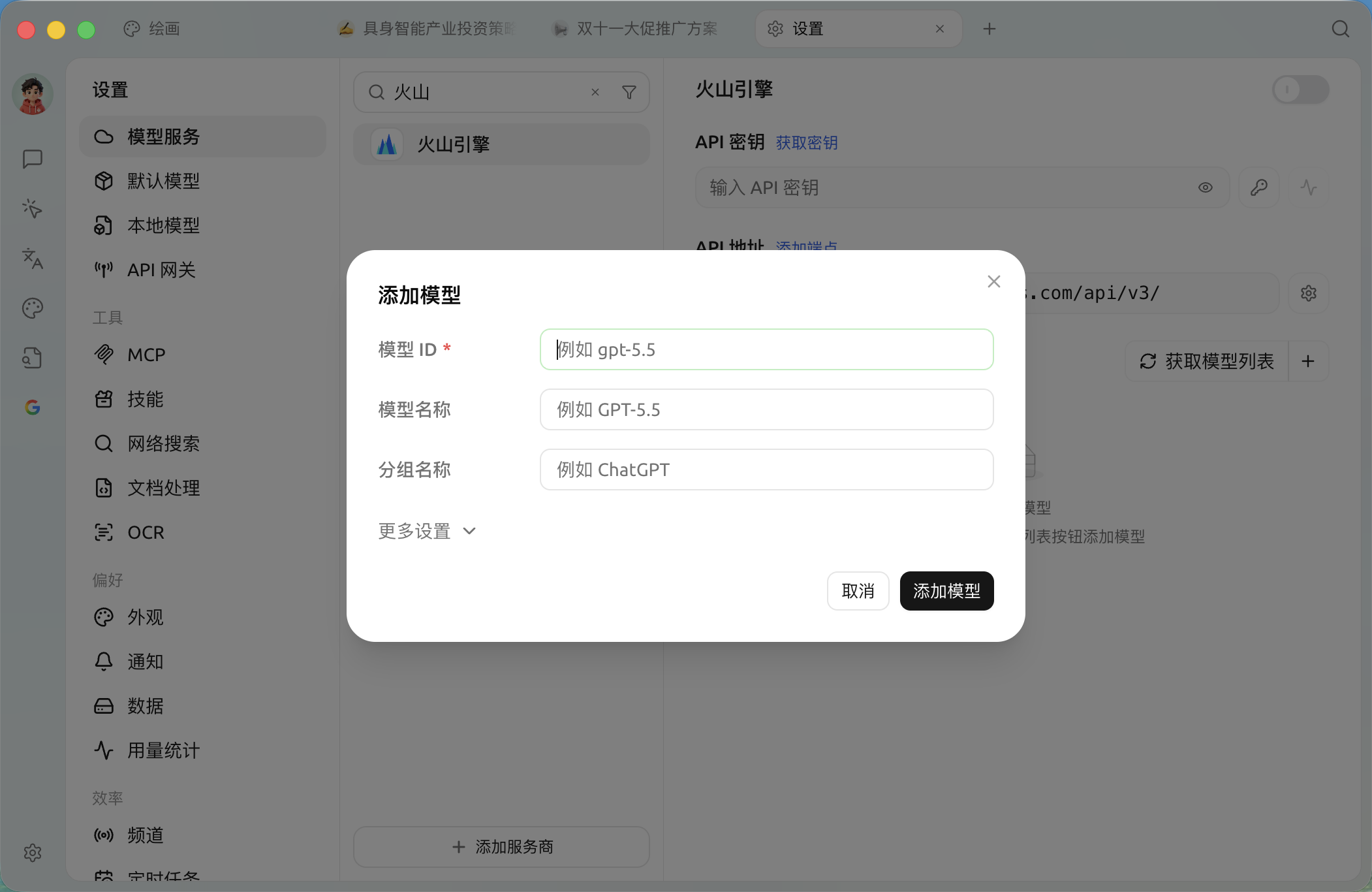
* Откройте в Cherry Studio [Сервисы моделей](/docs/russian/pre-basic/providers/providers.md) В настройках найдите Volcano Engine
* Нажмите «Добавить» и просто скопируйте ранее полученный Model ID в текстовое поле Model ID.
* Добавляйте модели по очереди по этому процессу
### API-адрес
API-адрес можно записать двумя способами
* Первый — стандартный для клиента:`https://ark.cn-beijing.volces.com/api/v3/`
* Второй способ записи:`https://ark.cn-beijing.volces.com/api/v3/chat/completions#`
{% hint style="info" %}
Разницы между этими двумя вариантами почти нет; можно оставить значение по умолчанию, без изменений.
О `/` и `#` О различии в окончании см. раздел настройки API-адреса у поставщика в документации,[Нажмите, чтобы перейти](/docs/russian/pre-basic/providers/providers.md#api-di-zhi)
{% endhint %}
Пример cURL в официальной документации
***
### Получить помощь и отправить отзыв
Если у вас в процессе настройки или использования возникнут какие-либо вопросы, баги или предложения по улучшению функций, пожалуйста, обратитесь к [Отзывы и предложения](/docs/russian/question-contact/suggestions.md) официальным каналам, указанным там.
---
# Agent Instructions
This documentation is published with GitBook. GitBook is the documentation platform designed so that both humans and AI agents can read, navigate, and reason over technical content effectively. Learn more at gitbook.com.
## Querying This Documentation
If you need additional information that is not directly available in this page, you can query the documentation dynamically by asking a question.
Perform an HTTP GET request on the current page URL with the `ask` query parameter, and the optional `goal` query parameter:
```
GET https://docs.cherryai.com.cn/docs/russian/pre-basic/providers/doubao.md?ask=&goal=
```
`ask` is the immediate question: it should be specific, self-contained, and written in natural language.
`goal` is optional and describes the broader end goal you are ultimately trying to accomplish on behalf of the user. GitBook uses it to tailor the answer towards what is most useful for that goal.
The response will contain a direct answer to the question and relevant excerpts and sources from the documentation.
Use this mechanism when the answer is not explicitly present in the current page, you need clarification or additional context, or you want to retrieve related documentation sections.
%20(1)%20(2).png?alt=media)
%20(2).png?alt=media)
%20(2).png?alt=media)
%20(2).png?alt=media)
%20(1)%20(2)%20(1).png?alt=media)
%20(2).png?alt=media)