> For the complete documentation index, see [llms.txt](https://docs.cherryai.com.cn/llms.txt). Markdown versions of documentation pages are available by appending `.md` to page URLs; this page is available as [Markdown](https://docs.cherryai.com.cn/docs/jp/pre-basic/settings/local-models.md).
# ローカルモデル
ローカルモデルは Cherry Studio に内蔵されており、**ダウンロード後はオフラインで実行できます** という小型モデルです。いずれもサービスプロバイダーの API を使わず、API Key の入力も不要です。サイズが小さく、自分のパソコン上で動作し、専用のクラウドモデルを用意するほどではない基本的な機能を補うために使われます。
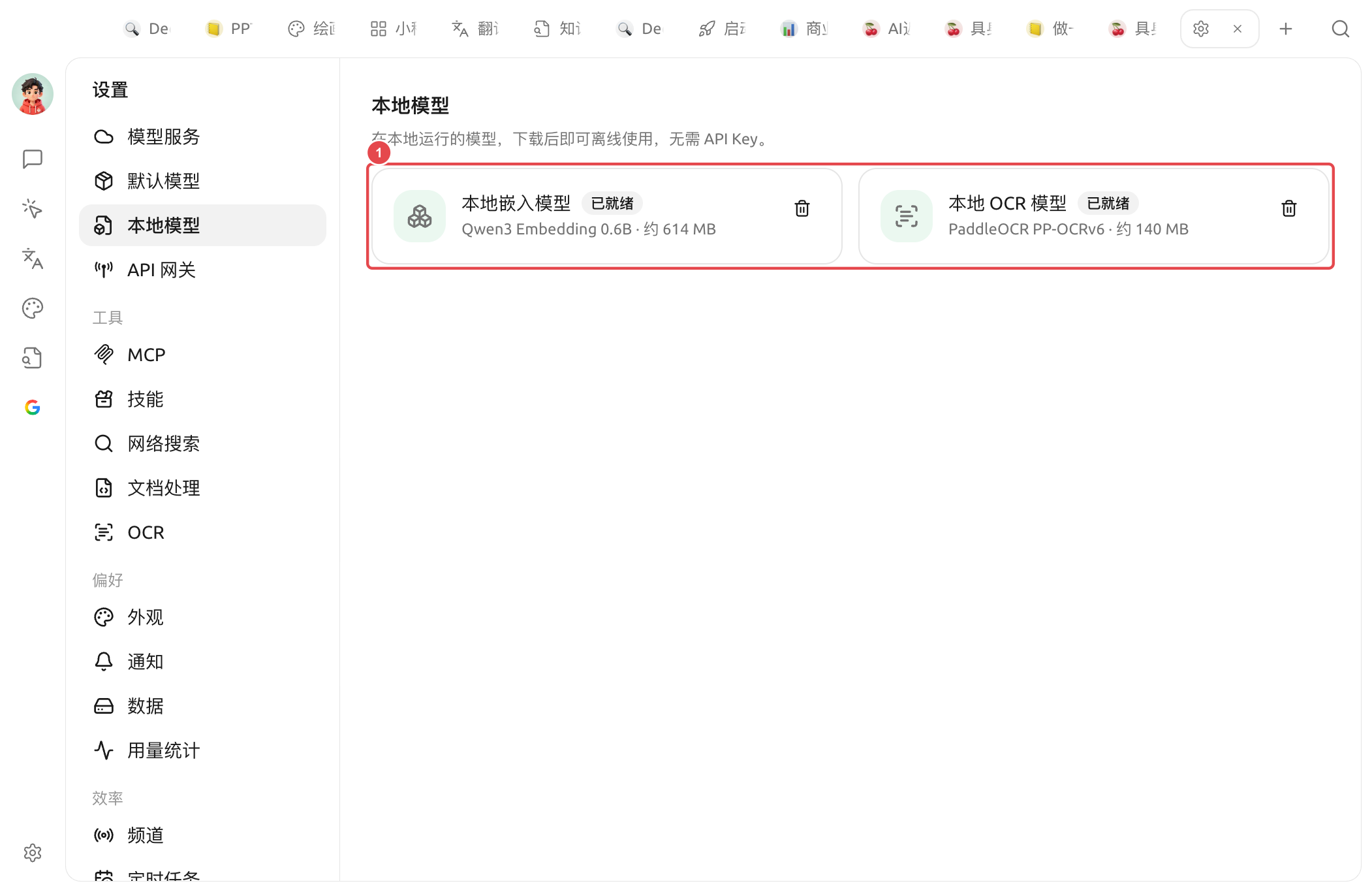
有効にすると `設定 → ローカルモデル` で管理できます:
現在、2種類のローカルモデルが内蔵されています:
| ローカルモデル | 基盤 | サイズ | 用途 |
| ---------------- | -------------------- | -------- | ------------------------------------------------------------------------------------ |
| **ローカル埋め込みモデル** | Qwen3 Embedding 0.6B | 約 614 MB | テキストをベクトルに変換し、 [ナレッジベース](/docs/jp/knowledge-base/knowledge-base.md) 検索、リコールなどのシーンで使用 |
| **ローカル OCR モデル** | PaddleOCR PP-OCRv6 | 約 140 MB | 画像 / スキャン文書内の文字をオフラインで認識し、 [OCR](/docs/jp/pre-basic/settings/ocr.md) 機能呼び出し |
### ダウンロードと状態
* モデル名の横にステータスバッジが表示されます:未ダウンロードのカード **下部** には全幅の「**ダウンロード**」ボタンがあり、クリックするとダウンロードを開始します。ダウンロード完了後、バッジは **準備完了**。
* になり、準備完了のモデルは右側の **削除** アイコンをクリックして削除し、ディスク容量を解放できます。必要なときは再度ダウンロードできます。(埋め込みモデルがまだナレッジベースで使用されている場合、削除は拒否され、重みは保持されます。)
* 一部のプラットフォーム / アーキテクチャでローカル推論がサポートされていない場合、パネルには「**現在のプラットフォームはローカルモデルをサポートしていません**」と表示され、この場合はダウンロードを提供しません。
ダウンロード時にあるミラーが利用できない場合、Cherry Studio は自動的に他のダウンロード元を試します。ダウンロード完了後、ローカル埋め込みモデルの推論処理は本機で実行され、ネット接続は不要です。
{% hint style="warning" %}
ページに【モデルファイルが不完全です。再ダウンロードして修復してください。】と表示された場合、ローカルキャッシュに必要なファイルが不足しています。削除するか、再ダウンロードすれば修復できます。モデルファイルを手動で結合しないでください。
{% endhint %}
{% hint style="info" %}
ローカルモデルは **オプション**です。もしすでに [モデルサービス](/docs/jp/pre-basic/providers/providers.md) でクラウド埋め込みモデルを設定しているか、標準搭載の OCR で十分なら、ダウンロードしなくても構いません。
{% endhint %}
### ローカルモデルを使うタイミング
* **クラウド埋め込みモデルがない / ナレッジベースに個別課金したくない**:ローカル埋め込みモデルをダウンロードすれば、ナレッジベースは完全オフラインで索引作成と検索ができます。
* **オフライン OCR が必要**:ネットワークがない、または画像を第三者にアップロードしたくない場面では、ローカル OCR モデルをダウンロードし、 [OCR 設定](/docs/jp/pre-basic/settings/ocr.md) で「ローカル PaddleOCR」を選択すればOKです。
* **プライバシー優先**:すべての計算はローカルで完結し、内容があなたのパソコンの外に出ることはありません。
{% hint style="warning" %}
ローカルモデルは「必要十分」の軽量な選択肢です。検索精度や認識精度に非常に高い要求がある場合は、クラウドの [埋め込みモデル](/docs/jp/knowledge-base/emb-models-info.md)や、より高性能な OCR サービスのほうが、通常はより良い結果が得られます。
{% endhint %}
***
### ヘルプの取得とフィードバックの送信
設定または使用中に不明点、バグ、機能改善の提案がある場合は、 [フィードバックと提案](/docs/jp/question-contact/suggestions.md) に記載の公式チャネルをご参照ください。
---
# Agent Instructions
This documentation is published with GitBook. GitBook is the documentation platform designed so that both humans and AI agents can read, navigate, and reason over technical content effectively. Learn more at gitbook.com.
## Querying This Documentation
If you need additional information that is not directly available in this page, you can query the documentation by asking a question.
Perform an HTTP GET request on the following URL with the `ask` and `goal` query parameters:
```
GET https://docs.cherryai.com.cn/docs/jp/pre-basic/settings/local-models.md?ask=&goal=
```
`ask` is the immediate question: it should be specific, self-contained, and written in natural language.
`goal` is what the user is ultimately trying to achieve, the reason they need the answer. Sharing it helps GitBook give you a better, more relevant answer. A goal is most helpful when it describes the outcome the user wants rather than restating the question. For example, with `ask=how do I create an API token`, a goal like `automate deployments from our CI pipeline` lets GitBook tailor the answer to that use case.
The response will contain a direct answer to the question and relevant excerpts and sources from the documentation.
Use this mechanism when the answer is not explicitly present in the current page, you need clarification or additional context, or you want to retrieve related documentation sections.