> For the complete documentation index, see [llms.txt](https://docs.cherryai.com.cn/llms.txt). Markdown versions of documentation pages are available by appending `.md` to page URLs; this page is available as [Markdown](https://docs.cherryai.com.cn/docs/jp/pre-basic/providers/doubao.md).
# Volcano Engine
* ログイン [Volcano Engine](https://console.volcengine.com/)
* 直接クリック [こちらへ直接アクセス](https://console.volcengine.com/ark/region:ark+cn-beijing/openManagement?LLM=%7B%7D)
### API Key を取得
* サイドバー下部の [API Key 管理](https://console.volcengine.com/ark/region:ark+cn-beijing/apiKey)
* API Key を作成
* 作成に成功したら、作成した API Key の横にある小さな目のアイコンをクリックして表示し、コピーします
* コピーした API Key を CherryStudio に入力したら、サービスプロバイダーのスイッチをオンにします。
### 有効化してモデルを追加
* Ark コンソールのサイドバー最下部にある [有効化管理](https://console.volcengine.com/ark/region:ark+cn-beijing/openManagement?LLM=%7B%7D\&OpenTokenDrawer=false) 使用するモデルを有効化します。ここでは必要に応じて、豆包シリーズや DeepSeek などのモデルを有効化できます。
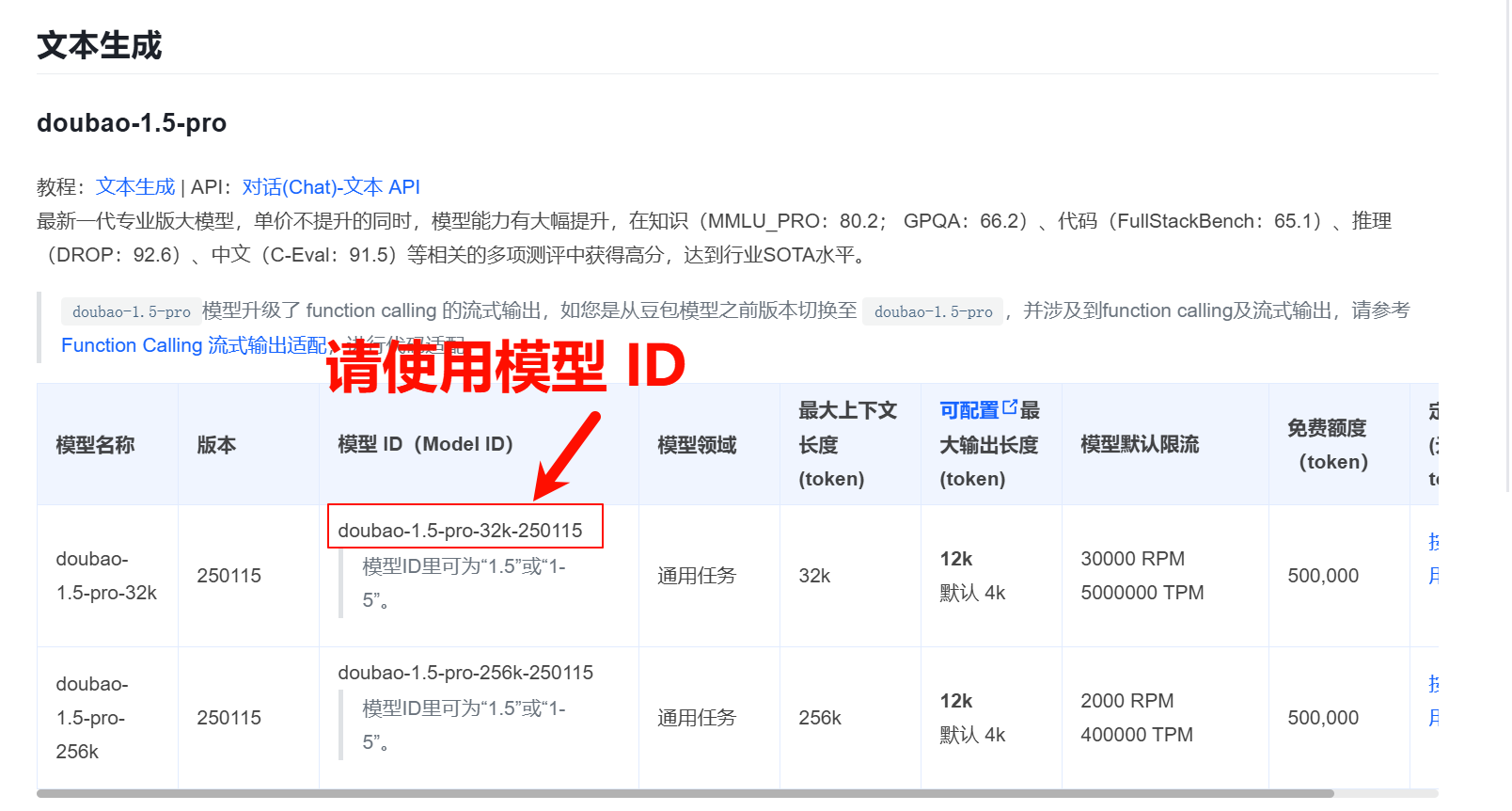
* 次の [モデル一覧ドキュメント](https://www.volcengine.com/docs/82379/1330310#%E6%96%87%E6%9C%AC%E7%94%9F%E6%88%90) で、必要なモデルに対応するモデルIDを見つけます。
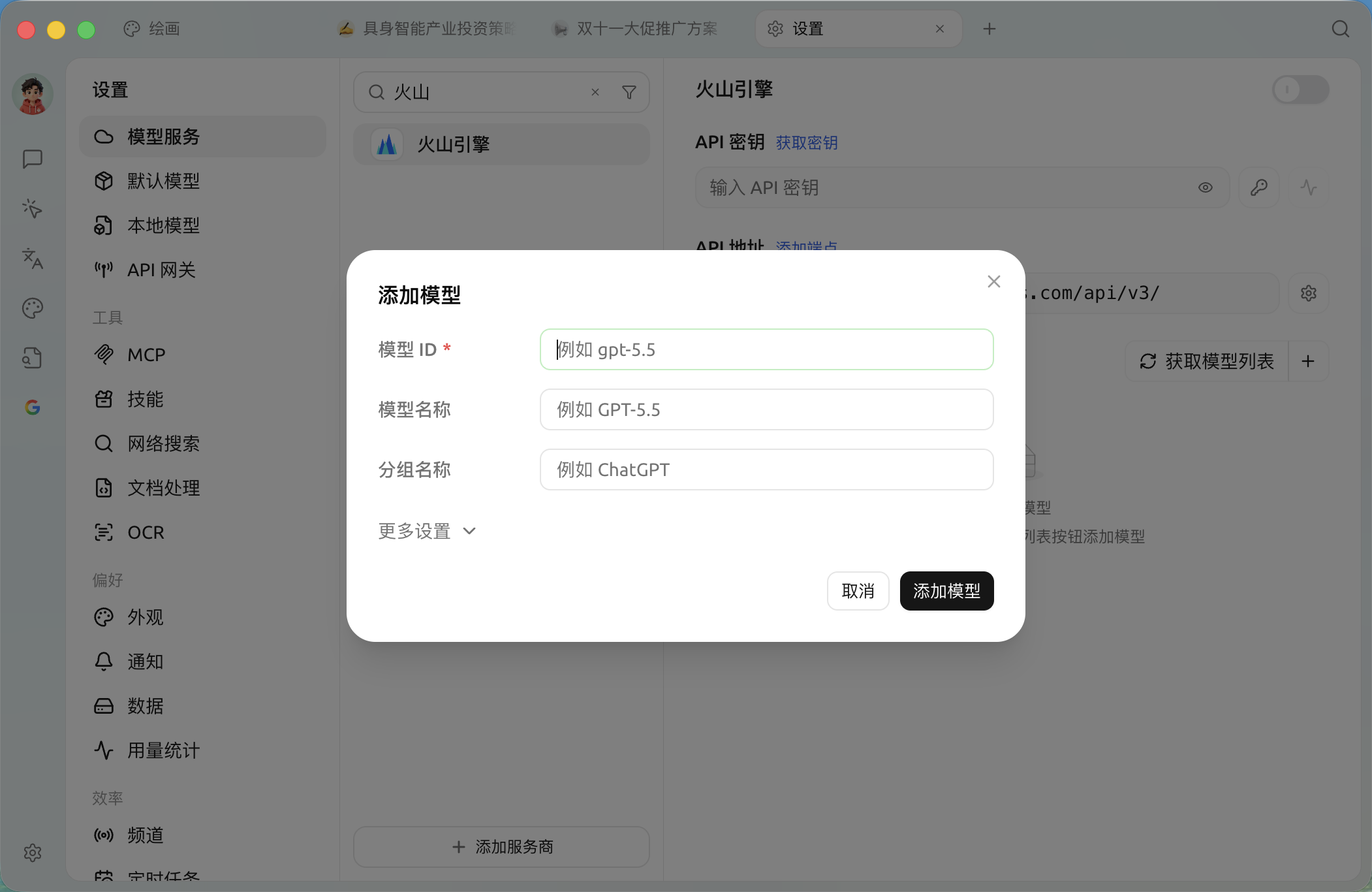
* Cherry Studio の [モデルサービス](/docs/jp/pre-basic/providers/providers.md) 設定で火山引擎を見つける
* クリックして追加し、以前取得したモデルIDをモデルIDのテキスト入力欄にコピーすればOKです
* この手順に従って、順番にモデルを追加します
### API アドレス
API アドレスには2通りの書き方があります
* 1つ目はクライアントのデフォルト:`https://ark.cn-beijing.volces.com/api/v3/`
* 2つ目の書き方は:`https://ark.cn-beijing.volces.com/api/v3/chat/completions#`
{% hint style="info" %}
2つの書き方に大きな違いはないので、デフォルトのままでよく、変更不要です。
について `/` と `#` 末尾の違いについては、参考ドキュメントの「サービスプロバイダー設定」のAPIアドレス部分を参照してください。[クリックして移動](/docs/jp/pre-basic/providers/providers.md#api-di-zhi)
{% endhint %}
公式ドキュメントの cURL サンプル
***
### ヘルプの取得とフィードバックの送信
設定または使用中に不明点、バグ、機能改善の提案がある場合は、 [フィードバックと提案](/docs/jp/question-contact/suggestions.md) に記載の公式チャネルをご参照ください。
---
# Agent Instructions
This documentation is published with GitBook. GitBook is the documentation platform designed so that both humans and AI agents can read, navigate, and reason over technical content effectively. Learn more at gitbook.com.
## Querying This Documentation
If you need additional information that is not directly available in this page, you can query the documentation dynamically by asking a question.
Perform an HTTP GET request on the current page URL with the `ask` query parameter, and the optional `goal` query parameter:
```
GET https://docs.cherryai.com.cn/docs/jp/pre-basic/providers/doubao.md?ask=&goal=
```
`ask` is the immediate question: it should be specific, self-contained, and written in natural language.
`goal` is optional and describes the broader end goal you are ultimately trying to accomplish on behalf of the user. GitBook uses it to tailor the answer towards what is most useful for that goal.
The response will contain a direct answer to the question and relevant excerpts and sources from the documentation.
Use this mechanism when the answer is not explicitly present in the current page, you need clarification or additional context, or you want to retrieve related documentation sections.
%20(1)%20(2).png?alt=media)
%20(2).png?alt=media)
%20(2).png?alt=media)
%20(2).png?alt=media)
%20(1)%20(2)%20(1).png?alt=media)
%20(2).png?alt=media)