> For the complete documentation index, see [llms.txt](https://docs.cherryai.com.cn/llms.txt). Markdown versions of documentation pages are available by appending `.md` to page URLs; this page is available as [Markdown](https://docs.cherryai.com.cn/docs/jp/knowledge-base/document-preprocessing.md).

# 文書前処理

ナレッジベースのドキュメント前処理は、ベクトル化の前に PDF / 画像などの非テキストコンテンツに OCR と構造解析を行い、ナレッジベースがこれらの資料を正しく検索できるようにします。

### OCRサービス提供者を設定する

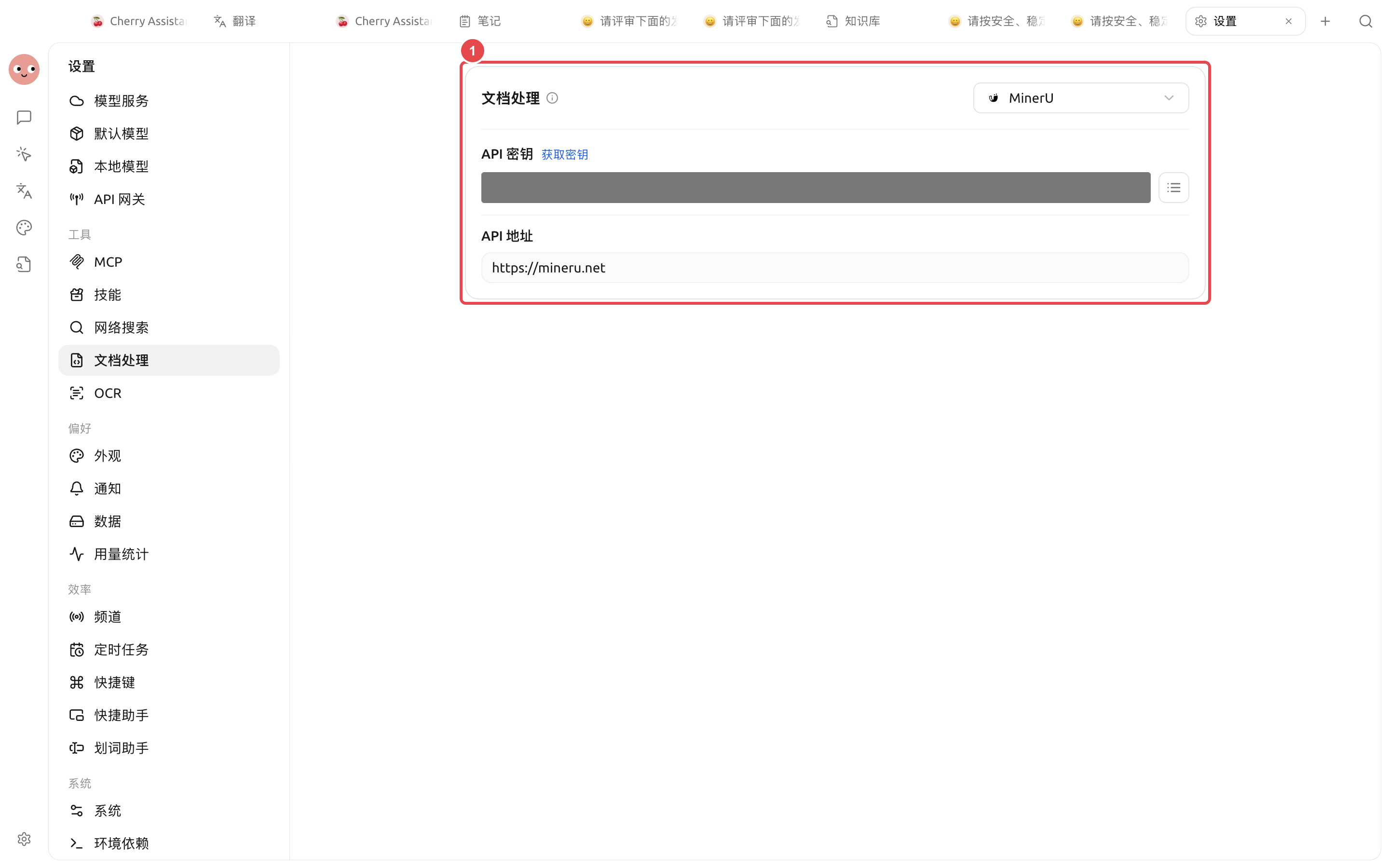
開く `設定 → 文書処理`、順に設定します：

* **システム OCR**：macOS ユーザーはそのまま利用可能です（設定不要）；Windows では OCR エンジンを手動で選択する必要があります
* **ドキュメント処理サービス提供者**：デフォルト `MinerU`、入力できます `API Key` + `API Host`（デフォルト `https://mineru.net`）；または Tesseract / Paddle OCR / OpenVINO / サードパーティ Provider に切り替えることもできます

<figure><img src="/files/84c89b9463efc17873dff2980a8ae4ce54bd1757" alt=""><figcaption></figcaption></figure>

「API KEYを取得」をクリックすると、申請ページがブラウザで開きます。「今すぐ申請」をクリックしてフォームを入力し、API KEYを取得してから、それをAPI KEY欄に入力してください。

<figure><img src="/files/9a1988d2e7538dcbe4dccf62addbc31a46eefd46" alt=""><figcaption></figcaption></figure>

### ナレッジベースでドキュメント前処理を有効にする

<figure><img src="/files/6537e256a9dc50c87e6e07f0a767da2cb176b78b" alt=""><figcaption></figcaption></figure>

作成済みのナレッジベース設定で **ドキュメント前処理** スイッチをオンにすると、ファイル追加時に前の手順で設定した OCR Provider が自動的に使用されます。

### ドキュメントをアップロード

<figure><img src="/files/b2034cb38bbd5abde27bb6bca48ddf2e208dbd3d" alt=""><figcaption></figcaption></figure>

> 右上の検索でナレッジベースの結果を確認できます

### 会話で使用する

<figure><img src="/files/415de2139f04ea031593e74a18eef8e9a2a04dbe" alt=""><figcaption></figcaption></figure>

> ナレッジベースの使い方のヒント：**性能の高い**モデルを使用する場合は、ナレッジベースの検索モードを意図認識に変更できます。意図認識では、質問内容をより正確かつ幅広く表現できます。

### ナレッジベースの意図認識を有効にする

<figure><img src="/files/00742c91ed84685cd44472f87f8ce21a03b952e2" alt=""><figcaption></figcaption></figure>

***

### 💡 ヘルプの取得とフィードバックの送信

設定や使用の過程で疑問、Bug、機能改善の提案がある場合は、 [フィードバックと提案](/docs/jp/question-contact/suggestions.md) に記載の公式チャネルをご参照ください。


---

# Agent Instructions
This documentation is published with GitBook. GitBook is the documentation platform designed so that both humans and AI agents can read, navigate, and reason over technical content effectively. Learn more at gitbook.com.

## Querying This Documentation
If you need additional information that is not directly available in this page, you can query the documentation dynamically by asking a question.

Perform an HTTP GET request on the current page URL with the `ask` query parameter, and the optional `goal` query parameter:

```
GET https://docs.cherryai.com.cn/docs/jp/knowledge-base/document-preprocessing.md?ask=<question>&goal=<endgoal>
```

`ask` is the immediate question: it should be specific, self-contained, and written in natural language.
`goal` is optional and describes the broader end goal you are ultimately trying to accomplish on behalf of the user. GitBook uses it to tailor the answer towards what is most useful for that goal.

The response will contain a direct answer to the question and relevant excerpts and sources from the documentation.

Use this mechanism when the answer is not explicitly present in the current page, you need clarification or additional context, or you want to retrieve related documentation sections.