> For the complete documentation index, see [llms.txt](https://docs.cherryai.com.cn/llms.txt). Markdown versions of documentation pages are available by appending `.md` to page URLs; this page is available as [Markdown](https://docs.cherryai.com.cn/docs/jp/advanced-basic/cases/private-knowledge-qa.md).
# プライベートナレッジベースQ\&A
人事チームは同僚に現行制度を確認してほしいが、Agent が常識で回答を補完することは望んでいない。この事例では、資料の範囲、検索テスト、回答ルールをまとめている。内容が見つからない場合、Agent は明確にそう説明すべきだ。
単一のテーマごとに独立したナレッジベースを作成し、現行資料と旧資料が混在しないようにする。
検索結果が不安定なときにのみ、資料構造に応じて RAG 設定を調整する。
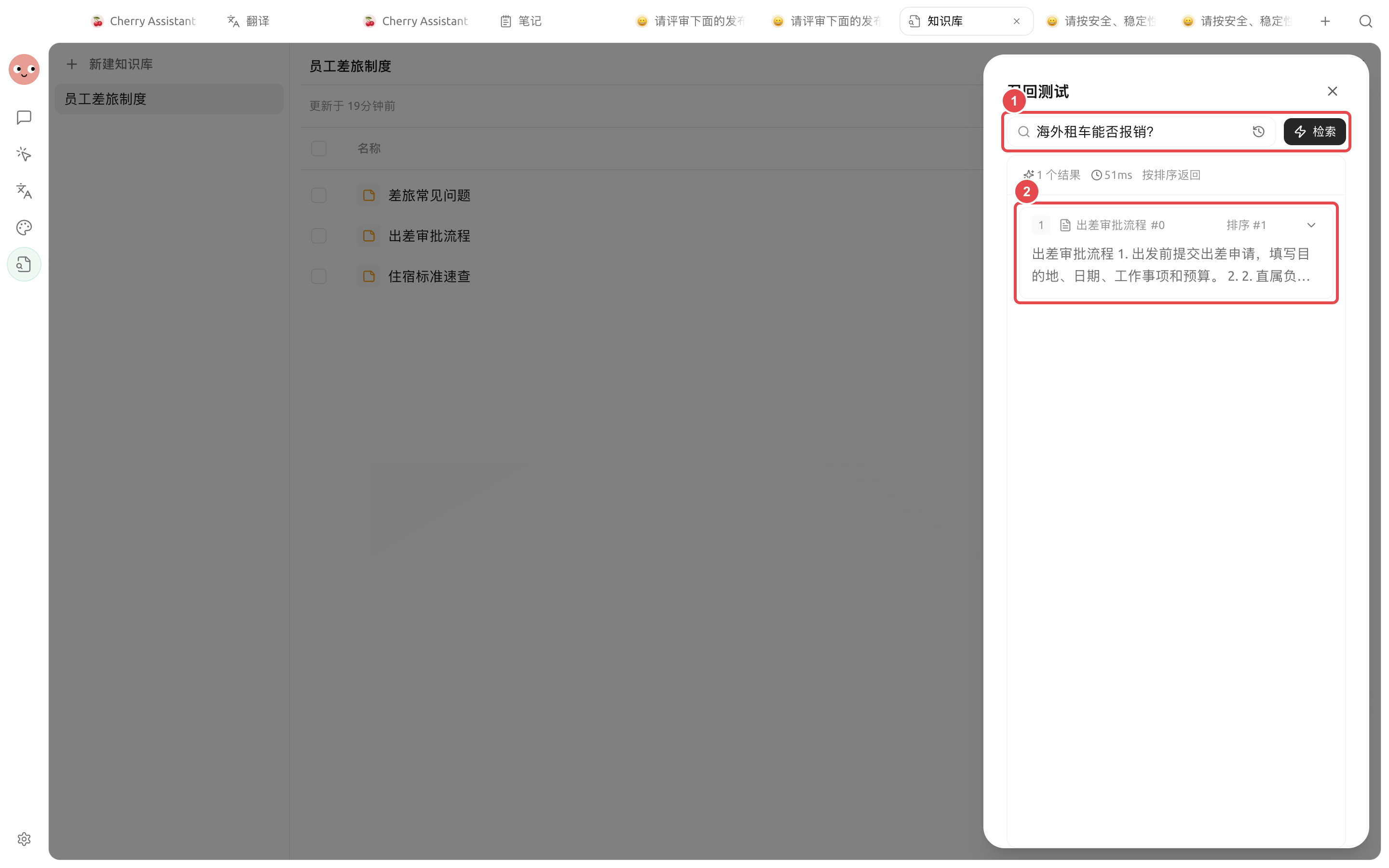
① 実際の質問でテストする;② 返された資料、原文の抜粋、関連度を確認する。ここが安定してから、ナレッジベースを Agent に使わせる。
## 操作手順
{% stepper %}
{% step %}
### 1. テーマを単一にしたナレッジベースを構築する
現行資料をまとめ、重複や期限切れの版を削除する。ファイル名にはテーマと有効範囲を明記する。
{% endstep %}
{% step %}
### 2. 実際の質問で検索テストを行う
少なくとも、紛らわしい条項、口語的な聞き方、答えのない質問をテストする。返される抜粋が安定するまで、資料や RAG 設定を調整する。
{% endstep %}
{% step %}
### 3. 専用 Agent を作成する
このナレッジベースだけを紐づけ、プロンプトで「資料を優先して引用する。見つからないときは未発見と答える。常識で制度を補完しない」と要求する。権限は最小範囲に保つ。
{% endstep %}
{% step %}
### 4. 小さな範囲から使い始める
まずは社内検索に使い、承認や専門的判断を直接置き換えない。誤答した質問を収集し、資料と検索テストに戻って修正する。
{% endstep %}
{% endstepper %}
## 質問例のルール
```
回答時はまず結論を示し、その後に資料名と関連段落を記載する。資料同士が矛盾する場合は矛盾点を列挙し、こちらで選ばない。ナレッジベースに答えがない場合は、必ず「現在の資料では見つかりません」と書く。
```
## 推奨の組み合わせと完成基準
| 項目 | 推奨方法 |
| ------- | ----------------------------------------------- |
| ナレッジベース | 1つのテーマに1組の資料、重複版と旧版を削除する |
| 検索テスト | 標準的な言い回し、口語的な言い回し、答えのない質問を同時にテストする |
| Agent | 必要なナレッジベースだけを紐づけ、資料の引用を求め、補完しないようにする |
| 完了基準 | 正しい段落を見つけられる。矛盾する資料は列挙される。答えがないときは、未発見だと明確に伝える。 |
{% hint style="danger" %}
プライベートナレッジベース内の内容は、選択した埋め込みモデルおよび対話モデルのサービスによって処理される。使用前に資料の機密要件とサービス範囲を確認し、秘密鍵やアカウント認証情報を知識資料として取り込まない。
{% endhint %}
---
# Agent Instructions
This documentation is published with GitBook. GitBook is the documentation platform designed so that both humans and AI agents can read, navigate, and reason over technical content effectively. Learn more at gitbook.com.
## Querying This Documentation
If you need additional information that is not directly available in this page, you can query the documentation by asking a question.
Perform an HTTP GET request on the following URL with the `ask` and `goal` query parameters:
```
GET https://docs.cherryai.com.cn/docs/jp/advanced-basic/cases/private-knowledge-qa.md?ask=&goal=
```
`ask` is the immediate question: it should be specific, self-contained, and written in natural language.
`goal` is what the user is ultimately trying to achieve, the reason they need the answer. Sharing it helps GitBook give you a better, more relevant answer. A goal is most helpful when it describes the outcome the user wants rather than restating the question. For example, with `ask=how do I create an API token`, a goal like `automate deployments from our CI pipeline` lets GitBook tailor the answer to that use case.
The response will contain a direct answer to the question and relevant excerpts and sources from the documentation.
Use this mechanism when the answer is not explicitly present in the current page, you need clarification or additional context, or you want to retrieve related documentation sections.