> For the complete documentation index, see [llms.txt](https://docs.cherryai.com.cn/llms.txt). Markdown versions of documentation pages are available by appending `.md` to page URLs; this page is available as [Markdown](https://docs.cherryai.com.cn/docs/jp/advanced-basic/cases/long-document-review.md).
# 長文書レビュー
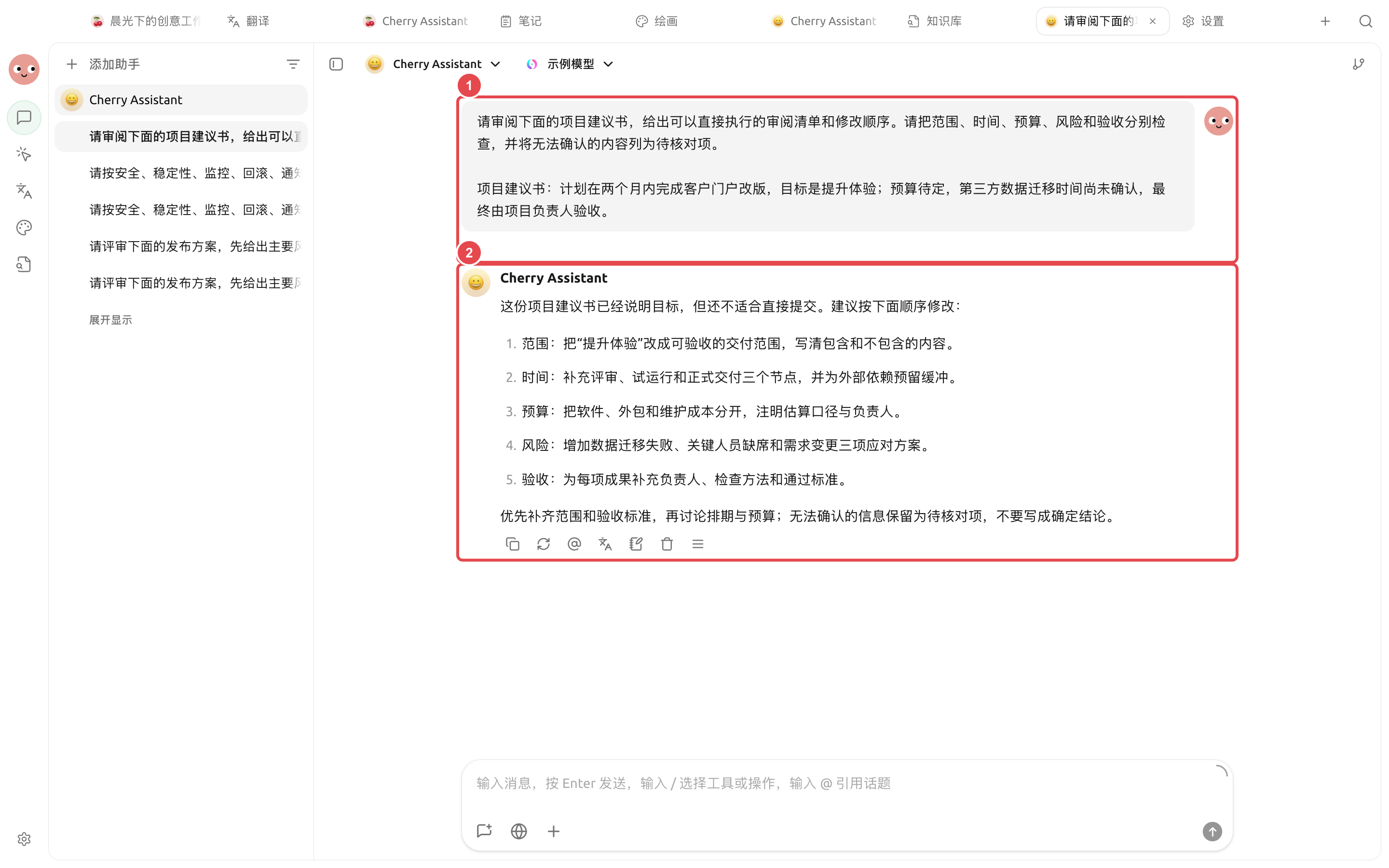
プロダクトマネージャーが長文の提案書を受け取り、事実上の問題、構成上の抜け、実行可能な修正点を見つけつつ、原稿と人による確認プロセスを保持する必要がある。以下のやり方は、報告書、規程、入札資料、プロダクト提案に適している。
## 推奨組み合わせ
* 【会話】:異なるモデルのレビュー観点を素早く比較する;
* 【作業】Agent:作業ディレクトリを読み取り、修正版を生成する;
* ナレッジベース:規程、用語、または履歴資料を提供する;
* 右側の【ファイル】:原稿と生成物を確認する。
① 原文とレビュー基準を入力する。② 実際の結果では項目ごとに抜けを指摘し、確認できない情報を要確認項目として残す。
## 操作手順
{% stepper %}
{% step %}
### 1. 原稿とレビュー基準を準備する
原稿を独立した作業ディレクトリに置き、別途簡潔なレビュー指示を作成して、読者、目的、変更できない事実、納品形式を明記する。
{% endstep %}
{% step %}
### 2. まず小規模で調整する
1つの章を選び、Agent に「問題点、原文の位置、影響、提案」の順で出力させる。基準が適切だと確認できてから全文を処理する。
{% endstep %}
{% step %}
### 3. 事実と表現を分ける
Agent に、検証が必要な事実を個別に列挙させ、不確かな内容を言い回しでごまかさないよう求める。重要な数字は元資料に戻って照合する。
{% endstep %}
{% step %}
### 4. 新しいファイルを生成し、人手で仕上げる
元ファイルを保持するよう求め、 `review/` の下に問題リストと修正版を生成する。右側の【ファイル】で段落ごとに確認し、その後エクスポートまたは共有する。
{% endstep %}
{% endstepper %}
## サンプルタスク
```
現在のディレクトリにある proposal.docx をレビューする。まず章ごとに事実上の問題、構成上の抜け、表現上の問題を列挙し、原文の位置を明記する。元ファイルは変更しないこと。リストを確認したら、review/ 下に修正版と要確認事項を生成する。
```
## 利用前の準備と完了基準
| 項目 | 推奨準備 |
| -------- | --------------------------------------------- |
| ファイル | 原文、レビュー要件、出力ディレクトリを別々に配置する |
| 推奨組み合わせ | 専用 Agent + 本プロジェクトのファイルのみを含む作業ディレクトリ + 【逐次確認】 |
| 抜き取り確認方式 | まず1章を抜き取り確認し、引用形式と判断基準を確認する |
| 完了基準 | 各コメントに原文位置を付ける。未読部分は明確にマークする。元ファイルは上書きされていない。 |
契約書、報告書、論文、仕様書の構造化レビューに適している。法務、医療、財務の結論が関わる場合、出力は補助資料としてのみ使用する。
{% hint style="info" %}
文書が長いときは、1回の会話で全文を何度も貼り付けない。Agent に作業ディレクトリを直接読み込ませ、章ごとに中間成果物を残させたほうが、確認や復元がしやすい。
{% endhint %}
---
# Agent Instructions
This documentation is published with GitBook. GitBook is the documentation platform designed so that both humans and AI agents can read, navigate, and reason over technical content effectively. Learn more at gitbook.com.
## Querying This Documentation
If you need additional information that is not directly available in this page, you can query the documentation dynamically by asking a question.
Perform an HTTP GET request on the current page URL with the `ask` query parameter, and the optional `goal` query parameter:
```
GET https://docs.cherryai.com.cn/docs/jp/advanced-basic/cases/long-document-review.md?ask=&goal=
```
`ask` is the immediate question: it should be specific, self-contained, and written in natural language.
`goal` is optional and describes the broader end goal you are ultimately trying to accomplish on behalf of the user. GitBook uses it to tailor the answer towards what is most useful for that goal.
The response will contain a direct answer to the question and relevant excerpts and sources from the documentation.
Use this mechanism when the answer is not explicitly present in the current page, you need clarification or additional context, or you want to retrieve related documentation sections.