> For the complete documentation index, see [llms.txt](https://docs.cherryai.com.cn/llms.txt). Markdown versions of documentation pages are available by appending `.md` to page URLs; this page is available as [Markdown](https://docs.cherryai.com.cn/docs/jp/advanced-basic/cases/automated-daily-report.md).
# チャンネルと定時日報
運用チームは毎営業日の午前中に指定資料を自動で集約し、日報を生成してチームチャンネルへ送信したい。自動化の前にまず手動で一度通し、データ欠損・パス誤り・通知先の問題を早めに見つける。
## まず何を準備するか
* 【仕事】で検証済みの日報 Agent;
* 明確なデータソースと、必要な資料だけを含む作業ディレクトリ;
* 固定フォーマットはスキル化できる;
* 接続済みでメッセージ範囲が制限されたチャンネル;
* 営業日の定時タスク。
日報はまずテスト済みのチャンネルに紐づけ、その後それを定時タスクの通知先として選ぶ。
初回の自動実行後は、Agentの状態と実行記録からタスクが本当に完了したか確認する。
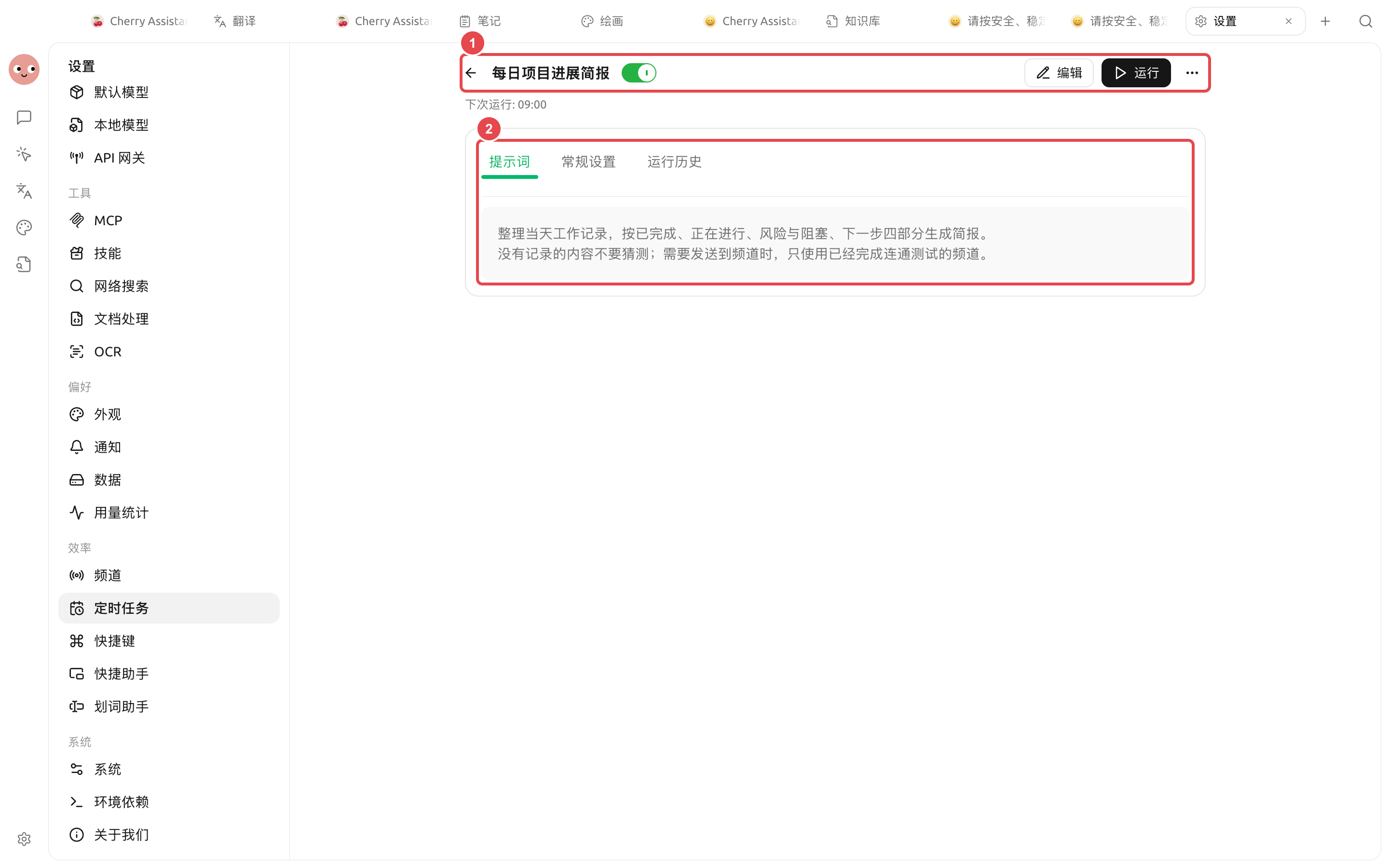
① タスクが有効になっていて、次回実行時刻が表示されている;② プロンプトに四部構成、欠損データの扱い、チャンネル送信条件が明確に書かれている。
## 設定手順
{% stepper %}
{% step %}
### 1. 手動で日報を1本作成する
Agentに「進捗、指標、リスク、ToDo」の4項目を出力させる。データ欠損時に内容をでっち上げず、明示的にその旨を示すか確認する。
{% endstep %}
{% step %}
### 2. 通知チャンネルを設定する
まずAgentとの対話で接続したいプラットフォームとグループを伝え、その後【設定】→【チャンネル】で資格情報、許可された会話ID、ワークスペース、権限モードを確認する。
{% endstep %}
{% step %}
### 3. 定時タスクを作成する
Agentに営業日のスケジュールを作成させるか、【設定】→【定時タスク】→【新規作成】を開く。日報Agent、作業ディレクトリ、実行時間、通知チャンネルを選ぶ。
{% endstep %}
{% step %}
### 4. すぐにテストする
保存後に【実行】をクリックし、生成された会話、実行履歴、チャンネルメッセージを確認する。翌日まで待ってからパスや受信先の誤りに気づくことがないようにする。
{% endstep %}
{% step %}
### 5. 監視して調整する
最初の数回の実行では、所要時間、使用量、失敗理由を確認する。データソースやチームのフォーマットが変わったら、スキルやタスクのプロンプトを更新し、複数箇所で矛盾するルールを管理しない。
{% endstep %}
{% endstepper %}
## サンプルのタスクプロンプト
```
現在の作業ディレクトリ内で昨日追加されたデータを読み取り、中国語の運用日報を生成してください。進捗、主要指標、異常、今日のToDoを必ず含める。データが見つからない場合は「データなし」と書き、不足しているファイルを列挙し、数値を補完してはならない。結果は設定済みのチームチャンネルに送信し、作業ディレクトリにMarkdownファイルを1部保存する。
```
## 障害対応
| 現象 | 確認する場所 |
| ----------- | --------------------------- |
| 実行されない | 定時タスクの状態、次回実行時刻、システムのスリープ |
| 実行失敗 | 【実行履歴】→【会話を表示】 |
| ファイルが生成されない | 作業ディレクトリ、権限要求、Agentのファイルツール |
| メッセージが届かない | チャンネルの状態、受信先、プラットフォームのログ |
| 内容が重複する | ハートビートと同じ計画を複数同時に有効化していないか |
## 推奨の組み合わせと完成基準
| 項目 | 推奨方法 |
| ----- | --------------------------------------------------------------------- |
| Agent | まず同じ日報を手動で一度通し、その後定時タスクに任せる |
| 計画 | 【毎日】または【営業日】を優先して使い、次回実行時刻を確認する |
| チャンネル | まずテスト用の会話に送信し、その後本番グループに切り替える |
| 完了基準 | 実行履歴が成功していること;レポートファイルが開けること;チャンネルに1件だけ届くこと;データが不足しているときに結果をでっち上げないこと |
{% hint style="warning" %}
定時タスクは無人環境で実行される。公開前に最小限のファイル範囲と適切な権限を維持し、高リスクな書き込みや外部変更を完全アクセスモードに任せないようにする。
{% endhint %}
{% hint style="info" %}
スクリーンショットのデモ環境では外部チャンネルが紐づけられていないため、保存済みで有効化されたタスクのみを表示しています。本番利用ではさらに【実行】をクリックし、【実行履歴】が成功していることを確認し、テストチャンネルで実際のメッセージが1件届いてから日常運用に投入してください。
{% endhint %}
---
# Agent Instructions
This documentation is published with GitBook. GitBook is the documentation platform designed so that both humans and AI agents can read, navigate, and reason over technical content effectively. Learn more at gitbook.com.
## Querying This Documentation
If you need additional information that is not directly available in this page, you can query the documentation by asking a question.
Perform an HTTP GET request on the following URL with the `ask` and `goal` query parameters:
```
GET https://docs.cherryai.com.cn/docs/jp/advanced-basic/cases/automated-daily-report.md?ask=&goal=
```
`ask` is the immediate question: it should be specific, self-contained, and written in natural language.
`goal` is what the user is ultimately trying to achieve, the reason they need the answer. Sharing it helps GitBook give you a better, more relevant answer. A goal is most helpful when it describes the outcome the user wants rather than restating the question. For example, with `ask=how do I create an API token`, a goal like `automate deployments from our CI pipeline` lets GitBook tailor the answer to that use case.
The response will contain a direct answer to the question and relevant excerpts and sources from the documentation.
Use this mechanism when the answer is not explicitly present in the current page, you need clarification or additional context, or you want to retrieve related documentation sections.