For the complete documentation index, see llms.txt. This page is also available as Markdown.

Issue Feedback and Feature Suggestions

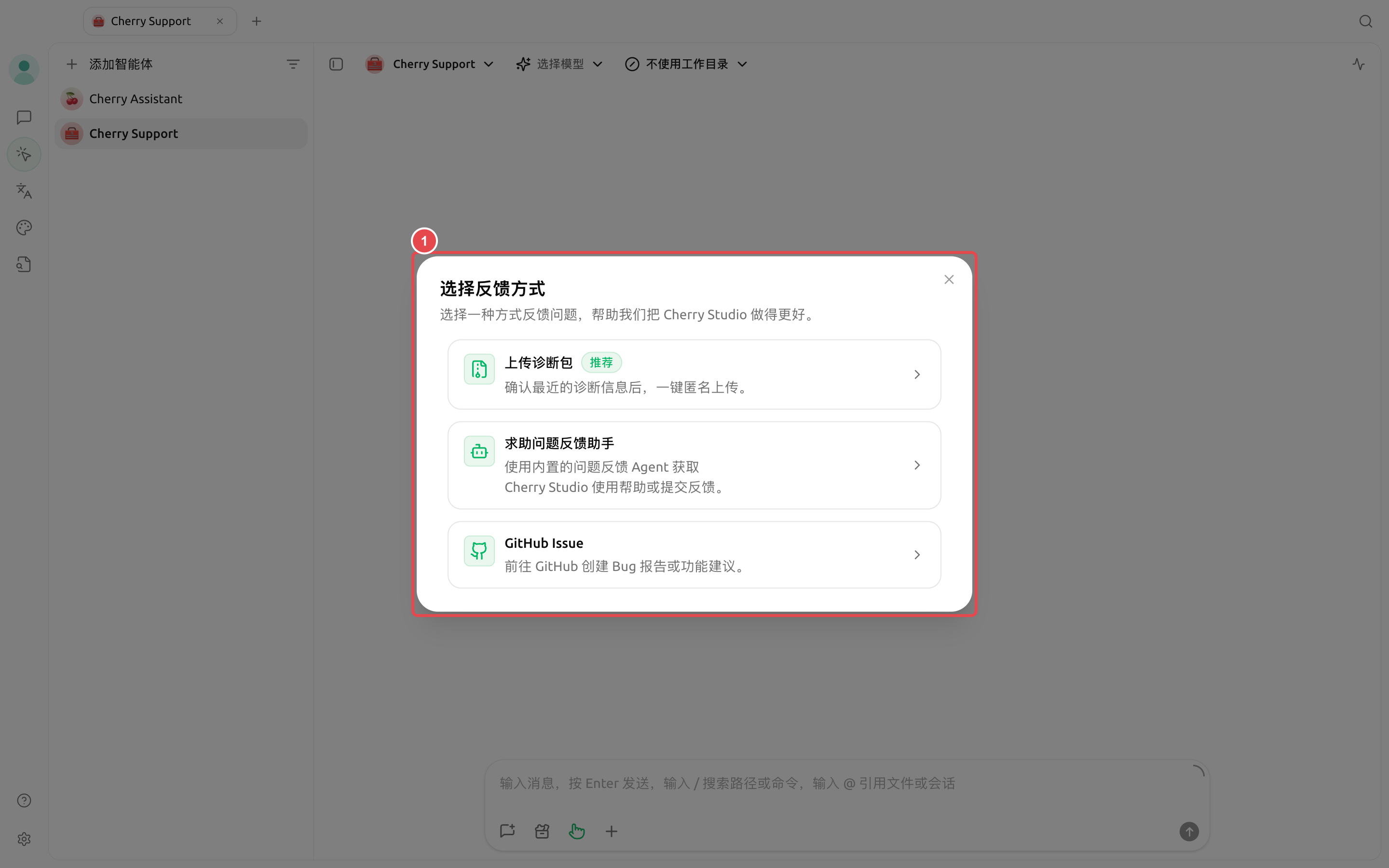
Cherry Studio provides three ways to give feedback: submit it guided by Cherry Assistant, go to a GitHub Issue, or use the feedback questionnaire in the Chinese interface. The entry is 【Settings】→【About Us】→【Feedback】.

根据使用疑问、可复现问题、功能建议和材料整理需求选择反馈入口的流程图
If you’re not good at organizing materials, prioritize having the Agent generate a feedback draft; remove private information before making a public submission.
应用内反馈窗口中的使用 Agent 提交、GitHub Issue 和反馈问卷
If you’re unsure what type of issue it is, choose 【Submit with Agent】; if you already have public information organized, then choose GitHub Issue.

Which one to choose

Method
Suitable for
What will happen

【Submit with Agent】

Unsure of the issue type, want information organized automatically

Cherry Assistant will diagnose, preview redacted content, and after confirmation submit or generate a diagnostic package

【GitHub Issue】

Already confirmed that you want to publicly track a bug or feature request

Open the official Issue type selection page

【Feedback Questionnaire】

General feedback from Chinese users

Open the official Feishu questionnaire

Cherry Assistant 反馈 Agent 的对话区、模型选择和状态面板
In the feedback Agent, explain the goal, actual result, and reproduction steps, then follow the prompts to decide whether to provide diagnostic information.
1

1. Open 【Settings】→【About Us】→【Feedback】

Choose 【Submit with Agent】 marked with 【Recommended】.

2

2. Describe the issue or suggestion

Explain the goal, actual result, expected result, and reproduction steps. Cherry Assistant will first check the current installation package information and, as needed, request access to errors, logs, MCP status, or model connections.

3

3. Decide whether to provide diagnostics

Only authorize items related to the issue. Cherry Assistant will mask credentials and show a preview; submit only after confirming everything is correct.

4

4. Choose the submission result

The default feedback process goes through the official feedback channel, and can also generate a diagnostic ZIP for you to send manually. If you clearly want to publish to GitHub, just say “Submit GitHub Issue.”

Submit GitHub Issue

Bug reports should include the platform, current version, issue description, reproduction steps, expected result, and relevant logs; feature requests should first explain the current pain point, then describe the desired solution and alternatives considered.

One-minute check before submitting

  • The title should make it clear which feature the problem occurred in;

  • Reproduction steps should start from a clear entry point;

  • Write the actual result and expected result separately;

  • Keep screenshots to the relevant area only, and redact account names, paths, keys, and business data;

  • For information that can be safely collected using the in-app Agent, do not manually copy the entire log;

  • You have already searched for the same Issue before making the public submission.

If you’re not sure whether this is a bug, a configuration issue, or a feature request, use 【Submit with Agent】 directly. Let Cherry Assistant help you organize it first, then decide whether to publish it publicly on GitHub.

How to make feature requests easier to understand

  • First write what you are trying to do, not where the button is;

  • Explain why the current solution is not enough;

  • Provide the expected result and success criteria;

  • If attaching a UI sketch or similar experience, indicate the reference points;

  • Explain whether there is a temporary workaround;

  • Avoid putting multiple unrelated suggestions into one Issue.

How long will it take to be handled after submission?

Handling time depends on the impact of the issue, difficulty of reproduction, maintenance plans, and available resources. Providing stable reproduction steps, redacted logs, and clear user impact is more helpful than repeated reminders.

Last updated

Was this helpful?