> For the complete documentation index, see [llms.txt](https://docs.cherryai.com.cn/llms.txt). Markdown versions of documentation pages are available by appending `.md` to page URLs; this page is available as [Markdown](https://docs.cherryai.com.cn/docs/en-us/pre-basic/settings/local-models.md).

# Local Models

Local models are built into Cherry Studio,**and can run offline after download** small models: they do not use any provider API and do not require an API Key. They are small in size, run on your own computer, and are meant to provide fallback support for basic capabilities that aren't worth configuring a separate cloud model for.

After opening `Settings → Local Models` to manage them:

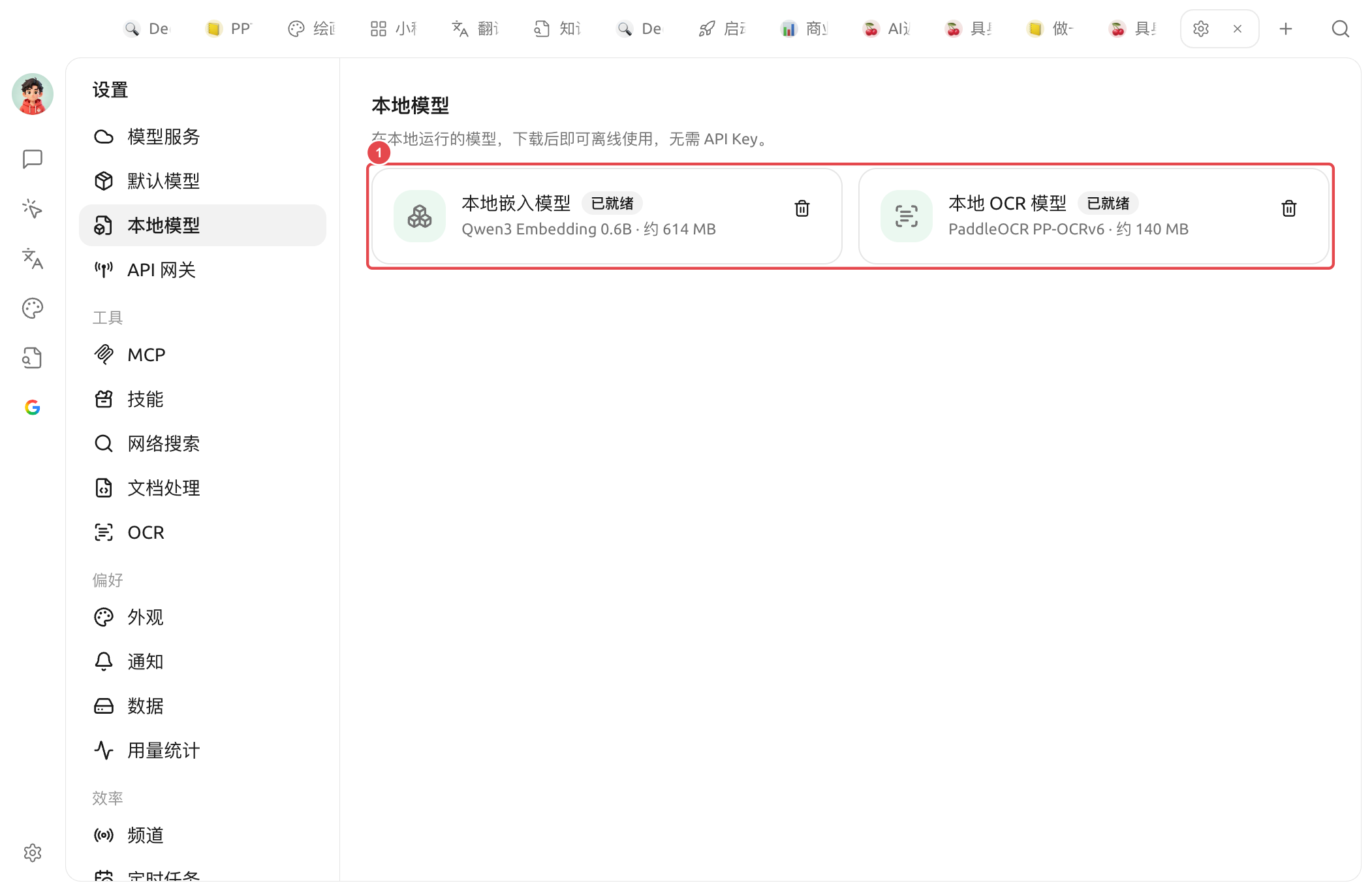
<figure><img src="/files/cbdceab1b80a4d5177fc277da5ae9e4350752fe1" alt=""><figcaption><p>Local models: ① two built-in local models — the local embedding model + the local OCR model (both shown as "Ready" in the image; you can click the delete icon on the right to remove them)</p></figcaption></figure>

There are currently two built-in types of local models:

| Local models              | Base                 | Size         | Purpose                                                                                                                                |
| ------------------------- | -------------------- | ------------ | -------------------------------------------------------------------------------------------------------------------------------------- |
| **local embedding model** | Qwen3 Embedding 0.6B | About 614 MB | Converts text into vectors for [Knowledge base](/docs/en-us/knowledge-base/knowledge-base.md) retrieval, recall, and similar scenarios |
| **Local OCR model**       | PaddleOCR PP-OCRv6   | About 140 MB | Offline recognition of text in images/scans for [OCR](/docs/en-us/pre-basic/settings/ocr.md) function calls                            |

### Download and status

* A status badge will appear next to the model name: for cards not downloaded **at the bottom** there is a full-width "**Download**" button; click it to start downloading. After the download completes, the badge changes to **Ready**.
* For models that are ready, you can click the **Delete** icon on the right to remove them and free up disk space; you can download them again when needed. (If the embedding model is still being used by the knowledge base, deletion will be refused and the weights will be kept.)
* When a few platforms/architectures do not support local inference, the panel will show "**This platform does not support local models**"; downloads are not available in that case.

If one mirror is unavailable during download, Cherry Studio will automatically try other download sources. After the download completes, the inference process of the local embedding model runs on your machine and does not require an internet connection.

{% hint style="warning" %}
If the page shows \[The model files are incomplete, please re-download to repair.], it means the local cache is missing required files. Deleting or re-downloading the model will fix it; do not manually piece together model files.
{% endhint %}

{% hint style="info" %}
Local models are **optional**. [Model services](/docs/en-us/pre-basic/providers/providers.md) If you have configured a cloud embedding model in it, or the system's built-in OCR is sufficient, you don't need to download them.
{% endhint %}

### When to use local models

* **No cloud embedding model / don't want to pay separately for the knowledge base**: download the local embedding model, and the knowledge base can index and retrieve completely offline.
* **Need offline OCR**: in scenarios with no network, or when you don't want images uploaded to third parties, download the local OCR model and use it together with [OCR settings](/docs/en-us/pre-basic/settings/ocr.md) to select "Local PaddleOCR."
* **Privacy first**: all computations are completed locally, and your content never leaves your computer.

{% hint style="warning" %}
Local models are a lightweight solution that is "good enough." If you have very high requirements for retrieval accuracy or recognition accuracy, cloud-based [Embedding model](/docs/en-us/knowledge-base/emb-models-info.md), and more powerful OCR services are usually better.
{% endhint %}

***

### Get help and submit feedback

If you encounter any questions, bugs, or have suggestions for feature improvements during configuration or use, please refer to [Feedback and Suggestions](/docs/en-us/question-contact/suggestions.md) for the official channels provided.


---

# Agent Instructions
This documentation is published with GitBook. GitBook is the documentation platform designed so that both humans and AI agents can read, navigate, and reason over technical content effectively. Learn more at gitbook.com.

## Querying This Documentation
If you need additional information that is not directly available in this page, you can query the documentation dynamically by asking a question.

Perform an HTTP GET request on the current page URL with the `ask` query parameter, and the optional `goal` query parameter:

```
GET https://docs.cherryai.com.cn/docs/en-us/pre-basic/settings/local-models.md?ask=<question>&goal=<endgoal>
```

`ask` is the immediate question: it should be specific, self-contained, and written in natural language.
`goal` is optional and describes the broader end goal you are ultimately trying to accomplish on behalf of the user. GitBook uses it to tailor the answer towards what is most useful for that goal.

The response will contain a direct answer to the question and relevant excerpts and sources from the documentation.

Use this mechanism when the answer is not explicitly present in the current page, you need clarification or additional context, or you want to retrieve related documentation sections.
