> For the complete documentation index, see [llms.txt](https://docs.cherryai.com.cn/llms.txt). Markdown versions of documentation pages are available by appending `.md` to page URLs; this page is available as [Markdown](https://docs.cherryai.com.cn/docs/en-us/pre-basic/settings/env-dependencies.md).
# Environment Dependencies
Environment dependencies are used to **manage the binary tools and runtimes required for some advanced features of Cherry Studio**. For example, [MCP services](/docs/en-us/advanced-basic/extensions/mcp.md),[skills](/docs/en-us/advanced-basic/extensions/skills.md),[Agent](/docs/en-us/cherry-studio/preview/agent.md) some capabilities rely on underlying calls to `uv`,`bun` and other command-line tools. Cherry Studio centralizes them here so you don't have to manually install and configure them from the command line.
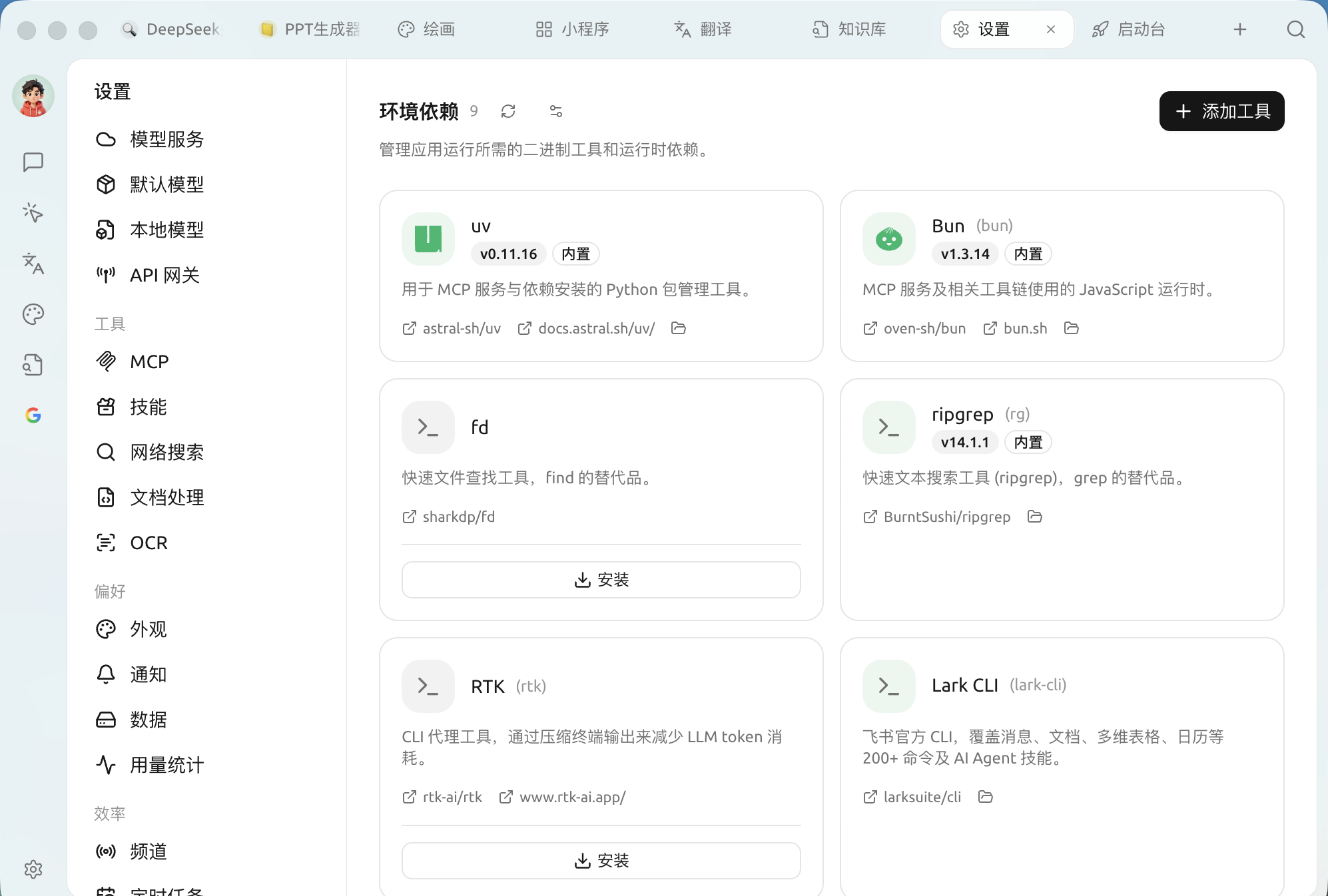
After opening `Settings → Environment Dependencies`:
Environment Dependencies: Built-in and Installable Tools
### Built-in and Installable
Each tool is shown as a card and labeled with a status:
* Marked with **Built-in** tools are distributed with Cherry Studio and work out of the box, with no action required.
* Uninstalled tool cards will show **Install** button, which Cherry Studio can click to automatically download and install into the app directory without affecting your system environment.
* The cards provide links to the source repository, official documentation, and an entry to open the local installation directory.
Common tools at a glance:
| Tools | Effect |
| ---------------- | ------------------------------------------------------------------------------------------------- |
| **uv** | A Python package management tool used for MCP services and dependency installation |
| **Bun** | A JavaScript runtime used by MCP services and related toolchains |
| **fd** | A fast file-finding tool,`find` an alternative to |
| **ripgrep (rg)** | A fast text search tool,`grep` an alternative to |
| **RTK** | A CLI proxy tool that compresses terminal output and reduces LLM token usage |
| **Lark CLI** | Feishu's official CLI, covering 200+ commands for messages / docs / spreadsheets / calendar, etc. |
The page also lists cards for `gh`(GitHub CLI),`ntn`(Notion CLI),`pi` and other tools, which can be installed with one click as needed. (Programming CLIs such as Claude Code / Codex are managed in [Coding companion](/docs/en-us/cherry-studio/preview/code-cli.md) the page, not on this page.)
### Add Tool
The “**Add Tool**” in the upper-right corner of the page lets you add tools outside the built-in list using mise tool keys (for example, `github:sharkdp/fd`,`uv`,`bun`).
### Advanced Installation Settings
Click the settings icon in the upper-right corner to open “**Advanced Installation Settings**”, and fine-tune how tools are downloaded (all fields can be left blank to use defaults):
* **GitHub mirror**: add a proxy prefix to GitHub Release downloads (for example, `https://ghfast.top`), used when direct connections are unreliable.
* **GitHub token**: Increase the GitHub API rate limit when querying tools (stored in plain text locally).
* **npm mirror / pip index URL**: set mirrors for `npm:` / `pipx:` and similar tools (leave blank to automatically choose a mirror in mainland China).
* **Verify tool signatures**: verify the tool's Sigstore / SLSA signatures; usually keep this enabled.
{% hint style="info" %}
Ordinary users generally don't need to do anything here—when a tool is needed, the relevant feature (such as installing an MCP service) will usually guide you back here for one-click installation. This page is more like an entry point for “checking and completing the runtime environment.”
{% endhint %}
{% hint style="warning" %}
If an MCP service or skill reports an error like “cannot find uv / bun / command not found,” first come here to confirm whether the corresponding tool is installed or marked as “Built-in” (the installation status refreshes automatically; the button in the upper-right corner is **Check for updates**, used to fetch the latest version of the tools).
{% endhint %}
***
### Get help and submit feedback
If you encounter any questions, bugs, or have suggestions for feature improvements during configuration or use, please refer to [Feedback and Suggestions](/docs/en-us/question-contact/suggestions.md) for the official channels provided.
---
# Agent Instructions
This documentation is published with GitBook. GitBook is the documentation platform designed so that both humans and AI agents can read, navigate, and reason over technical content effectively. Learn more at gitbook.com.
## Querying This Documentation
If you need additional information that is not directly available in this page, you can query the documentation by asking a question.
Perform an HTTP GET request on the following URL with the `ask` and `goal` query parameters:
```
GET https://docs.cherryai.com.cn/docs/en-us/pre-basic/settings/env-dependencies.md?ask=&goal=
```
`ask` is the immediate question: it should be specific, self-contained, and written in natural language.
`goal` is what the user is ultimately trying to achieve, the reason they need the answer. Sharing it helps GitBook give you a better, more relevant answer. A goal is most helpful when it describes the outcome the user wants rather than restating the question. For example, with `ask=how do I create an API token`, a goal like `automate deployments from our CI pipeline` lets GitBook tailor the answer to that use case.
The response will contain a direct answer to the question and relevant excerpts and sources from the documentation.
Use this mechanism when the answer is not explicitly present in the current page, you need clarification or additional context, or you want to retrieve related documentation sections.