For the complete documentation index, see llms.txt. This page is also available as Markdown.

Default model settings

Cherry Studio needs to "pick a model to use" in many scenarios (for example, helping you name a conversation, optimize prompts, translate, generate images), and it’s impossible to ask you "which model to use" every time.Default model settings That is, to tell Cherry Studio:Which model to use when I don't specify it.

Note: these are models used by the "behind-the-scenes helpers",they can be different from the model used to chat with you. The main chat model is set separately in each assistant.

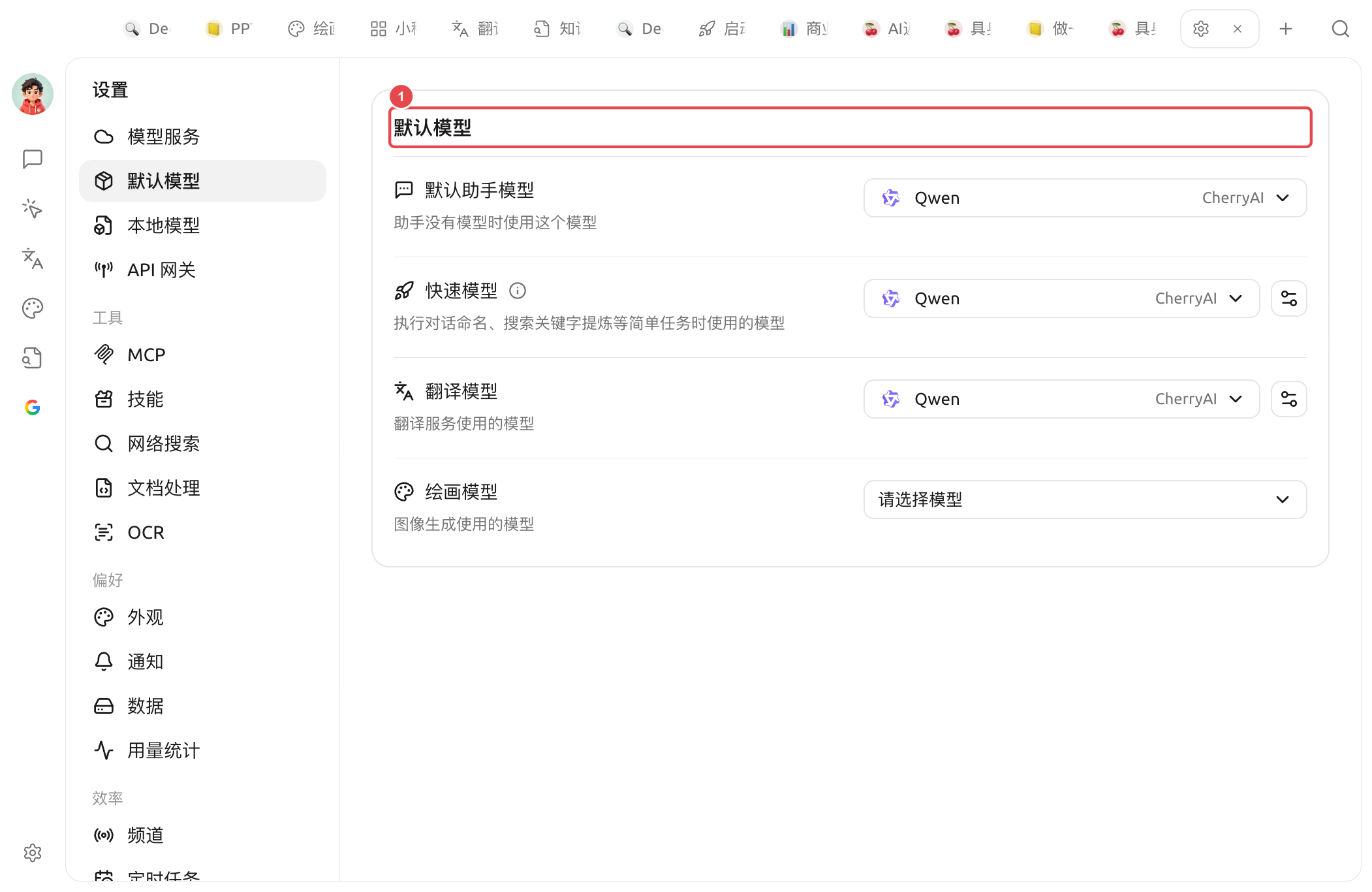
Default models (① is the section title): below, choose one for each of the four default models: Default Assistant / Quick / Translate / Draw

What do the 4 default models handle respectively?

Default assistant model

  • Who uses it: when an assistant hasn’t specified its own model, this model is used automatically

  • How to choose: choose a conversation model you use often, that is stable and reasonably priced

Quick model

  • Who uses it:Conversation naming,Search keyword extraction and other lightweight internal tasks that don’t require top-tier intelligence

  • How to choose: use cheap and fast model is fine; it’s recommended to choose a lightweight model, not a reasoning model

Translation model

  • Who uses it: message translation in chat boxes, translation page;Text selection assistant translation operations in

  • How to choose: ordinary conversation models are fine; if you do a lot of Chinese-English translation, DeepSeek or Claude series works better

Painting model

  • Who uses it: the model used by default for image generation (drawing)

  • How to choose: choose an image generation model you have already configured (e.g. the qwen-image series)

Recommendation in one sentence

If you don’t want to go into details, just fill it in as below:

Field
Recommended

Default assistant model

Your most frequently used conversation model

Quick model

A cheap, fast lightweight model

Translation model

Any conversation model that can follow instructions works (you can also choose a dedicated translation model, such as the qwen-mt series)

Painting model

The image generation model you have already configured

If you’re unsure, just leave everything at the default. After using it for a while, if you find something isn’t enough, come back and adjust it.


Get help and submit feedback

If you encounter any questions, bugs, or have suggestions for feature improvements during configuration or use, please refer to Feedback and Suggestions for the official channels provided.

Last updated

Was this helpful?