> For the complete documentation index, see [llms.txt](https://docs.cherryai.com.cn/llms.txt). Markdown versions of documentation pages are available by appending `.md` to page URLs; this page is available as [Markdown](https://docs.cherryai.com.cn/docs/en-us/cherry-studio/preview/knowledge-base.md).

# Knowledge Base

A knowledge base is like giving AI a **dedicated reference book**: you put your own documents, notes, and URLs into it, and then when chatting, let AI flip through this book to answer your questions.

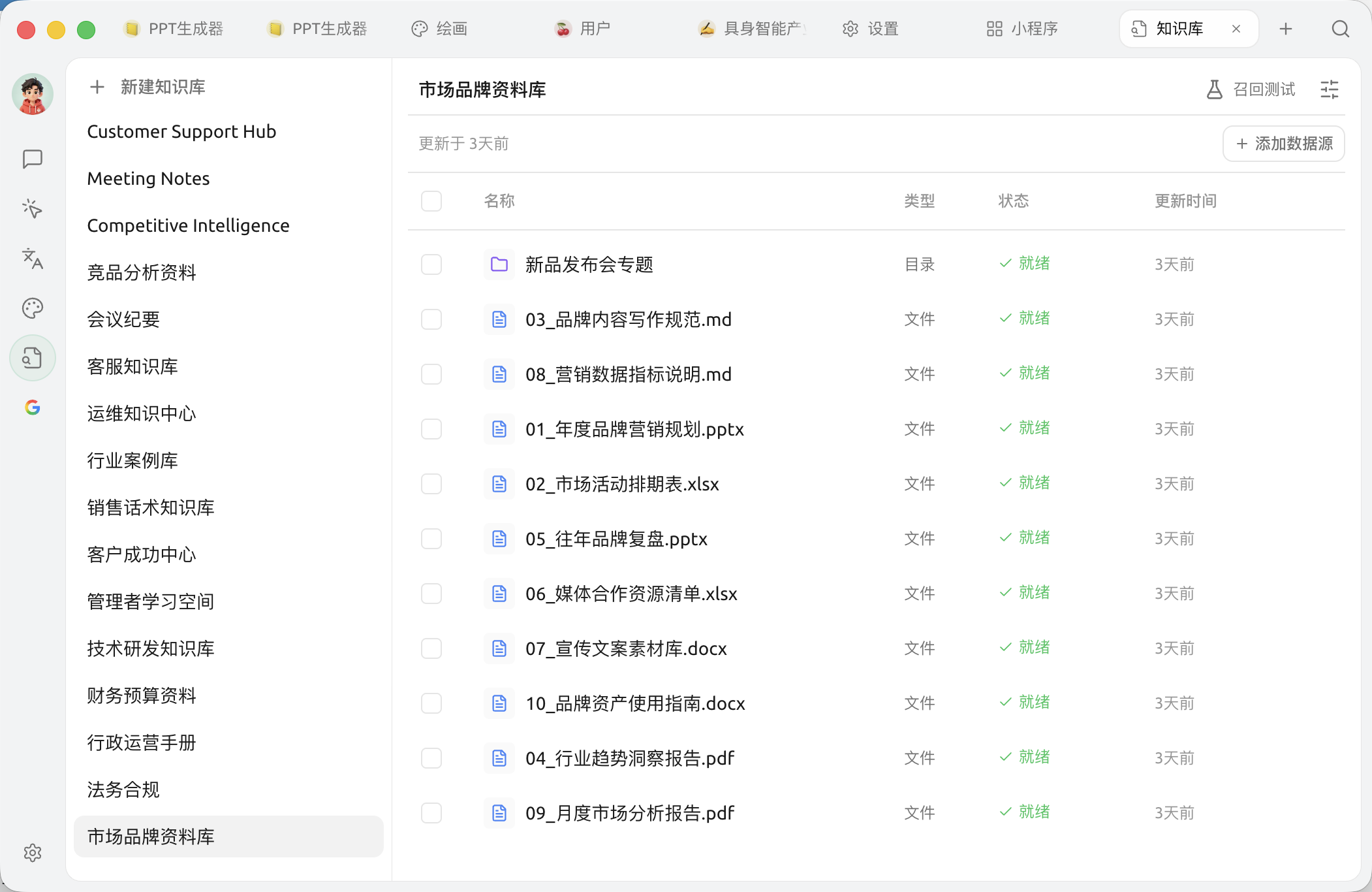
<figure><img src="https://1658303467-files.gitbook.io/~/files/v0/b/gitbook-x-prod.appspot.com/o/spaces%2F0Ut5BptC3t8CtSU1UWpM%2Fuploads%2Fgit-blob-7635f10ba0ff542ab21cdba46a692e45f9863dc3%2Fknowledge-base-empty.png?alt=media" alt=""><figcaption><p>Knowledge Base: the left panel is the list of created knowledge bases (at the top <code>+ New Knowledge Base</code>), and on the right add file / note / directory / linked data sources to the selected knowledge base</p></figcaption></figure>

## What can you do with a knowledge base?

Here are a few real-world scenarios:

* **Company knowledge assistant**: put product manuals, API docs, and internal standards all into it, and when employees ask questions, AI answers automatically
* **Personal information manager**: put your work notes from previous years, reading excerpts, and email archives into it, and ask AI, "In which PPT last year did I mention that analysis framework?"
* **Study partner**: put courseware and papers into it, and let AI help you quiz chapter by chapter and answer questions
* **Contract/regulation quick lookup**: put legal provisions and contract templates into it, and ask AI about the application of specific clauses

## Why use a knowledge base instead of just giving files directly to AI?

Limitations of directly giving files:

* Need to re-upload every time you ask a question, which is troublesome
* Single conversation has length limits; long documents won't fit
* Can't be reused across conversations

**The knowledge base solves all the above problems**: upload once, and then it can be called in any conversation, and can "precisely extract relevant passages" from a large amount of material to feed AI.

## How to use it?

* For first-time use: see [complete knowledge base tutorial](/docs/en-us/knowledge-base/knowledge-base.md)
* Want to add images / scanned PDFs: first see [document preprocessing](/docs/en-us/knowledge-base/document-preprocessing.md), so AI can "understand" the text in images
* Want to know how to choose an embedding model: see [embedding model reference](/docs/en-us/knowledge-base/emb-models-info.md)
* Want to use it offline, without cloud embeddings: you can use the built-in [local embedding model](/docs/en-us/pre-basic/settings/local-models.md)The knowledge base can build indexes and retrieve without needing internet access
* Want to know where the data is stored: see [knowledge base data](/docs/en-us/knowledge-base/data.md)

## combinations with other capabilities

* **Knowledge base + assistant**: attach a knowledge base to a certain assistant, and it specializes in this domain
* **Knowledge base +** [**agent**](/docs/en-us/cherry-studio/preview/agent.md): let the agent check the knowledge base on its own during task execution
* **Knowledge base +** [**Channels**](/docs/en-us/advanced-basic/automation/channels.md): send an agent that "knows how to check company documents" to be on duty in a Feishu group

{% hint style="info" %}
Recommended to read first [advanced capability map](/docs/en-us/advanced-basic/capability-map.md), to understand how the knowledge base works together with agents, MCP, channels, and other features.
{% endhint %}

***

### Get help and submit feedback

If you encounter any questions, bugs, or have suggestions for feature improvements during configuration or use, please refer to [Feedback and Suggestions](/docs/en-us/question-contact/suggestions.md) for the official channels provided.


---

# Agent Instructions
This documentation is published with GitBook. GitBook is the documentation platform designed so that both humans and AI agents can read, navigate, and reason over technical content effectively. Learn more at gitbook.com.

## Querying This Documentation
If you need additional information that is not directly available in this page, you can query the documentation dynamically by asking a question.

Perform an HTTP GET request on the current page URL with the `ask` query parameter, and the optional `goal` query parameter:

```
GET https://docs.cherryai.com.cn/docs/en-us/cherry-studio/preview/knowledge-base.md?ask=<question>&goal=<endgoal>
```

`ask` is the immediate question: it should be specific, self-contained, and written in natural language.
`goal` is optional and describes the broader end goal you are ultimately trying to accomplish on behalf of the user. GitBook uses it to tailor the answer towards what is most useful for that goal.

The response will contain a direct answer to the question and relevant excerpts and sources from the documentation.

Use this mechanism when the answer is not explicitly present in the current page, you need clarification or additional context, or you want to retrieve related documentation sections.
