> For the complete documentation index, see [llms.txt](https://docs.cherryai.com.cn/llms.txt). Markdown versions of documentation pages are available by appending `.md` to page URLs; this page is available as [Markdown](https://docs.cherryai.com.cn/docs/en-us/advanced-basic/knowledge-content/translation-workflow.md).

# File, Image, and Long-Text Translation

\[Translation] It can handle text entered directly, and you can also upload images or documents. Images are first run through text recognition, while documents are processed according to format and content; history items can be favorited, reopened, and reused.

<figure><img src="/files/8b5041b3f770b75a9f321578d787950900a11dfd" alt="资料经过检索和 Agent 处理后形成文字、图片或译文的内容工作流图"><figcaption><p>Translation is part of the content workflow: first confirm the input materials, then standardize terminology and check the final deliverable.</p></figcaption></figure>

## Choose an input method

| Material           | Recommended practice        | Key checks                                               |
| ------------------ | --------------------------- | -------------------------------------------------------- |
| Short text         | Paste directly              | Tone, proper nouns, context                              |
| Screenshot or scan | Upload an image and use OCR | Check for misread characters, tables, and numbers        |
| Long document      | Upload file                 | Heading hierarchy, paragraphs, footnotes, and formatting |
| Markdown           | Check using the preview     | Whether links, code blocks, and markup are preserved     |

### Example: short text translation

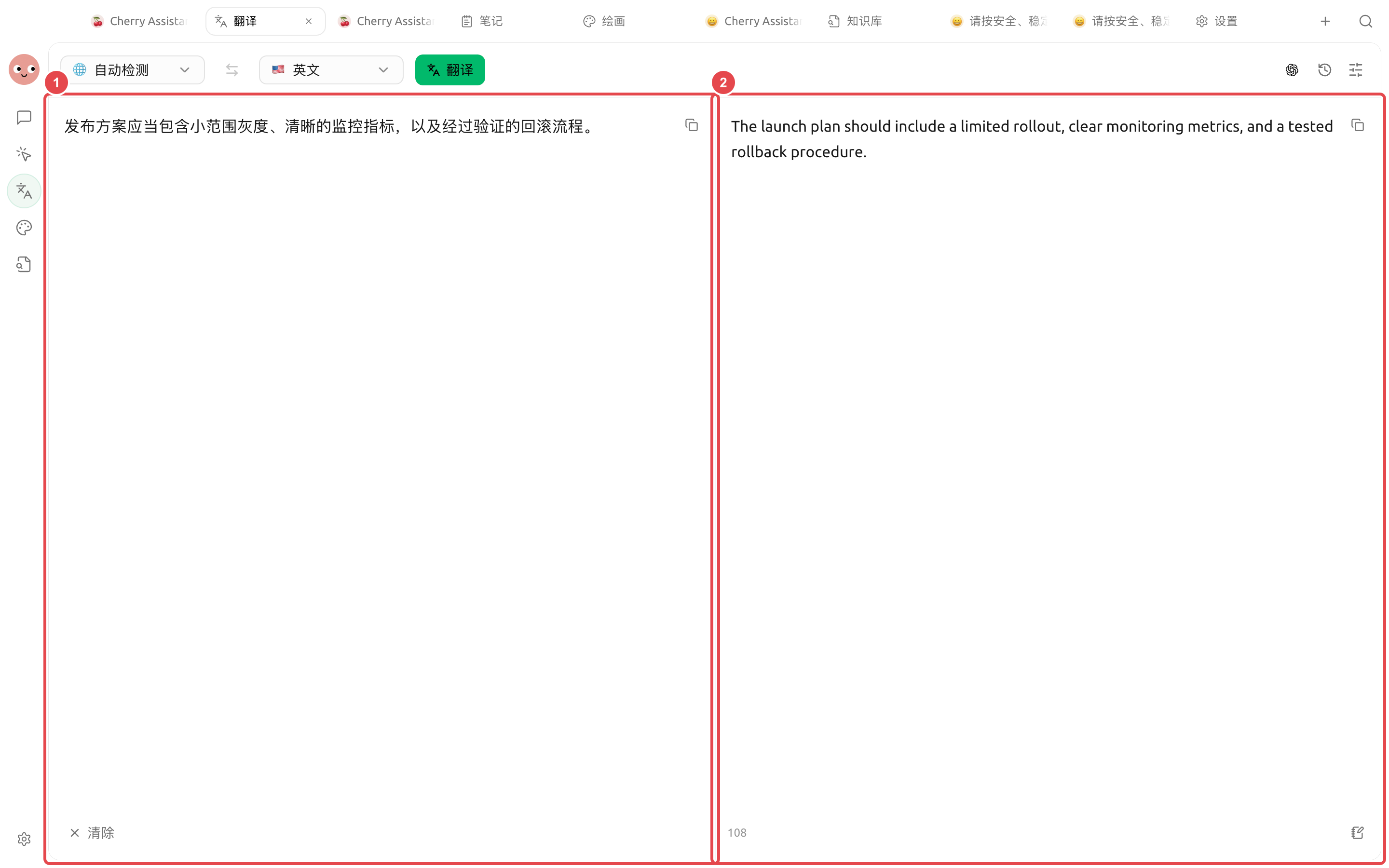
Choose \[Auto-detect] as the source language and \[English] as the target language. Enter the Chinese text and click \[Translate]. After the result appears, first verify the key meanings of terms like “gray release,” “monitoring metrics,” and “rollback process,” then copy it or save it to notes.

<figure><img src="https://3562065924-files.gitbook.io/~/files/v0/b/gitbook-x-prod.appspot.com/o/spaces%2F0Ut5BptC3t8CtSU1UWpM%2Fuploads%2Fgit-blob-ee99f863bdfef7403502cdc2b4ad505c0cf66069%2Fcherry-v2-guide-translation-result.png?alt=media" alt="中文发布方案翻译为英文的完整结果"><figcaption><p>① Keep the original text on the left; ② show the translation on the right. Before delivery, check gray release, monitoring metrics, and rollback procedures item by item.</p></figcaption></figure>

### What to check after the result comes out

| Check item             | Example                                                                         |
| ---------------------- | ------------------------------------------------------------------------------- |
| Key meaning            | “Gray release” should not be translated literally based only on the word “gray” |
| Proper nouns           | Keep product names, team names, and feature names consistent                    |
| Numbers and conditions | Dates, percentages, amounts, and negatives must not be omitted                  |
| Tone                   | Notices, contracts, and marketing copy should each use an appropriate tone      |

Short text can be checked sentence by sentence; for files and long documents, first spot-check headings, tables, numbers, and repeated terms, then decide whether to deliver the whole piece.

## Translation steps

{% stepper %}
{% step %}

### 1. Confirm the source and target languages first

Auto-detection is suitable for mixed or unknown languages; for formal materials such as contracts and technical documents, manually confirm the language to reduce misjudgment.
{% endstep %}

{% step %}

### 2. Choose a translation method

Use the configured model when context, tone, and terminology consistency are needed; for ordinary short sentences, you can choose a lighter-weight method. The available options depend on the current page.
{% endstep %}

{% step %}

### 3. Check by segment

First check names, numbers, dates, negatives, and units. For image translation, also verify the OCR results; if recognition is wrong, the later translation will be wrong too.
{% endstep %}

{% step %}

### 4. Favorite or reuse the result

In \[History], view, favorite, and reuse translations. Before formal delivery, save the glossary and manual revisions in the project materials.
{% endstep %}
{% endstepper %}

### Use case: preparing multilingual product materials

First compile the product names, feature names, and terms that must not be rewritten into a single reference document. Upload the Chinese manual, translate one chapter first and confirm the terminology, then process the full text; upload promotional images separately for OCR translation. Afterward, put the confirmed terms and translations into the project working directory so the Agent can uniformly check headings, links, and numbers, but do not let it rewrite legal statements on its own.

{% hint style="danger" %}
Medical, legal, financial, and safety-related content requires review by professionals. Automatic translation can improve efficiency, but it cannot replace review by a responsible human.
{% endhint %}


---

# Agent Instructions
This documentation is published with GitBook. GitBook is the documentation platform designed so that both humans and AI agents can read, navigate, and reason over technical content effectively. Learn more at gitbook.com.

## Querying This Documentation
If you need additional information that is not directly available in this page, you can query the documentation dynamically by asking a question.

Perform an HTTP GET request on the current page URL with the `ask` query parameter, and the optional `goal` query parameter:

```
GET https://docs.cherryai.com.cn/docs/en-us/advanced-basic/knowledge-content/translation-workflow.md?ask=<question>&goal=<endgoal>
```

`ask` is the immediate question: it should be specific, self-contained, and written in natural language.
`goal` is optional and describes the broader end goal you are ultimately trying to accomplish on behalf of the user. GitBook uses it to tailor the answer towards what is most useful for that goal.

The response will contain a direct answer to the question and relevant excerpts and sources from the documentation.

Use this mechanism when the answer is not explicitly present in the current page, you need clarification or additional context, or you want to retrieve related documentation sections.