> For the complete documentation index, see [llms.txt](https://docs.cherryai.com.cn/llms.txt). Markdown versions of documentation pages are available by appending `.md` to page URLs; this page is available as [Markdown](https://docs.cherryai.com.cn/docs/en-us/advanced-basic/knowledge-content/notes-knowledge-agent.md).
# Notes, knowledge base, and Agent
\[Notes] are suitable for maintaining content you will continue to revise; \[Knowledge Base] is suitable for relatively stable materials retrieved by question; an Agent working directory is suitable for files currently being processed for the task. Separating the three makes content easier to maintain.
## Notes workspace
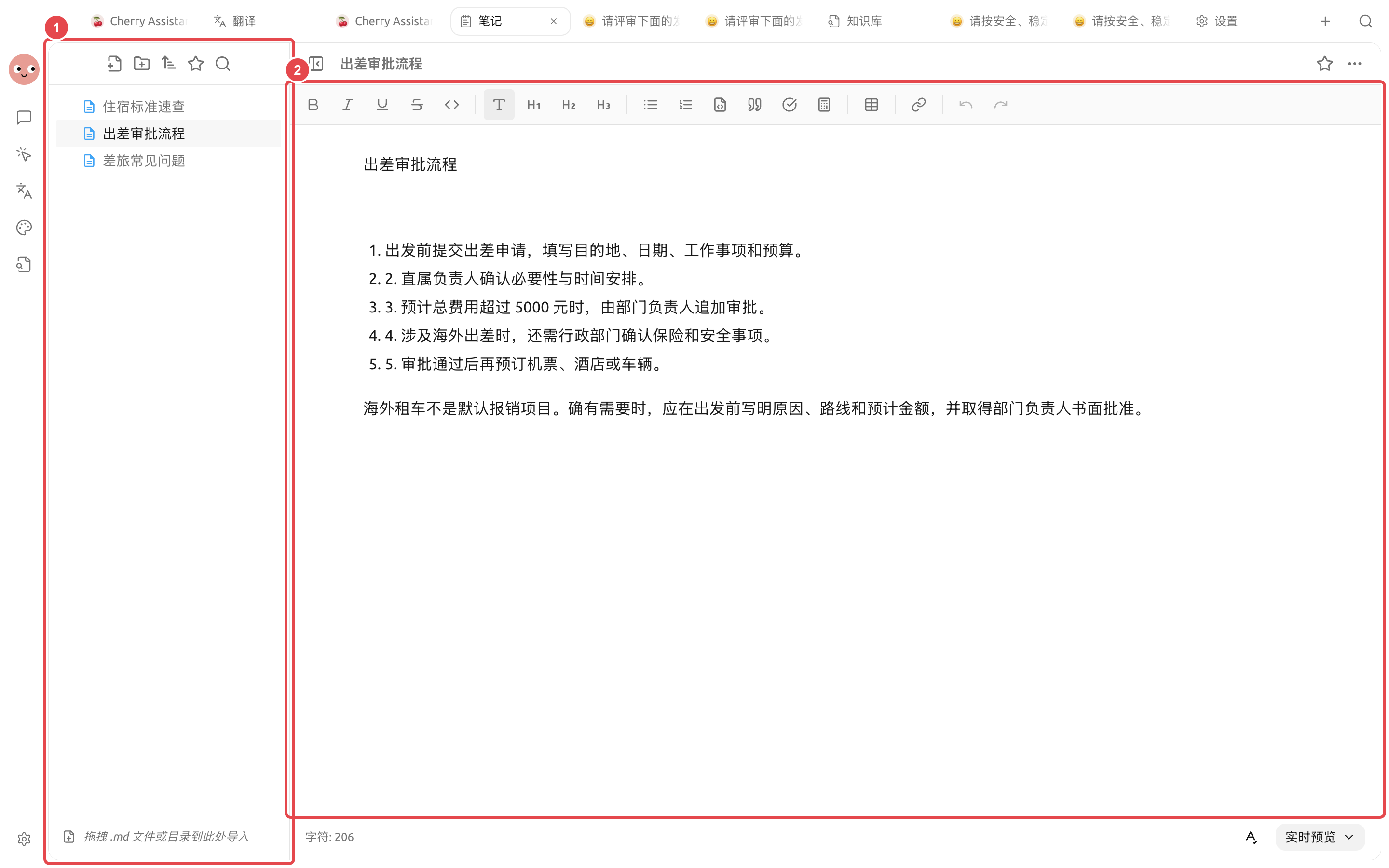
Notes support folders, full-text search, and Markdown editing, and can switch between source code, live preview, and reading modes. You can also import Markdown files or folders, and export them as PDF, Word, and other formats.
1. Manage notes by topic on the left; 2. Edit and review the full content in the middle workspace.
### Use case: Turning policy notes into searchable materials
In \[Notes], create a new \[Business Trip Approval Process] note and clearly write out the four steps: application, approval, ticket booking, and reimbursement. After confirming the content is correct, open \[Knowledge Base] → \[Add] → \[Notes], select this note, and wait for the status to become \[Ready]. Finally, use real questions to perform a recall test, then bind the knowledge base to the Agent that needs to handle travel-related issues.
{% hint style="warning" %}
After updating a note, check whether the source in the knowledge base has been synchronized. When formal policy changes occur, deal with the old content first to avoid the Agent citing two conflicting versions at the same time.
{% endhint %}
## How content flows
{% stepper %}
{% step %}
### 1. Organize drafts in Notes
Organize interview records, meeting points, or article outlines into clear Markdown. Mark unconfirmed content as pending review, and do not rush to add it to the knowledge base.
{% endstep %}
{% step %}
### 2. Add stable content to the knowledge base
Select the note and use the add to knowledge base action. After later modifying the note, check the processing status in the knowledge base and reprocess it if necessary.
{% endstep %}
{% step %}
### 3. Bind it to the Agent
Open \[Work] → Agent menu → \[Edit] → \[Knowledge Base], and select only the knowledge bases relevant to that Agent.
{% endstep %}
{% step %}
### 4. Let the Agent generate new deliverables
When a task needs to be turned into a file, choose the working directory and ask the Agent to create a clearly defined output file, rather than directly overwriting the original note.
{% endstep %}
{% endstepper %}
### Use case: Generating weekly reports from meeting notes
Record meeting conclusions every day in the “This Week’s Records” folder. On Friday, manually fill in the owner and status first, then hand these notes to the “Weekly Report Compilation” Agent. The Agent generates the weekly report file according to “Completed, In Progress, Risks, Next Week Plan”; after confirmation, export it to Word and send it to the team. Put long-term project background in the knowledge base and leave this week’s temporary progress in Notes to avoid old progress interfering with retrieval.
After a note is added to the knowledge base, do edits sync immediately?
First check the data status in the knowledge base. If the content has changed but the retrieval results have not been updated, reprocess the corresponding material and perform the recall test again.
---
# Agent Instructions
This documentation is published with GitBook. GitBook is the documentation platform designed so that both humans and AI agents can read, navigate, and reason over technical content effectively. Learn more at gitbook.com.
## Querying This Documentation
If you need additional information that is not directly available in this page, you can query the documentation dynamically by asking a question.
Perform an HTTP GET request on the current page URL with the `ask` query parameter, and the optional `goal` query parameter:
```
GET https://docs.cherryai.com.cn/docs/en-us/advanced-basic/knowledge-content/notes-knowledge-agent.md?ask=&goal=
```
`ask` is the immediate question: it should be specific, self-contained, and written in natural language.
`goal` is optional and describes the broader end goal you are ultimately trying to accomplish on behalf of the user. GitBook uses it to tailor the answer towards what is most useful for that goal.
The response will contain a direct answer to the question and relevant excerpts and sources from the documentation.
Use this mechanism when the answer is not explicitly present in the current page, you need clarification or additional context, or you want to retrieve related documentation sections.