> For the complete documentation index, see [llms.txt](https://docs.cherryai.com.cn/llms.txt). Markdown versions of documentation pages are available by appending `.md` to page URLs; this page is available as [Markdown](https://docs.cherryai.com.cn/docs/en-us/advanced-basic/knowledge-content/knowledge-base.md).

# Build a knowledge base and run retrieval tests

The knowledge base processes files, web pages, and notes into searchable chunks. It is suited for answering “what does the material say,” and it does not mean the model permanently remembers the entire document.

## Create and import materials

{% stepper %}
{% step %}

### 1. Open \[Knowledge Base] → \[Create Knowledge Base]

Fill in an easily recognizable name, and choose an available embedding model. The embedding model turns the materials into searchable representations; it is not the same as the main model used for conversations.
{% endstep %}

{% step %}

### 2. Select a source of materials

You can add files, folders, notes, or URLs. Common document formats include PDF, DOCX, Markdown, Excel, TXT, and CSV; scanned files may require OCR to extract the text.
{% endstep %}

{% step %}

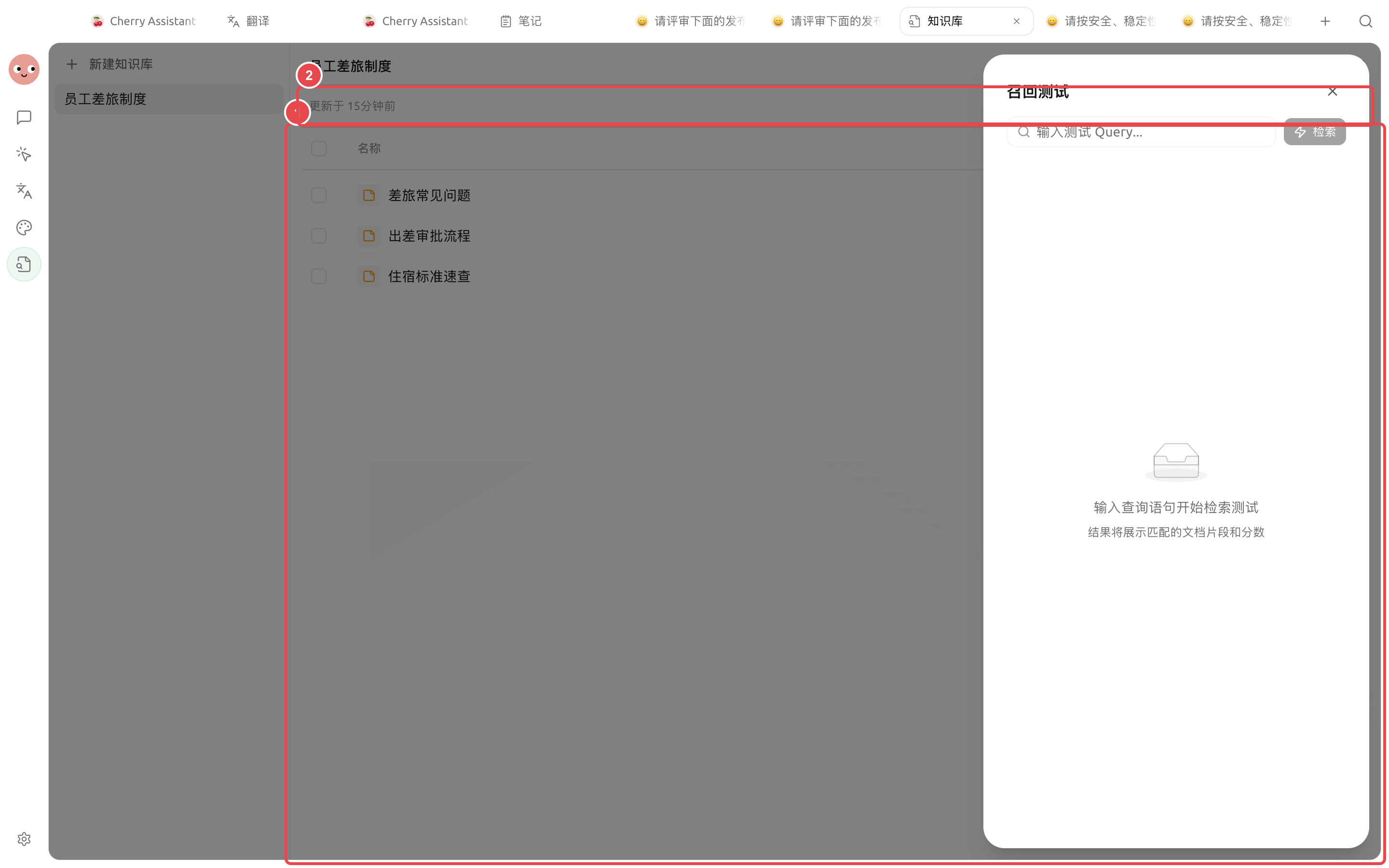
### 3. Wait for processing to complete

Open the file details to view the preview and chunking. If the title is missing, garbled, or table structure is lost, first organize the original file, then process it again.
{% endstep %}

{% step %}

### 4. Run a recall test

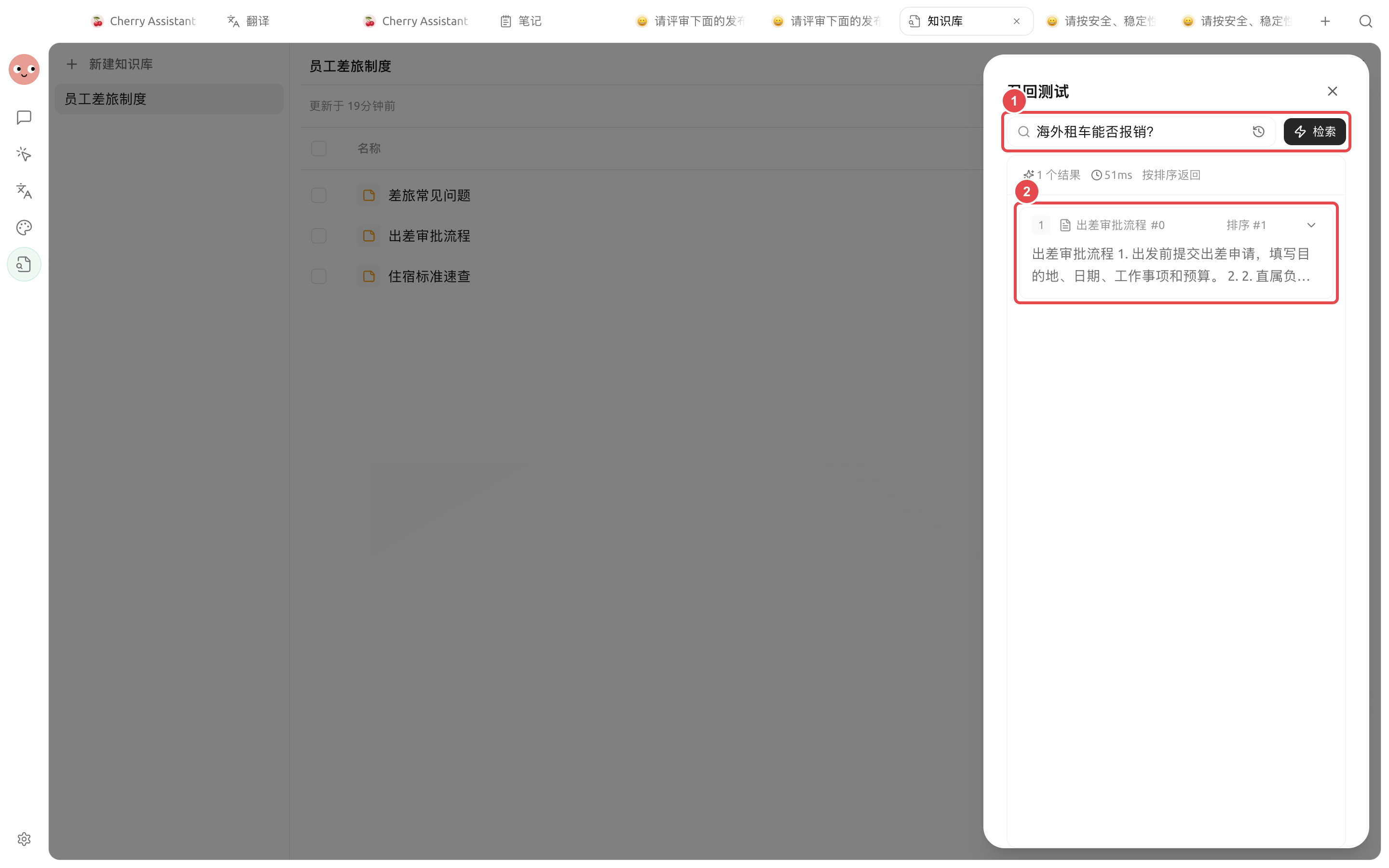
Test with questions real users would ask, not just file titles. Check whether the returned chunks are relevant and contain the full context, then decide whether to bind it to the Agent.
{% endstep %}
{% endstepper %}

<figure><img src="/files/234ab76e1553bbd72fc663014f01d7ecef9bde54" alt="新建知识库时的名称、嵌入模型和保存入口"><figcaption><p>When creating a knowledge base, first enter a name and select an available embedding model.</p></figcaption></figure>

<figure><img src="https://3562065924-files.gitbook.io/~/files/v0/b/gitbook-x-prod.appspot.com/o/spaces%2F0Ut5BptC3t8CtSU1UWpM%2Fuploads%2Fgit-blob-9b55e8bfc279019611a137d7667c91533e6684eb%2Fcherry-v2-guide-knowledge-sources.png?alt=media" alt="员工差旅制度知识库中已就绪的笔记来源与召回测试入口"><figcaption><p>① All three travel-related documents are ready; ② Click [Recall Test] at the top to verify actual questions.</p></figcaption></figure>

<figure><img src="https://3562065924-files.gitbook.io/~/files/v0/b/gitbook-x-prod.appspot.com/o/spaces%2F0Ut5BptC3t8CtSU1UWpM%2Fuploads%2Fgit-blob-413972fdce3631aee8d1619db3a9936b2dfc3774%2Fcherry-v2-guide-knowledge-recall.png?alt=media" alt="知识库对海外租车能否报销的召回测试结果"><figcaption><p>① Enter questions that are actually asked in real work; ② Check the matched materials, chunk content, and relevance.</p></figcaption></figure>

### Validate recall results with real questions

After the materials show as \[Ready], test them with questions that would really come up at work. For example, in a policy knowledge base you could ask “Can overseas car rentals be reimbursed?” Then check whether the returned content comes from the correct material and includes enough context.

| What the results show                                                        | Next step                                                                                                               |
| ---------------------------------------------------------------------------- | ----------------------------------------------------------------------------------------------------------------------- |
| Matched the correct material, and the chunk is enough to answer the question | Can be bound for Agent use                                                                                              |
| Matched the correct material, but the chunk was truncated                    | First check the structure of the original text, then adjust the chunk length                                            |
| Matched old policies or irrelevant materials                                 | Clean up outdated materials, and add clearer titles and content                                                         |
| No results at all                                                            | Check the material status and how the question is phrased; do not blindly increase the number of returned results first |

{% hint style="info" %}
After the recall test passes, verify the full Q\&A in the Agent. This helps distinguish between “could not find the material” and “found the material but answered poorly.”
{% endhint %}

## How to understand RAG settings

RAG means “retrieve materials first, then let the model answer.” Common settings control chunk length, overlap, number of returned results, and relevance threshold.

| Configuration              | Effect                                                 | Suggested starting point             | When to adjust                                                                                 |
| -------------------------- | ------------------------------------------------------ | ------------------------------------ | ---------------------------------------------------------------------------------------------- |
| Chunk length               | Decides how much content each retrieved chunk contains | Start with the page’s default value  | When chunks often cut off sentences or mix too many topics together                            |
| Chunk overlap              | Keeps the connection between adjacent chunks           | Keep a small amount of overlap       | When clauses span multiple chunks and context is often broken                                  |
| Number of returned results | How many candidate chunks to provide at once           | Start with a small number of results | Increase it when key materials are missed; decrease it when there is too much noise            |
| Relevance threshold        | Filters out irrelevant content                         | Decide using recall tests            | Raise it when there are many irrelevant results; lower it when correct chunks are filtered out |

<figure><img src="/files/4d704155cae35c38dbf30215b10a973239de67a7" alt="知识库 RAG 的分段、返回和过滤设置"><figcaption><p>Only adjust RAG settings according to the material structure when the recall results are unstable.</p></figcaption></figure>

### Use case: building an internal policy Q\&A knowledge base

Organize the current policies by department, and include the topic and effective scope in the file names. After importing, use real questions such as “How should overtime hotel expenses be handled?” and “Who needs to approve leave during probation?” for recall testing. Once the chunks are confirmed to be accurate, bind only this knowledge base to the “Policy Q\&A” Agent, and require it to mention the material name when answering; if content is missing, explicitly say it was not found.

{% hint style="warning" %}
The knowledge base does not automatically determine whether a file is outdated. When policies, prices, or processes change, update or remove old materials and run the recall test again.
{% endhint %}

<details>

<summary>Why are there still no results after importing?</summary>

Check the file processing status, the embedding model connection, and the document preview. If a scanned PDF has no extractable text, you need to configure OCR first or replace it with a searchable version.

</details>


---

# Agent Instructions
This documentation is published with GitBook. GitBook is the documentation platform designed so that both humans and AI agents can read, navigate, and reason over technical content effectively. Learn more at gitbook.com.

## Querying This Documentation
If you need additional information that is not directly available in this page, you can query the documentation dynamically by asking a question.

Perform an HTTP GET request on the current page URL with the `ask` query parameter, and the optional `goal` query parameter:

```
GET https://docs.cherryai.com.cn/docs/en-us/advanced-basic/knowledge-content/knowledge-base.md?ask=<question>&goal=<endgoal>
```

`ask` is the immediate question: it should be specific, self-contained, and written in natural language.
`goal` is optional and describes the broader end goal you are ultimately trying to accomplish on behalf of the user. GitBook uses it to tailor the answer towards what is most useful for that goal.

The response will contain a direct answer to the question and relevant excerpts and sources from the documentation.

Use this mechanism when the answer is not explicitly present in the current page, you need clarification or additional context, or you want to retrieve related documentation sections.