> For the complete documentation index, see [llms.txt](https://docs.cherryai.com.cn/llms.txt). Markdown versions of documentation pages are available by appending `.md` to page URLs; this page is available as [Markdown](https://docs.cherryai.com.cn/docs/en-us/advanced-basic/extensions/skills.md).

# Skills and Capability Library

A skill is a reusable set of work instructions and supporting resources. It does not connect to external systems; instead, it tells the Agent what process, standards, and format to follow to complete a task.

{% hint style="success" %}
When you need a certain way of working, first tell the Agent your goal in \[Work], and let it help you find or install the right skill. Only when you need to check sources, manage in bulk, or import from local files should you open \[Settings] → \[Skills].
{% endhint %}

<figure><img src="/files/9b00652317bad3dcfaeb99d65a0f86a7f0cab964" alt="根据任务需要选择知识库、技能、内置工具或 MCP 的关系图"><figcaption><p>Reusable methods are suitable to be distilled into skills; references, built-in actions, and external systems should each use their corresponding entry points.</p></figcaption></figure>

### Install skill

Manual path: \[Settings] → \[Skills].

The page supports four sources:

* Search the online skill registry;
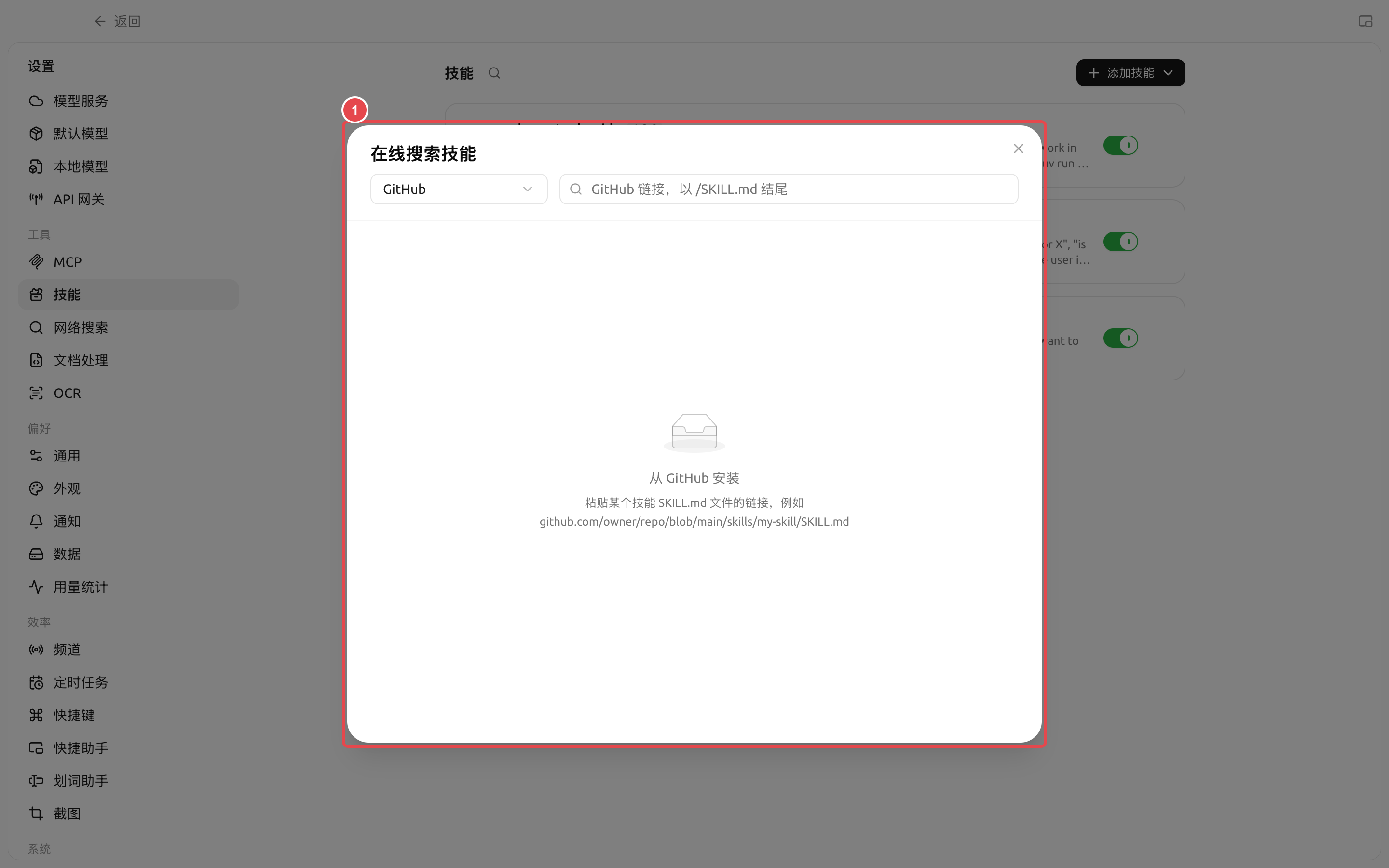
* In online search, select \[GitHub] and paste a skill `SKILL.md` file link;
* Install from a local ZIP file;
* Install from a folder containing `SKILL.md` the file.

<figure><img src="https://raw.githubusercontent.com/SiinXu/cherry-studio-docs/2446b25878f69e98f33d50623a3c4cf5e836680a/.gitbook/assets/cherry-guide-skill-github-source.png" alt="技能在线搜索中选择 GitHub 并粘贴 SKILL.md 链接"><figcaption><p>① After selecting [GitHub], paste the target skill’s `SKILL.md` file link; the page will first parse the specific skill and then provide installation.</p></figcaption></figure>

{% stepper %}
{% step %}

#### 1. First confirm the purpose

Describe in one sentence the problem you want the skill to solve, for example, “Organize meeting notes into decisions, owners, and deadlines.” Similar names do not mean the workflow is the same; read the description before installing.
{% endstep %}

{% step %}

#### 2. Check the source and content

Open the skill details to confirm what it asks the Agent to do, whether it includes scripts, and whether additional tools or external accounts are required. Do not use skills from unknown sources directly in sensitive directories.
{% endstep %}

{% step %}

#### 3. Bind to the Agent

First go to \[Settings] → \[Skills] and confirm the skill’s global toggle is enabled, then open \[Work] → Agent menu → \[Edit] → \[Skills] to enable it for this Agent. Skill switching is saved automatically with the Agent configuration and takes effect starting with the next message.
{% endstep %}

{% step %}

#### 4. Verify with a real task

Give the Agent a small sample and check whether the steps, output format, and boundaries match expectations before using it for batch or scheduled tasks.
{% endstep %}
{% endstepper %}

### Global enable and Agent enable

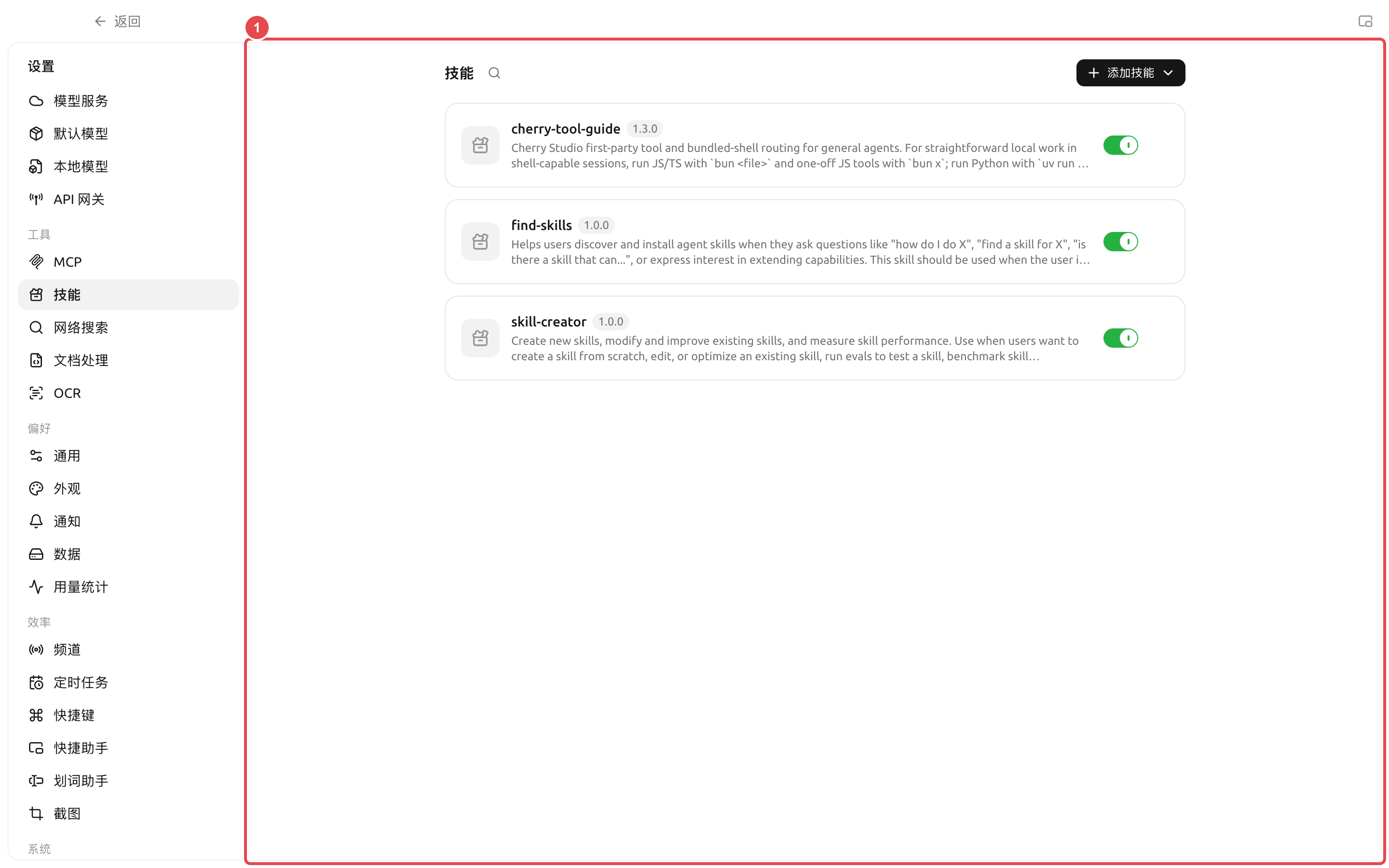
<figure><img src="https://raw.githubusercontent.com/SiinXu/cherry-studio-docs/2446b25878f69e98f33d50623a3c4cf5e836680a/.gitbook/assets/cherry-guide-skills-global-toggle.png" alt="技能设置页中的全局启用开关和已安装技能列表"><figcaption><p>① The switch on the right side of the card controls whether the skill is available to all Agents; when turned off, the skill will no longer appear in the Agent edit window.</p></figcaption></figure>

| Status         | Function                                                                   | When to use                                                                 |
| -------------- | -------------------------------------------------------------------------- | --------------------------------------------------------------------------- |
| Global enable  | Make the skill appear in the Agent’s optional skill catalog                | The skill source is trusted, but it may still be used by one or more Agents |
| Global disable | Pause all Agents from using this skill while keeping the installed content | Temporary deactivation, troubleshooting, or waiting for a security review   |
| Agent enable   | Only load this skill for the current Agent                                 | The workflow matches the current Agent’s long-term responsibilities         |

<figure><img src="https://raw.githubusercontent.com/SiinXu/cherry-studio-docs/2446b25878f69e98f33d50623a3c4cf5e836680a/.gitbook/assets/cherry-guide-skill-github-source.png" alt="技能在线搜索中选择 GitHub 并粘贴 SKILL.md 链接"><figcaption></figcaption></figure>

Turning off the global switch does not uninstall the skill; after turning it back on, still check each Agent’s enabled status. Uninstalling will delete the skill content and clean up associations.

### How to choose between skills, prompts, and MCP

| Need                                   | Choose              | Reason                                                           |
| -------------------------------------- | ------------------- | ---------------------------------------------------------------- |
| A single temporary request             | Current task prompt | No need to add long-term configuration                           |
| Reuse the same workflow multiple times | Skill               | Can save instructions, templates, and resources at the same time |
| Set the Agent’s long-term role         | Agent system prompt | Must be followed for every task                                  |
| Access a database or external service  | MCP                 | The skill itself does not provide connectivity capabilities      |

### User case: team weekly report skill

The team turned the weekly report sections, tone, data checks, and banned phrases into a skill and bound it to the “Weekly Report Organizer” Agent. Each week, they only need to provide that week’s materials, and the Agent outputs a fixed structure according to the skill; when data comes from an external system, MCP is combined instead, rather than putting account and API details into the skill text.

{% hint style="danger" %}
Uninstalling a skill removes it from the global capability library and cleans up its associations in Agent workspaces. Before proceeding, confirm that no tasks are currently using the skill; team-customized skills should keep a recoverable source file.
{% endhint %}

<details>

<summary>Why didn’t the Agent use the skill after installation?</summary>

First confirm that the skill has not been globally disabled, then enable it in the Agent edit window under \[Skills], or let the Agent help you complete the binding. Then send a new message to test it.

</details>

<details>

<summary>Can a skill include programs?</summary>

A skill package can include instructions, resources, and scripts. Whether scripts can be executed also depends on the Agent’s tools, working directory, environment dependencies, and permission mode.

</details>

<details>

<summary>Can a skill include programs?</summary>

A skill package can include instructions, resources, and scripts. Whether scripts can be executed also depends on the Agent’s tools, working directory, environment dependencies, and permission mode.

</details>


---

# Agent Instructions
This documentation is published with GitBook. GitBook is the documentation platform designed so that both humans and AI agents can read, navigate, and reason over technical content effectively. Learn more at gitbook.com.

## Querying This Documentation
If you need additional information that is not directly available in this page, you can query the documentation dynamically by asking a question.

Perform an HTTP GET request on the current page URL with the `ask` query parameter, and the optional `goal` query parameter:

```
GET https://docs.cherryai.com.cn/docs/en-us/advanced-basic/extensions/skills.md?ask=<question>&goal=<endgoal>
```

`ask` is the immediate question: it should be specific, self-contained, and written in natural language.
`goal` is optional and describes the broader end goal you are ultimately trying to accomplish on behalf of the user. GitBook uses it to tailor the answer towards what is most useful for that goal.

The response will contain a direct answer to the question and relevant excerpts and sources from the documentation.

Use this mechanism when the answer is not explicitly present in the current page, you need clarification or additional context, or you want to retrieve related documentation sections.