> For the complete documentation index, see [llms.txt](https://docs.cherryai.com.cn/llms.txt). Markdown versions of documentation pages are available by appending `.md` to page URLs; this page is available as [Markdown](https://docs.cherryai.com.cn/docs/en-us/advanced-basic/chat/artifacts-export.md).

# Outputs, Citations, and Export

A single reply may contain body text, code, files, images, quotes, and content that can continue to be edited. First check the output, then decide whether to copy, download, export, or hand it to the Agent for further processing.

<figure><img src="/files/20b651b813cddcf71d1790d18aa40bd75a83aa58" alt="从写清问题、比较或分支探索到形成最终产物的对话选择流程图"><figcaption><p>After reaching the final output, first check the content, source, and file, then decide whether to copy, export, or hand it to the Agent to continue organizing.</p></figcaption></figure>

### Preview first, deliver later

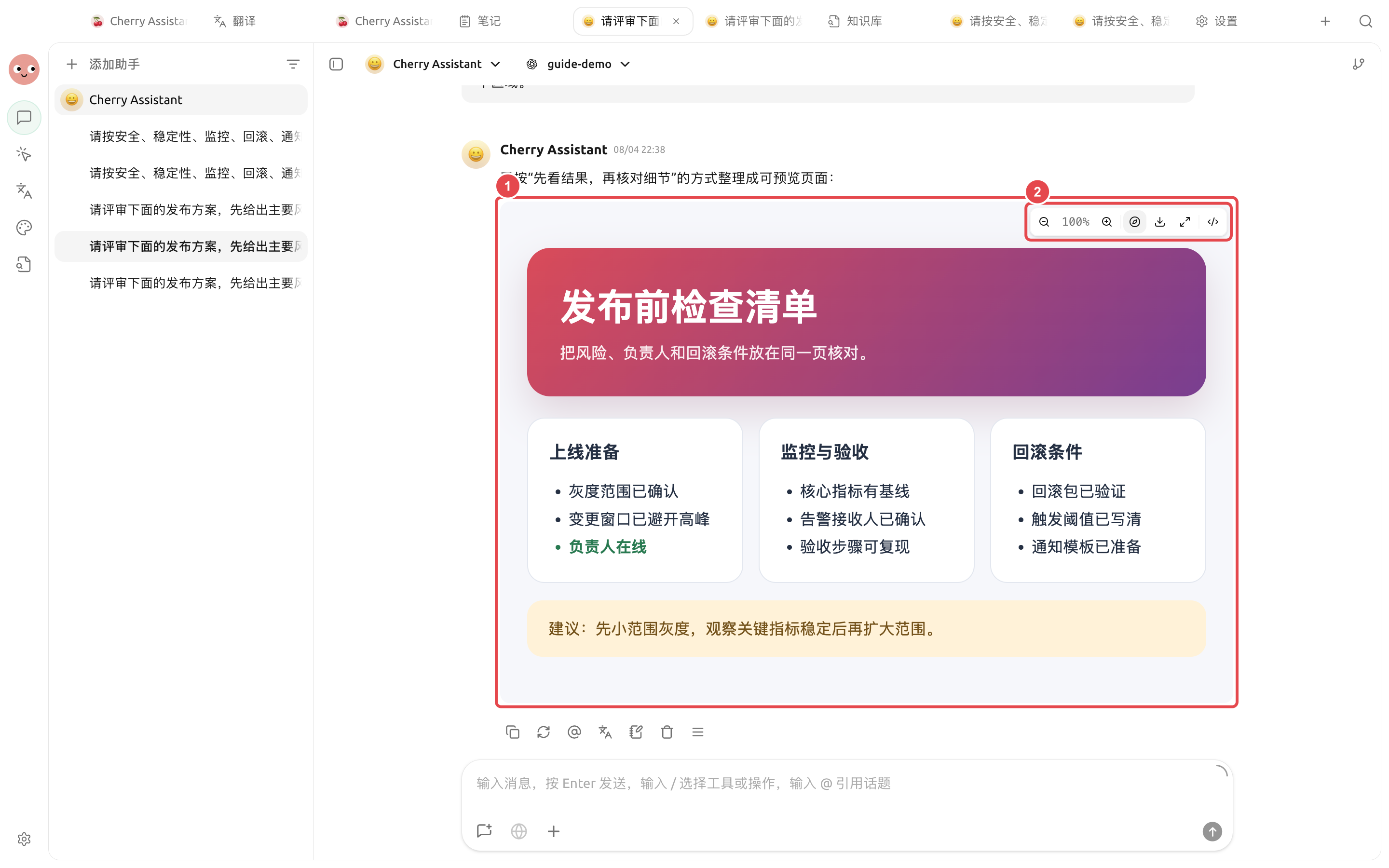
Click the output in the message or in the Agent file panel to open the corresponding preview on the right. HTML can be checked for page layout and interactions; PDF, Word, PowerPoint, images, and text are displayed according to their format;`.xlsx` Spreadsheets let you directly view worksheets, cell styles, merged cells, formula results, images, and charts.

<figure><img src="https://3562065924-files.gitbook.io/~/files/v0/b/gitbook-x-prod.appspot.com/o/spaces%2F0Ut5BptC3t8CtSU1UWpM%2Fuploads%2Fgit-blob-f5bee1202b5aed4675a5537b57f3a1fd9147cf23%2Fcherry-v2-guide-artifact-preview.png?alt=media" alt="对话中已生成的发布前检查页与右侧 HTML 预览"><figcaption><p>① The preview area is for verifying the complete content; ② The toolbar can zoom, download, maximize, or switch views.</p></figcaption></figure>

```mermaid
flowchart LR
    A[Explain the output format in the conversation] --> B[Open the right-side preview]
    B --> C{Is the content and layout complete}
    C -- No --> D[Go back to the conversation and add revision requirements]
    D --> B
    C -- Yes --> E[Download, copy, or hand it to the Agent to save]
```

The purpose of previewing is to catch missing items in advance, not just to confirm that it has been generated. If the page is to be handed to colleagues for use, at minimum click the links, buttons, and download files once to check them.

{% hint style="info" %}
If the result is only a code block and no preview appears, you can add in the same conversation: "Please output a complete HTML output that can be previewed directly," and specify the sections the page needs to include.
{% endhint %}

#### Use case: Pre-launch page review

Enter: "Turn the pre-launch checklist into a complete HTML output that can be previewed directly, including three sections: launch preparation, monitoring and acceptance, and rollback conditions." After the preview opens, first check whether the three parts are complete, then download it or hand it to the Agent to save in the project directory.

#### Use case: Reviewing a data table

Open the `.xlsx` budget spreadsheet generated by the Agent, switch each worksheet first, then check merged headers, amount formats, formula results, and charts. When cell content is long, click to expand; use zoom when you need a clearer view of images or charts. Preview is for validation and does not replace the full editing and recalculation capabilities in Excel.

### Do three checks first

1. **Content**: whether numbers, dates, proper nouns, and conclusions are consistent with the original material.
2. **Source**: whether online results retain links that can be opened; whether the citations actually support the corresponding claims.
3. **File**: whether the file name, format, and contents can open normally, and whether it contains information that should not be shared.

### Common destinations

| Result                            | Recommended approach                                                                                                                    |
| --------------------------------- | --------------------------------------------------------------------------------------------------------------------------------------- |
| A finalized piece of text         | Copy it into the target app, or save it as a note                                                                                       |
| Markdown that needs ongoing edits | Put it into the Agent working directory and continue editing in the \[Files] panel                                                      |
| Reusable materials                | After organizing, add it to the knowledge base; do not import the entire temporary discussion                                           |
| Image                             | Open the original image to check its size and details, then download and use it                                                         |
| `.xlsx` Spreadsheet               | In the built-in preview, check worksheets, styles, formula results, images, and charts, then use spreadsheet software for final editing |
| Code or command                   | Read it first and verify it in a recoverable environment; do not run unknown commands directly                                          |

{% hint style="warning" %}
"Generated successfully" only means the model returned content; it does not mean the file is ready to publish directly. External materials still need checks for facts, copyright, privacy, and brand requirements.
{% endhint %}

#### Use case: Turning discussion into a deliverable document

The team first discusses the event plan in \[Conversation], and after confirming the audience, timing, and budget boundaries, asks the model to output a structured outline. Then they hand the outline to the content Agent in \[Work], which generates in the specified directory `campaign-plan.md`. Finally, revise it in \[Files] on the right to avoid copying dozens of rounds of discussion verbatim into the formal document.

<details>

<summary>Why won't the citation links open?</summary>

The links may be broken, require login, or the search results may only provide a summary. Recheck using the original source; sources that cannot be opened should not be the sole support for a key conclusion.

</details>

<details>

<summary>Why won't the citation links open?</summary>

The links may be broken, require login, or the search results may only provide a summary. Recheck using the original source; sources that cannot be opened should not be the sole support for a key conclusion.

</details>


---

# Agent Instructions
This documentation is published with GitBook. GitBook is the documentation platform designed so that both humans and AI agents can read, navigate, and reason over technical content effectively. Learn more at gitbook.com.

## Querying This Documentation
If you need additional information that is not directly available in this page, you can query the documentation dynamically by asking a question.

Perform an HTTP GET request on the current page URL with the `ask` query parameter, and the optional `goal` query parameter:

```
GET https://docs.cherryai.com.cn/docs/en-us/advanced-basic/chat/artifacts-export.md?ask=<question>&goal=<endgoal>
```

`ask` is the immediate question: it should be specific, self-contained, and written in natural language.
`goal` is optional and describes the broader end goal you are ultimately trying to accomplish on behalf of the user. GitBook uses it to tailor the answer towards what is most useful for that goal.

The response will contain a direct answer to the question and relevant excerpts and sources from the documentation.

Use this mechanism when the answer is not explicitly present in the current page, you need clarification or additional context, or you want to retrieve related documentation sections.