For the complete documentation index, see llms.txt. This page is also available as Markdown.

Artifacts, Citations, and Export

A single reply may contain body text, code, files, images, quotes, and content that can continue to be edited. Check the output first, then decide whether to copy, download, export, or hand it to the Agent for further processing.

从写清问题、比较或分支探索到形成最终产物的对话选择流程图
After reaching the final output, first check the content, sources, and files, then decide whether to copy, export, or hand it to the Agent for further organization.

Preview first, then deliver

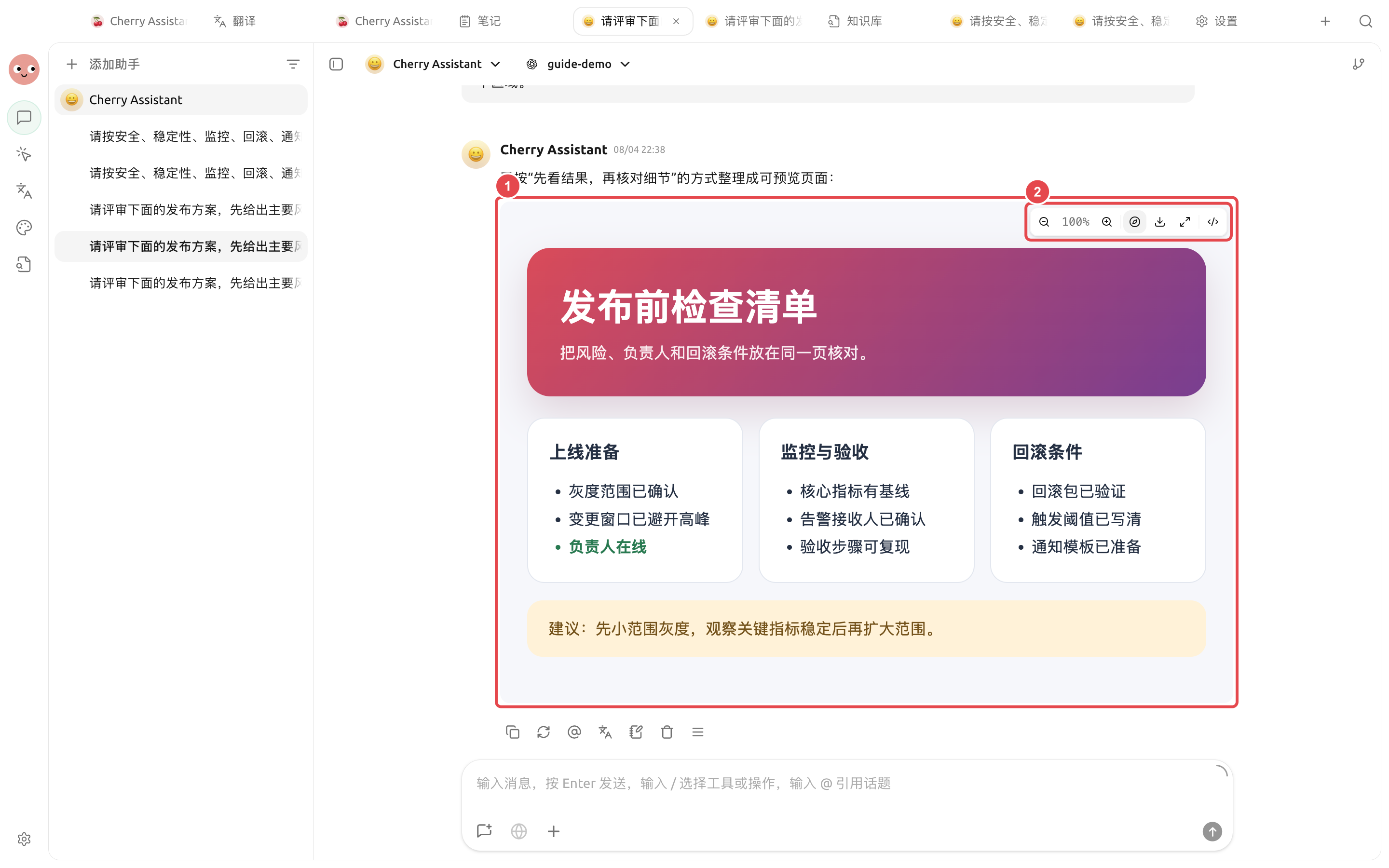
After explicitly asking in [Chat] for previewable HTML output, click the output in the message to open the preview on the right. First verify the page content and layout, then use the preview bar to zoom, download, maximize, or switch to code view.

对话中已生成的发布前检查页与右侧 HTML 预览
① The preview area is used to verify the complete content; ② The toolbar can zoom, download, maximize, or switch views.

The purpose of previewing is to catch missing items early, not just to confirm it has "been generated." If the page will be handed to colleagues, at least click the links, buttons, and downloaded files once each to check them.

If the result is only a code block and no preview appears, you can add in the same turn: “Please output a complete, directly previewable HTML artifact,” and clearly specify the sections the page needs to include.

Use case: Pre-release checklist page

Enter “Turn the pre-release checklist into a complete HTML artifact that can be previewed directly, including three sections: launch preparation, monitoring and acceptance, and rollback conditions.” After the preview opens, first check whether all three parts are complete, then download it or hand it to the Agent to save to the project directory.

First do three checks

  1. Content: Are the numbers, dates, proper nouns, and conclusions consistent with the original materials?

  2. Sources: Do online results retain links that can be opened; do the citations actually support the corresponding claims?

  3. Files: Can the file name, format, and content open normally, and does it contain information that should not be shared?

Common destinations

Result
Recommended practice

A finalized paragraph

Copy it into the target app, or save it as a note

Markdown that needs ongoing edits

Put it into the Agent working directory and continue editing in the [Files] panel

Reusable material

Organize it and add it to the knowledge base; do not import the entire temporary discussion

Image

Open the original image to check its size and details, then download and use it

Code or commands

Read it first and verify it in a recoverable environment; do not run unknown commands directly

Use case: Organize discussions into a deliverable document

The team first discusses the event plan in [Chat], and after confirming the audience, timing, and budget boundaries, asks the model to output a structured outline. Then hand the outline to the content Agent in [Work] to generate campaign-plan.md. Finally revise it in [Files] on the right, to avoid copying dozens of rounds of discussion verbatim into the formal document.

Last updated

Was this helpful?