> For the complete documentation index, see [llms.txt](https://docs.cherryai.com.cn/llms.txt). Markdown versions of documentation pages are available by appending `.md` to page URLs; this page is available as [Markdown](https://docs.cherryai.com.cn/docs/en-us/advanced-basic/cases/research-review.md).

# Multi-model Research Review

A product team is preparing for a quarterly review: internal materials are already complete, but public information still needs to be added, and the viewpoints given by different models need to be compared. The final deliverable should be a research report that can be traced back to its sources for verification and clearly distinguishes facts from judgments.

<figure><img src="/files/6e480690b987061aa8346a25a82a2b1637d647d2" alt="对话输入区中的模型选择与多模型对比入口"><figcaption><p>At the start of the research, first determine the comparison models and the scope of the questions, and do not change the criteria arbitrarily midway.</p></figcaption></figure>

<figure><img src="/files/2c4a451679558b8e216d4aff12ff3f685390310a" alt="消息分支管理用于保留不同追问路线"><figcaption><p>Put different hypotheses into separate branches, then return to the main thread and summarize the conclusions that have already been confirmed.</p></figcaption></figure>

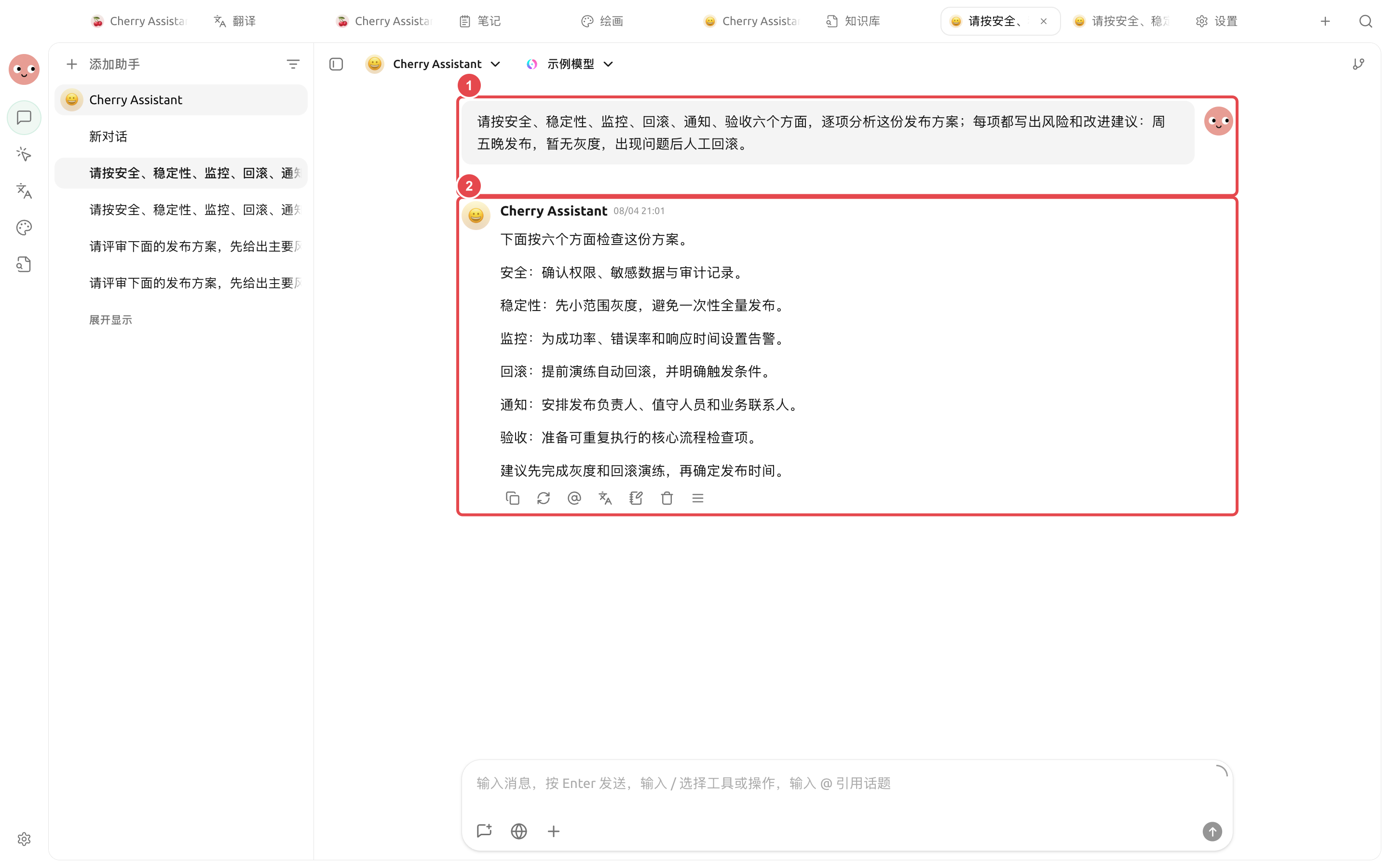
<figure><img src="https://3562065924-files.gitbook.io/~/files/v0/b/gitbook-x-prod.appspot.com/o/spaces%2F0Ut5BptC3t8CtSU1UWpM%2Fuploads%2Fgit-blob-e7449e0f11e092748e672dbe97c7c0564276691f%2Fcherry-v2-guide-case-research-review.png?alt=media" alt="对发布方案提出统一检查要求后，Cherry Assistant 按安全、稳定性、监控、回滚、通知和验收给出实际评审结果"><figcaption><p>1. Clearly state the inspection dimensions and known conditions in the prompt; 2. Present the results in the same structure so they are easy to compare further, question, and verify manually.</p></figcaption></figure>

## Recommended combination

* \[Dialogue] Multiple models: identify consensus, disagreements, and omissions;
* Research Agent: drive tasks forward, break down subtasks, and generate reports;
* Knowledge base: retrieve internal materials;
* Web search or trusted MCP: supplement external sources;
* Working directory: save raw materials and final deliverables.

## Workflow

{% stepper %}
{% step %}

### 1. Compare viewpoints using the same question

In \[Dialogue], select multiple models and ask each to list conclusions, assumptions, sources, and uncertainties separately. Organize the real conflicts into questions for further research.
{% endstep %}

{% step %}

### 2. Create a research Agent

Bind the relevant knowledge base and research skills, and keep permissions at \[confirm each time]. In the working directory, store the raw materials and `report/` output directory separately.
{% endstep %}

{% step %}

### 3. Assign subtasks

Have the Agent separately check the factual timeline, data changes, and external viewpoints, then have the main Agent compare the conflicts. Information that cannot be confirmed should remain pending verification and not be forcibly merged.
{% endstep %}

{% step %}

### 4. Generate the report and review manually

The report includes conclusions, sources, uncertainties, and next actions. Check citations, dates, and numbers in the right-side \[Files] before publishing.
{% endstep %}
{% endstepper %}

## Example task

```
Review the project materials in the current directory and supplement them with public information. Write facts, judgments, and recommendations separately; keep source links for external information. Check the timeline, data, and risks separately, and finally generate the report in report/review.md. Do not modify files in raw/.
```

## Preparation before use and completion criteria

| Item                    | Recommended preparation                                                                                                                            |
| ----------------------- | -------------------------------------------------------------------------------------------------------------------------------------------------- |
| Research question       | State the conclusion to be compared in one sentence                                                                                                |
| Source requirements     | Specify the time range, region, and acceptable sources                                                                                             |
| Recommended combination | Multi-model comparison is used to collect differences, branches are used for follow-up questions, and notes are used to save confirmed conclusions |
| Completion criteria     | Each key conclusion can be traced back to a source; disagreements are listed separately; unconfirmed content is not written as fact                |

This case is suitable for research that needs to compare viewpoints and review decision-making processes, but it is not suitable for directly treating multi-model voting as factual judgment.

{% hint style="danger" %}
High-risk topics such as finance, healthcare, and law cannot rely solely on model conclusions. The report should retain sources and be reviewed by someone with the relevant experience or qualifications.
{% endhint %}


---

# Agent Instructions
This documentation is published with GitBook. GitBook is the documentation platform designed so that both humans and AI agents can read, navigate, and reason over technical content effectively. Learn more at gitbook.com.

## Querying This Documentation
If you need additional information that is not directly available in this page, you can query the documentation dynamically by asking a question.

Perform an HTTP GET request on the current page URL with the `ask` query parameter, and the optional `goal` query parameter:

```
GET https://docs.cherryai.com.cn/docs/en-us/advanced-basic/cases/research-review.md?ask=<question>&goal=<endgoal>
```

`ask` is the immediate question: it should be specific, self-contained, and written in natural language.
`goal` is optional and describes the broader end goal you are ultimately trying to accomplish on behalf of the user. GitBook uses it to tailor the answer towards what is most useful for that goal.

The response will contain a direct answer to the question and relevant excerpts and sources from the documentation.

Use this mechanism when the answer is not explicitly present in the current page, you need clarification or additional context, or you want to retrieve related documentation sections.