> For the complete documentation index, see [llms.txt](https://docs.cherryai.com.cn/llms.txt). Markdown versions of documentation pages are available by appending `.md` to page URLs; this page is available as [Markdown](https://docs.cherryai.com.cn/docs/en-us/advanced-basic/cases/notes-weekly-report.md).

# Generate Weekly Reports from Notes

The project lead accumulated meeting notes, progress updates, and scattered to-dos over the course of a week, and hopes to organize them into a structurally stable, fact-checkable weekly report by Friday. The key is to first standardize the recording method, then let the Agent summarize, rather than having it guess missing status.

<figure><img src="/files/36ff8811abb71527ea2399ac122ccfcae496c523" alt="笔记中的文件夹、新建、编辑预览和导出入口"><figcaption><p>Recording continuously in the same structure makes it easier to verify status and owner when organizing at the end of the week.</p></figcaption></figure>

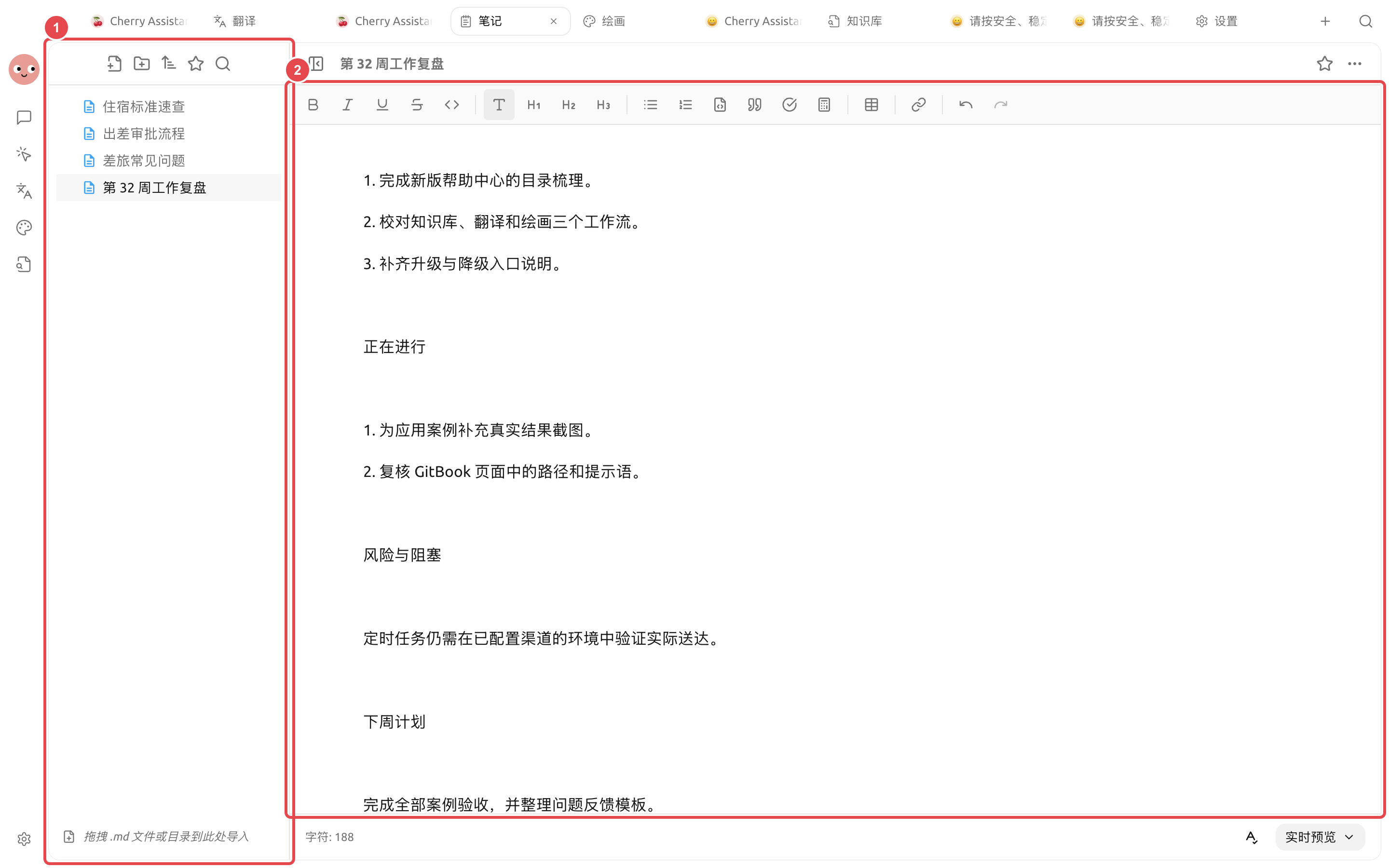
<figure><img src="https://3562065924-files.gitbook.io/~/files/v0/b/gitbook-x-prod.appspot.com/o/spaces%2F0Ut5BptC3t8CtSU1UWpM%2Fuploads%2Fgit-blob-af2b16bd1259a4d59cbab0420062ec9a791a8e5c%2Fcherry-v2-guide-case-notes-weekly-report.png?alt=media" alt="笔记中已经填写完成事项、进行中工作、风险与阻塞和下周计划的第 32 周工作复盘"><figcaption><p>① Keep the raw records and this week’s review on the left; ② the weekly report on the right already has real content and can continue to be manually edited, previewed, and exported.</p></figcaption></figure>

## Workflow

{% stepper %}
{% step %}

### 1. Standardize the recording method

Record items in the same notes folder every day, including at least the date, result, owner, and status. Do not write unfinished items as if they have already been delivered.
{% endstep %}

{% step %}

### 2. Manually organize on Friday first

Merge duplicate items and fill in key numbers and links. Put long-term background into the knowledge base, and keep this week’s changes in the current notes.
{% endstep %}

{% step %}

### 3. Hand it over to the Agent to generate a draft

Ask it to output in the format of “completed this week, in progress, risks, next week’s plan,” and list missing items when materials are incomplete.
{% endstep %}

{% step %}

### 4. Check and export

Confirm the status, numbers, and responsible person, then finalize and export in \[Notes]. A stable format can be turned into a skill and reused next week.
{% endstep %}
{% endstepper %}

## Example task

```
Read this week’s notes and generate a weekly report draft. Merge the same item, but preserve status changes on different dates; do not infer completion status. If the responsible person, numbers, or next step are missing, list them under “To Be Supplemented.”
```

## Recommended combination and completion criteria

| Item                | Recommended approach                                                                                                                                  |
| ------------------- | ----------------------------------------------------------------------------------------------------------------------------------------------------- |
| Daily input         | Notes are recorded by date or project, with only facts and to-dos written down                                                                        |
| Agent               | Use a fixed weekly report structure, read this week’s notes, and then generate it                                                                     |
| Output              | The weekly report is written to a separate file and does not overwrite the original notes                                                             |
| Completion criteria | Each progress item can be traced back to the original note; unfinished items have a responsible person or next step; no data is added out of thin air |

Suitable for organizing already recorded work into a weekly report; not suitable for letting the Agent guess a week’s achievements from scattered memories.

{% hint style="info" %}
Before automatically generating weekly reports at a fixed time, run it manually for a few weeks first. Only after the input format is stable and missing information is handled reliably should you create a scheduled task.
{% endhint %}


---

# Agent Instructions
This documentation is published with GitBook. GitBook is the documentation platform designed so that both humans and AI agents can read, navigate, and reason over technical content effectively. Learn more at gitbook.com.

## Querying This Documentation
If you need additional information that is not directly available in this page, you can query the documentation dynamically by asking a question.

Perform an HTTP GET request on the current page URL with the `ask` query parameter, and the optional `goal` query parameter:

```
GET https://docs.cherryai.com.cn/docs/en-us/advanced-basic/cases/notes-weekly-report.md?ask=<question>&goal=<endgoal>
```

`ask` is the immediate question: it should be specific, self-contained, and written in natural language.
`goal` is optional and describes the broader end goal you are ultimately trying to accomplish on behalf of the user. GitBook uses it to tailor the answer towards what is most useful for that goal.

The response will contain a direct answer to the question and relevant excerpts and sources from the documentation.

Use this mechanism when the answer is not explicitly present in the current page, you need clarification or additional context, or you want to retrieve related documentation sections.