> For the complete documentation index, see [llms.txt](https://docs.cherryai.com.cn/llms.txt). Markdown versions of documentation pages are available by appending `.md` to page URLs; this page is available as [Markdown](https://docs.cherryai.com.cn/docs/en-us/advanced-basic/cases/multilingual-materials.md).

# Multilingual Material Organization

The marketing team receives a package of materials containing documents, screenshots, and product terminology that needs to be translated into another language while keeping names, numbers, and formatting consistent. A glossary and a small pilot translation can reduce rework for the entire set of materials.

<figure><img src="/files/8b5041b3f770b75a9f321578d787950900a11dfd" alt="资料经过知识库检索、Agent 整理并形成译文或内容交付物的工作流图"><figcaption><p>First confirm that the source materials are retrieved accurately, then have the Agent unify the terminology and output format, and finally manually verify key content.</p></figcaption></figure>

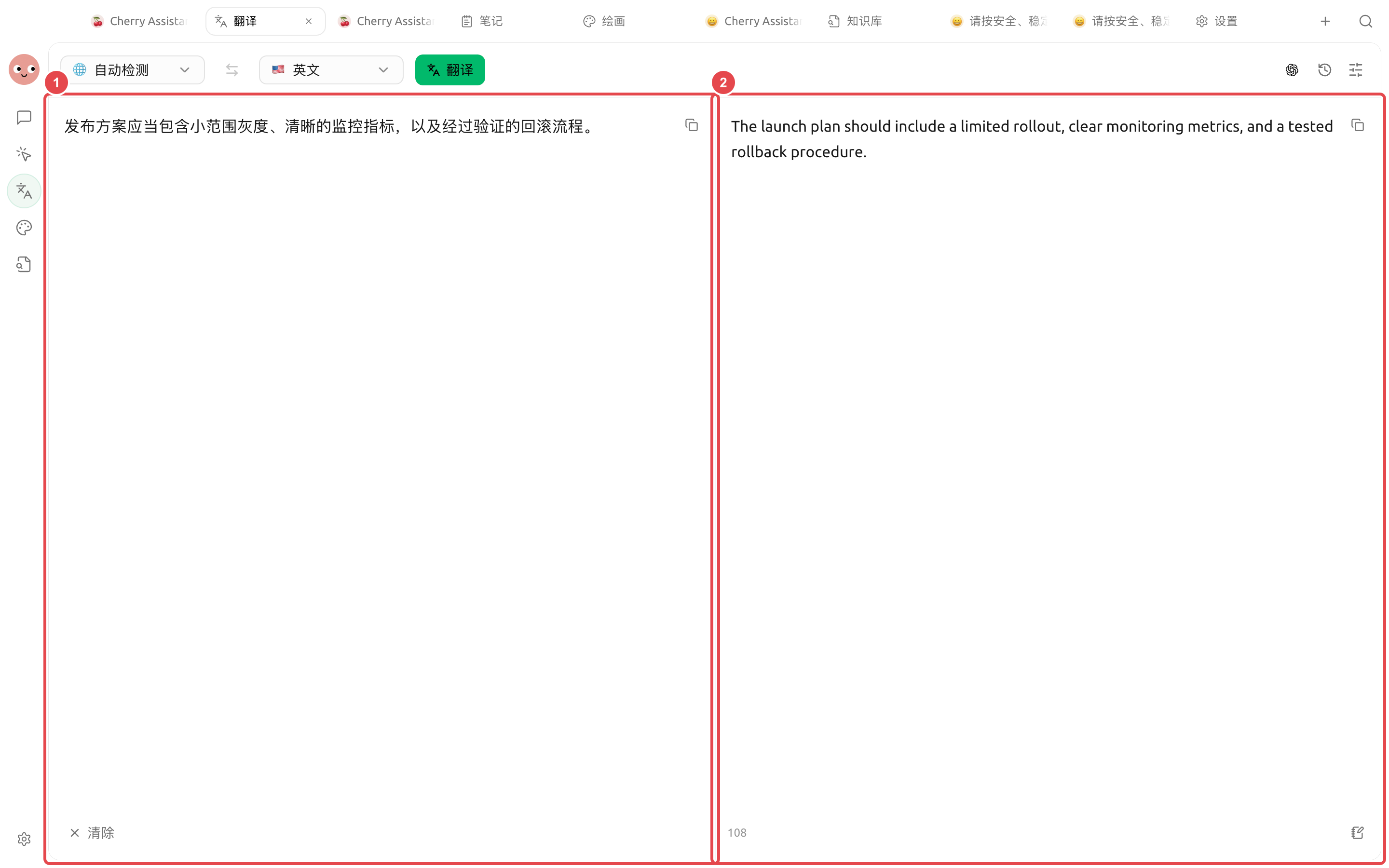
<figure><img src="https://3562065924-files.gitbook.io/~/files/v0/b/gitbook-x-prod.appspot.com/o/spaces%2F0Ut5BptC3t8CtSU1UWpM%2Fuploads%2Fgit-blob-ee99f863bdfef7403502cdc2b4ad505c0cf66069%2Fcherry-v2-guide-translation-result.png?alt=media" alt="翻译页面把中文发布方案完整翻译成英文的实际结果"><figcaption><p>Keep the original text on the left and display the actual translation on the right. Before delivery, you can line-by-line verify key terms such as gray release, monitoring metrics, and rollback procedures.</p></figcaption></figure>

## Workflow

{% stepper %}
{% step %}

### 1. First build a glossary

List product names, feature names, personal names, units, and legal wording that cannot be rewritten. Write down the usage in the target language for each term.
{% endstep %}

{% step %}

### 2. Use a small passage to calibrate the style

In \[Translate], first process one representative section to confirm the level of formality, heading style, and terminology, then translate the entire document.
{% endstep %}

{% step %}

### 3. Check images separately with OCR

After uploading screenshots, first verify the recognized text, especially numbers, button names, and tables. Recognition errors should be corrected before translation.
{% endstep %}

{% step %}

### 4. Let the Agent perform a consistency check

Put the source text, translation, and glossary into the working directory, and let the Agent list terminology inconsistencies, omissions, number discrepancies, and link issues, without directly replacing legal content.
{% endstep %}
{% endstepper %}

## Checks before delivery

* Product names and UI paths match the actual interface;
* Numbers, dates, currency, and units have not changed;
* Markdown links, code blocks, and image captions are preserved;
* Legal, medical, or safety content has undergone professional review.

## Recommended combination and completion criteria

| Item                    | Recommended approach                                                                                                                   |
| ----------------------- | -------------------------------------------------------------------------------------------------------------------------------------- |
| Translation entry point | Use \[Translate] for short text and screenshots; leave multi-file organization to the Agent                                            |
| Terminology             | Provide product names, proper nouns, and a do-not-translate list first                                                                 |
| Files                   | Save the source text and translation in separate directories, keeping the correspondence of original filenames                         |
| Completion criteria     | Numbers, links, and proper nouns are consistent; image text has been spot-checked; formatting changes are marked in the delivery notes |

{% hint style="warning" %}
The history is convenient for reuse, but it also stores translated content. After handling sensitive materials, check and clear the records according to your data management requirements.
{% endhint %}


---

# Agent Instructions
This documentation is published with GitBook. GitBook is the documentation platform designed so that both humans and AI agents can read, navigate, and reason over technical content effectively. Learn more at gitbook.com.

## Querying This Documentation
If you need additional information that is not directly available in this page, you can query the documentation dynamically by asking a question.

Perform an HTTP GET request on the current page URL with the `ask` query parameter, and the optional `goal` query parameter:

```
GET https://docs.cherryai.com.cn/docs/en-us/advanced-basic/cases/multilingual-materials.md?ask=<question>&goal=<endgoal>
```

`ask` is the immediate question: it should be specific, self-contained, and written in natural language.
`goal` is optional and describes the broader end goal you are ultimately trying to accomplish on behalf of the user. GitBook uses it to tailor the answer towards what is most useful for that goal.

The response will contain a direct answer to the question and relevant excerpts and sources from the documentation.

Use this mechanism when the answer is not explicitly present in the current page, you need clarification or additional context, or you want to retrieve related documentation sections.