> For the complete documentation index, see [llms.txt](https://docs.cherryai.com.cn/llms.txt). Markdown versions of documentation pages are available by appending `.md` to page URLs; this page is available as [Markdown](https://docs.cherryai.com.cn/docs/en-us/advanced-basic/cases/long-document-review.md).

# Long document review

Product managers receive a lengthy proposal and need to identify factual issues, structural gaps, and actionable edits, while preserving the original draft and the human confirmation process. The following approach is suitable for reports, policies, bid materials, and product proposals.

## Recommended combination

* 【Conversation】: Quickly compare the review perspectives of different models;
* 【Work】Agent: Read the working directory and generate a revised draft;
* Knowledge base: Provide policies, terminology, or historical materials;
* On the right, 【Files】: Check the original draft and the output.

<figure><img src="https://1658303467-files.gitbook.io/~/files/v0/b/gitbook-x-prod.appspot.com/o/spaces%2F0Ut5BptC3t8CtSU1UWpM%2Fuploads%2FrukBGo1HENGJMzvyjrua%2Fclipboard.png?alt=media&amp;token=4a83a44b-a01d-4103-86fb-dd31d1348bdb" alt="知识库中的文件、文件夹、笔记和网址来源入口"><figcaption><p>Policies, terminology, and historical materials can be used as knowledge base sources, while the original draft remains in a separate working directory.</p></figcaption></figure>

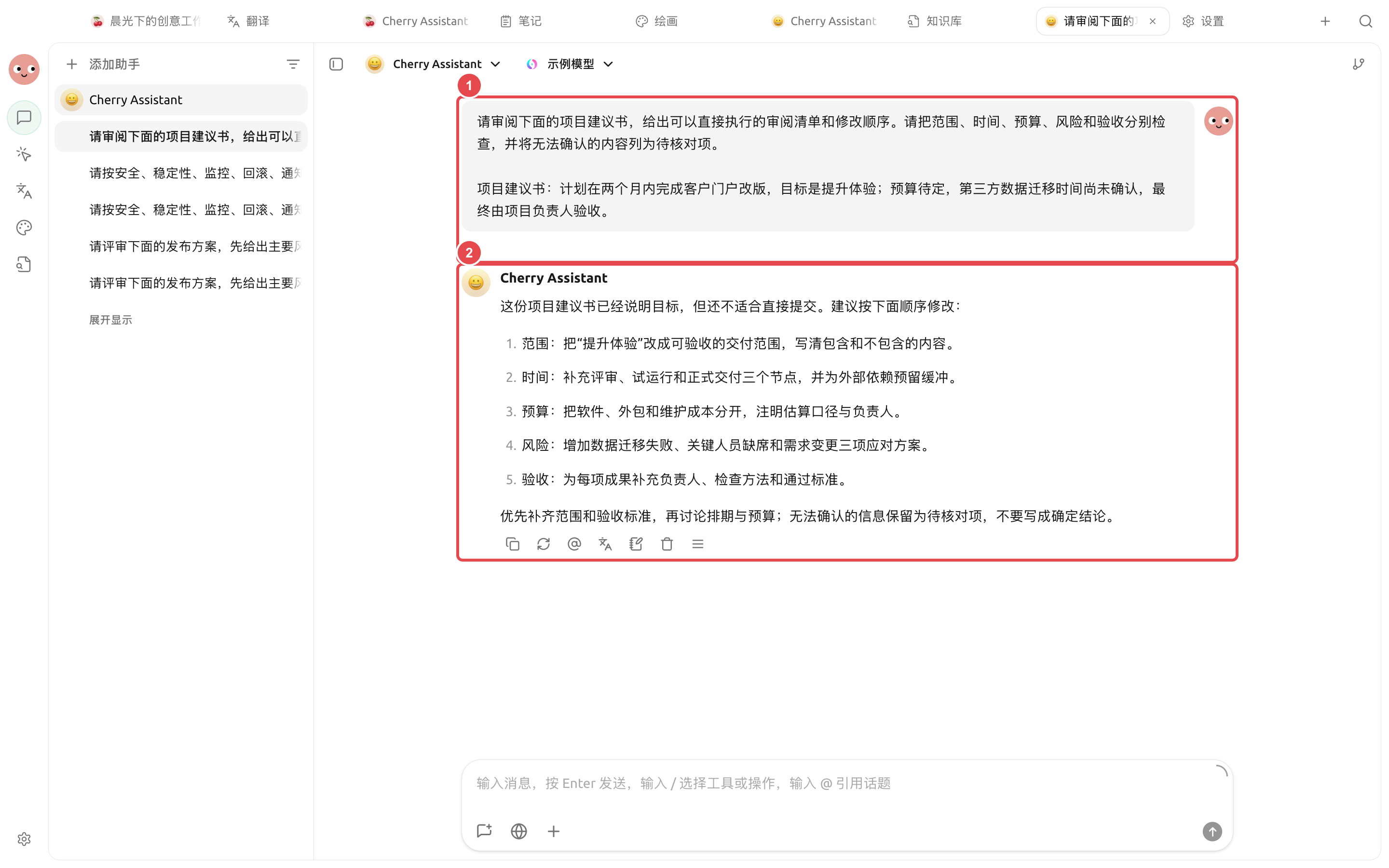
<figure><img src="https://3562065924-files.gitbook.io/~/files/v0/b/gitbook-x-prod.appspot.com/o/spaces%2F0Ut5BptC3t8CtSU1UWpM%2Fuploads%2Fgit-blob-ca3effb63c66ecbc7c7351c0156a74f4a4c13f97%2Fcherry-v2-guide-case-long-document-review.png?alt=media" alt="Cherry Assistant 根据项目建议书内容给出范围、时间、预算、风险和验收五项审阅清单"><figcaption><p>① Input the original text and review criteria; ② The actual result itemizes the gaps and keeps information that cannot be confirmed as items to be checked.</p></figcaption></figure>

## Workflow

{% stepper %}
{% step %}

### 1. Prepare the original draft and review criteria

Put the original draft into a separate working directory, and create a brief review brief that clearly states the reader, purpose, facts that cannot be changed, and the delivery format.
{% endstep %}

{% step %}

### 2. First do a small-scope calibration

Choose a section and have the Agent output it in the format “issue, original text location, impact, suggestion.” Once the scale is appropriate, process the full text.
{% endstep %}

{% step %}

### 3. Separate facts from expression

Ask the Agent to list the facts that need verification separately, and do not use polished language to obscure uncertain content. Check key numbers against the original materials.
{% endstep %}

{% step %}

### 4. Generate a new file and finalize manually

Require keeping the original file, and in `review/` generate the issue list and revised draft under that folder. Use the right-side 【Files】 to check paragraph by paragraph, then export or share.
{% endstep %}
{% endstepper %}

## Example task

```
Review proposal.docx in the current directory. First list factual issues, structural gaps, and expression issues by section, noting the original text location. Do not modify the original file; after confirming the list, generate a revised draft and items to verify under review/.
```

## Preparation before use and completion criteria

| Item                    | Recommended preparation                                                                                                     |
| ----------------------- | --------------------------------------------------------------------------------------------------------------------------- |
| Files                   | Original text, review requirements, and output directory placed separately                                                  |
| Recommended combination | Dedicated Agent + working directory containing only this project's files + 【Confirm each step】                              |
| Spot-check method       | Spot-check one chapter first to confirm the citation format and judgment scale                                              |
| Completion criteria     | Each comment includes the original text location; unread portions are clearly marked; the original file was not overwritten |

Suitable for structured review of contracts, reports, papers, or specifications; when legal, medical, or financial conclusions are involved, the output can only be used as supporting material.

{% hint style="info" %}
When the document is very long, do not repeatedly paste the full text in one conversation. Let the Agent read the working directory directly and leave intermediate outputs by chapter, which makes review and recovery easier.
{% endhint %}


---

# Agent Instructions
This documentation is published with GitBook. GitBook is the documentation platform designed so that both humans and AI agents can read, navigate, and reason over technical content effectively. Learn more at gitbook.com.

## Querying This Documentation
If you need additional information that is not directly available in this page, you can query the documentation by asking a question.

Perform an HTTP GET request on the following URL with the `ask` and `goal` query parameters:

```
GET https://docs.cherryai.com.cn/docs/en-us/advanced-basic/cases/long-document-review.md?ask=<question>&goal=<user_goal>
```

`ask` is the immediate question: it should be specific, self-contained, and written in natural language.
`goal` is what the user is ultimately trying to achieve, the reason they need the answer. Sharing it helps GitBook give you a better, more relevant answer. A goal is most helpful when it describes the outcome the user wants rather than restating the question. For example, with `ask=how do I create an API token`, a goal like `automate deployments from our CI pipeline` lets GitBook tailor the answer to that use case.

The response will contain a direct answer to the question and relevant excerpts and sources from the documentation.

Use this mechanism when the answer is not explicitly present in the current page, you need clarification or additional context, or you want to retrieve related documentation sections.