> For the complete documentation index, see [llms.txt](https://docs.cherryai.com.cn/llms.txt). Markdown versions of documentation pages are available by appending `.md` to page URLs; this page is available as [Markdown](https://docs.cherryai.com.cn/cherry-studio/preview/translation.md).
# 翻译
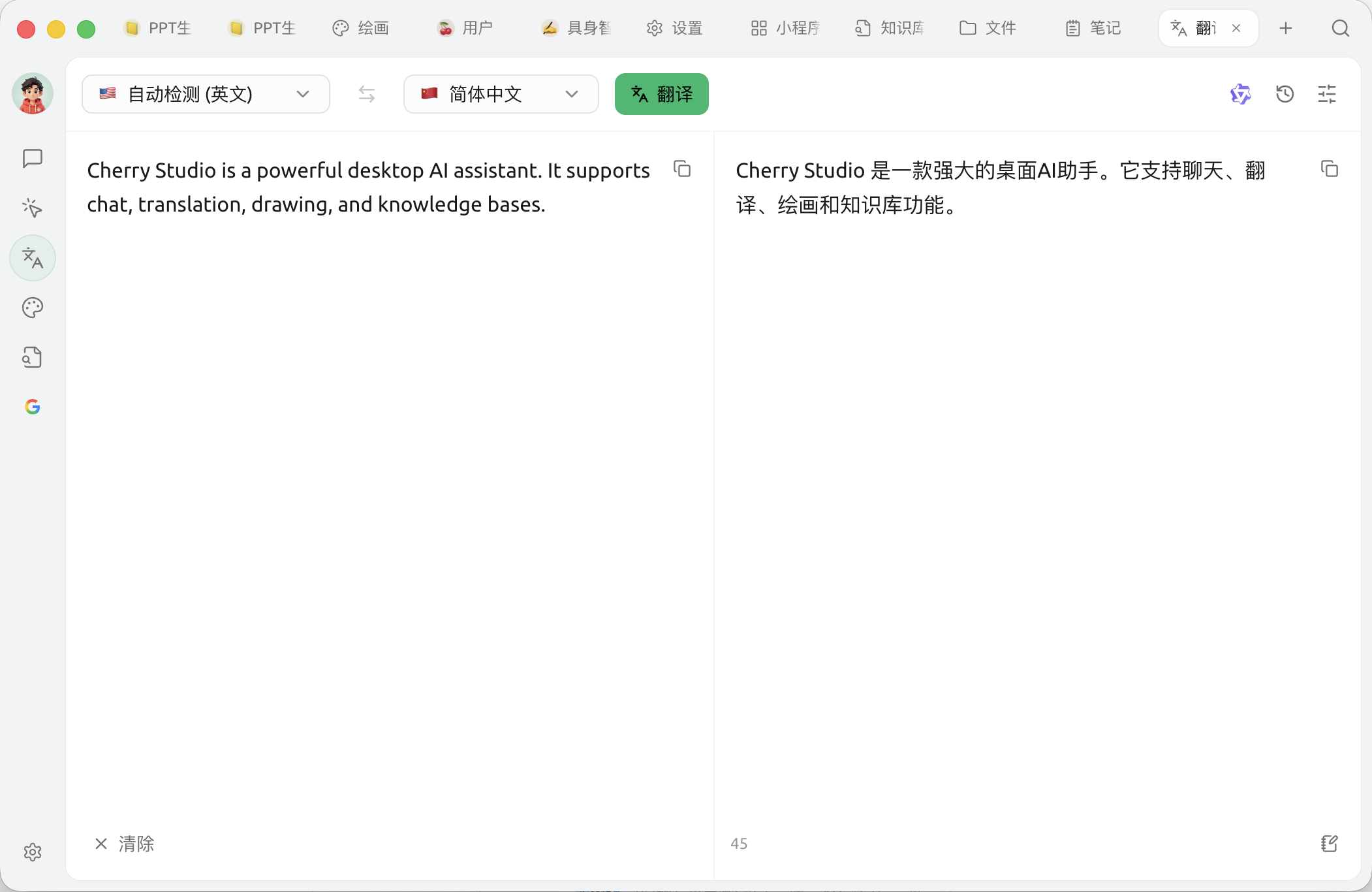
Cherry Studio 的翻译功能为您提供快速、准确的文本翻译服务,支持多种语言之间的互译。
### 界面概览
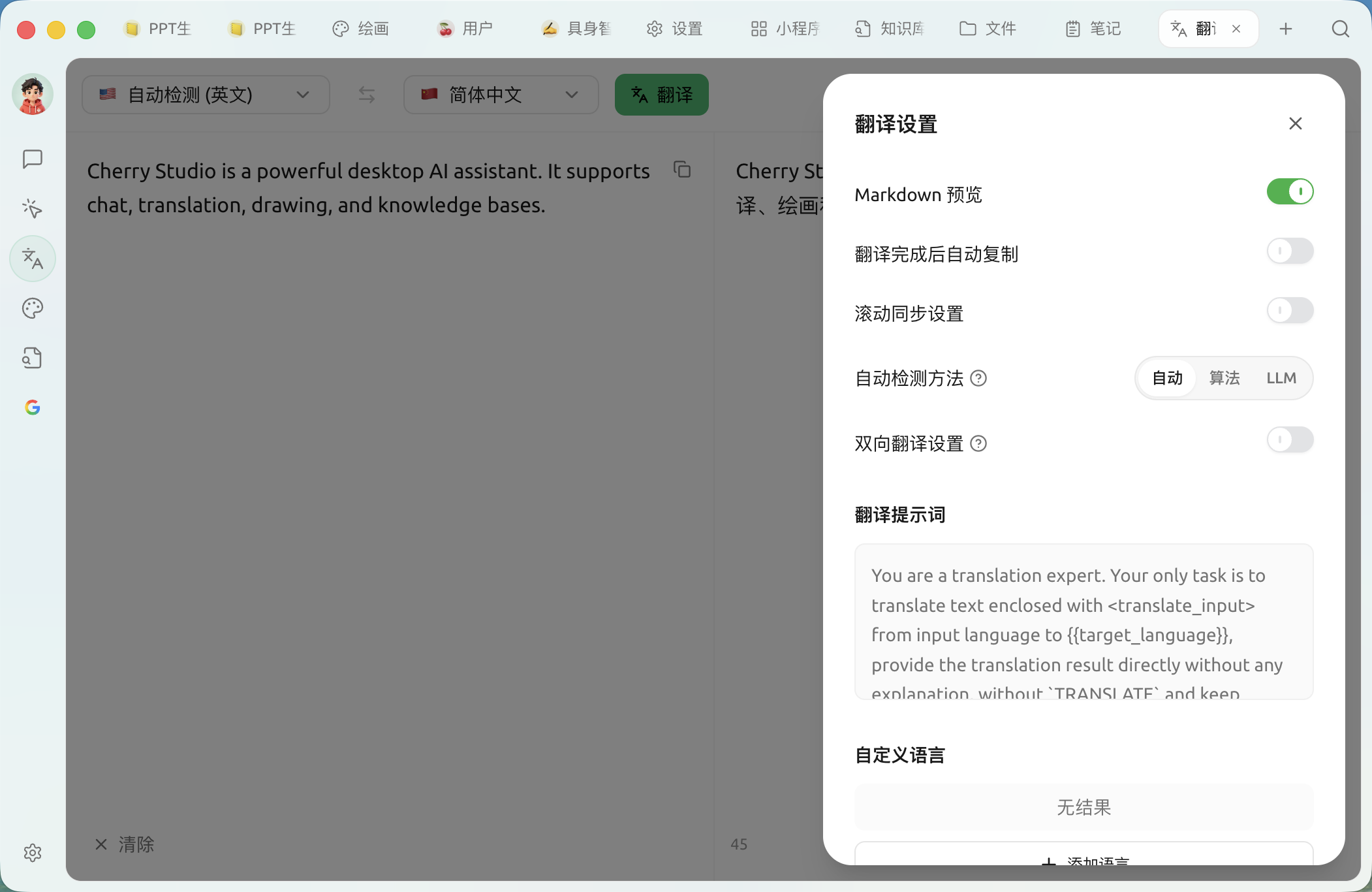
* **Markdown 预览**:开启后翻译结果按 Markdown 渲染
* **翻译完成后自动复制**:结果生成即复制到剪贴板
* **滚动同步设置**:左右两栏滚动联动
* **自动检测方法**:自动 / 算法(franc 本地)/ LLM——LLM 检测更准但会消耗少量 token
* **双向翻译设置**:开启后只在指定的两种语种之间互译,顶部语言栏会合并为一个“源 ⇆ 目标”语言对;下方可选语种对
* **翻译提示词**:自定义翻译使用的系统提示词,改动后可一键恢复默认
* **自定义语言**:在内置语言之外添加、编辑或删除语言(填写语言名与语言代码,如 `zh-cn`)
### 常见问题解答 (FAQ)
* **Q: 翻译不准确怎么办?**
* A: AI 翻译虽然强大,但并非完美。对于专业领域或复杂语境的文本,建议进行人工校对。 您也可以尝试切换不同的模型。
* **Q: 支持哪些语言?**
* A: Cherry Studio 翻译功能支持多种主流语言,具体支持的语言列表请参考 Cherry Studio 的官方网站或应用内说明。
* **Q: 可以翻译整个文件 / 图片吗?**
* A: 可以。输入框支持直接 **拖入或点击上传** 图片与文档:图片会通过 OCR 识别后再翻译,PDF / Word / PPT / Excel 等文档会抽取正文后翻译。若文档特别长,也可以进入对话页面,把文档作为附件发给翻译助手处理。
* **Q: 翻译速度慢怎么办?**
* A: 翻译速度可能受网络连接、文本长度、服务器负载等因素影响。请确保您的网络连接稳定,并耐心等待。
***
### 获取帮助与提交反馈
如果您在配置或使用过程中遇到任何疑问、Bug 或有功能改进建议,请参考 [反馈与建议](/question-contact/suggestions.md) 中提供的官方渠道。
---
# Agent Instructions
This documentation is published with GitBook. GitBook is the documentation platform designed so that both humans and AI agents can read, navigate, and reason over technical content effectively. Learn more at gitbook.com.
## Querying This Documentation
If you need additional information that is not directly available in this page, you can query the documentation dynamically by asking a question.
Perform an HTTP GET request on the current page URL with the `ask` query parameter, and the optional `goal` query parameter:
```
GET https://docs.cherryai.com.cn/cherry-studio/preview/translation.md?ask=&goal=
```
`ask` is the immediate question: it should be specific, self-contained, and written in natural language.
`goal` is optional and describes the broader end goal you are ultimately trying to accomplish on behalf of the user. GitBook uses it to tailor the answer towards what is most useful for that goal.
The response will contain a direct answer to the question and relevant excerpts and sources from the documentation.
Use this mechanism when the answer is not explicitly present in the current page, you need clarification or additional context, or you want to retrieve related documentation sections.