> For the complete documentation index, see [llms.txt](https://docs.cherryai.com.cn/llms.txt). Markdown versions of documentation pages are available by appending `.md` to page URLs; this page is available as [Markdown](https://docs.cherryai.com.cn/advanced-basic/knowledge-content/translation-workflow.md).
# 文件、图片与长文翻译
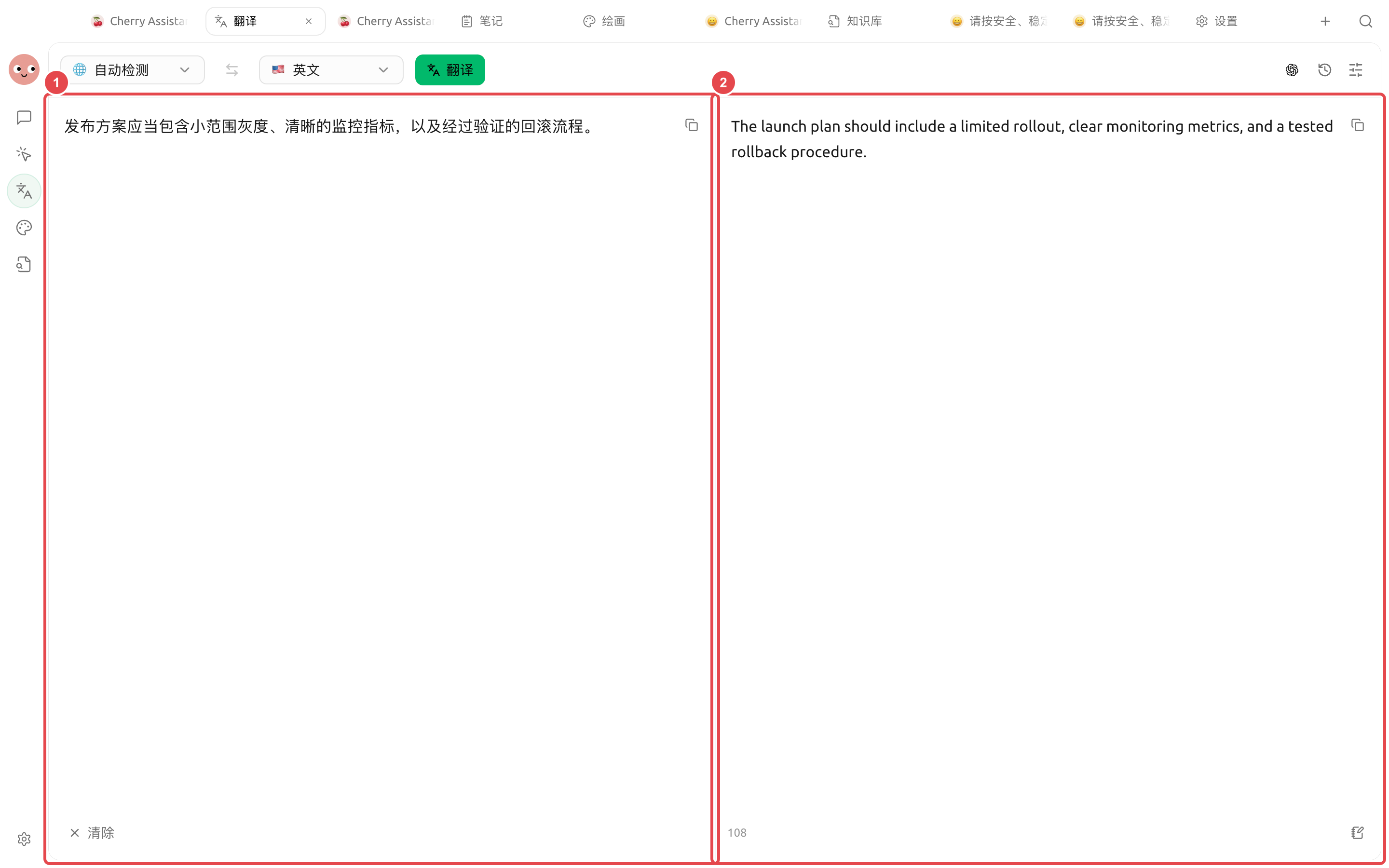
【翻译】可以处理直接输入的文本,也可以上传图片或文档。图片会先识别文字,文档则按格式和内容处理;历史记录可以收藏、再次打开和复用。
#### 结果出来后检查什么
| 检查项 | 例子 |
| ----- | ------------------ |
| 关键含义 | “灰度发布”不能只按颜色直译 |
| 专有名词 | 产品名、团队名和功能名保持统一 |
| 数字与条件 | 日期、比例、金额和否定词不能遗漏 |
| 语气 | 通知、合同、营销文案分别采用合适语气 |
短文本可以直接逐句核对;文件和长文先抽查标题、表格、数字和重复术语,再决定是否整篇交付。
### 保留版式翻译 PDF
上传可提取文字的 PDF 后,页面会检测 BabelDOC。首次使用时选择【安装 BabelDOC】;依赖就绪后,左侧预览原文,右侧显示译文 PDF,并按检查资源、解析、翻译、排版和渲染显示进度。
{% stepper %}
{% step %}
#### 1. 上传 PDF 并检查依赖
点击【拖入或点击上传图片/文档】选择一个 PDF。页面提示缺少或版本过旧时,安装或更新 BabelDOC;安装由 Cherry Studio 的【环境依赖】统一管理。
{% endstep %}
{% step %}
#### 2. 选择翻译模型和目标语言
PDF 翻译需要当前模型能通过本地 API 网关调用。模型不可用时先回到【设置】→【模型服务】检查连接,不要反复安装 BabelDOC。
{% endstep %}
{% step %}
#### 3. 对照双栏结果
翻译完成后逐页比较原文与译文,重点检查表格、图注、页眉页脚、脚注和断行。点击下载按钮可另存译文 PDF。
{% endstep %}
{% step %}
#### 4. 从历史记录继续
PDF 翻译会进入【翻译历史】和【文件】。历史记录可重新打开双栏预览、定位译文文件或另存结果;删除记录时,对应译文文件也会一并回收。
{% endstep %}
{% endstepper %}
{% hint style="warning" %}
扫描版或纯图片 PDF 暂不支持保留版式翻译。页面提示需要 OCR 时,先将图片文字识别为可校对文本,再使用普通翻译流程。
{% endhint %}
### 翻译步骤
{% stepper %}
{% step %}
#### 1. 先确认源语言和目标语言
自动识别适合混合或未知语言;合同、技术文档等正式材料建议手动确认语言,减少误判。
{% endstep %}
{% step %}
#### 2. 选择翻译方式
需要上下文、语气和术语一致时使用已配置的模型;普通短句可以选择更轻量的方式。具体可用项以当前页面为准。
{% endstep %}
{% step %}
#### 3. 分段核对
先检查名称、数字、日期、否定词和单位。图片翻译还要核对 OCR 结果;识别错了,后面的译文也会跟着错。
{% endstep %}
{% step %}
#### 4. 收藏、导出或复用结果
在【翻译历史】中查看、收藏和再次使用文本译文;PDF 结果可以双栏预览、打开文件或另存。正式交付前,把术语表和人工修订保存到项目资料中。
{% endstep %}
{% endstepper %}
#### 应用案例:准备多语言产品资料
先把产品名、功能名和禁止改写的术语整理成一份说明。上传中文说明书,先翻译一个章节并确认术语,再处理全文;宣传图片单独上传做 OCR 翻译。完成后把已确认的术语和译文放进项目工作目录,让 Agent 统一检查标题、链接和数字,但不让它自行改写法务声明。
{% hint style="danger" %}
医疗、法律、财务及安全相关内容需要专业人员复核。自动翻译可以提高效率,不能替代有责任主体的审校。
{% endhint %}
---
# Agent Instructions
This documentation is published with GitBook. GitBook is the documentation platform designed so that both humans and AI agents can read, navigate, and reason over technical content effectively. Learn more at gitbook.com.
## Querying This Documentation
If you need additional information that is not directly available in this page, you can query the documentation by asking a question.
Perform an HTTP GET request on the following URL with the `ask` and `goal` query parameters:
```
GET https://docs.cherryai.com.cn/advanced-basic/knowledge-content/translation-workflow.md?ask=&goal=
```
`ask` is the immediate question: it should be specific, self-contained, and written in natural language.
`goal` is what the user is ultimately trying to achieve, the reason they need the answer. Sharing it helps GitBook give you a better, more relevant answer. A goal is most helpful when it describes the outcome the user wants rather than restating the question. For example, with `ask=how do I create an API token`, a goal like `automate deployments from our CI pipeline` lets GitBook tailor the answer to that use case.
The response will contain a direct answer to the question and relevant excerpts and sources from the documentation.
Use this mechanism when the answer is not explicitly present in the current page, you need clarification or additional context, or you want to retrieve related documentation sections.