> For the complete documentation index, see [llms.txt](https://docs.cherryai.com.cn/llms.txt). Markdown versions of documentation pages are available by appending `.md` to page URLs; this page is available as [Markdown](https://docs.cherryai.com.cn/advanced-basic/knowledge-content/knowledge-base.md).

# 构建知识库与召回测试

知识库把文件、网页和笔记处理成可检索片段。它适合回答“资料里怎么说”，不等于让模型永久记住整份文档。

## 新建并导入资料

{% stepper %}
{% step %}

### 1. 打开【知识库】→【新建知识库】

填写容易识别的名称，并选择可用的嵌入模型。嵌入模型负责把资料变成可搜索的表示，与对话使用的主模型不是一回事。
{% endstep %}

{% step %}

### 2. 选择资料来源

可以添加文件、文件夹、笔记或网址。常见文档格式包括 PDF、DOCX、Markdown、Excel、TXT 和 CSV；扫描件可能需要 OCR 才能取得文字。
{% endstep %}

{% step %}

### 3. 等待处理完成

打开文件详情查看预览和分段。标题缺失、乱码或表格结构丢失时，先整理原文件，再重新处理。
{% endstep %}

{% step %}

### 4. 做召回测试

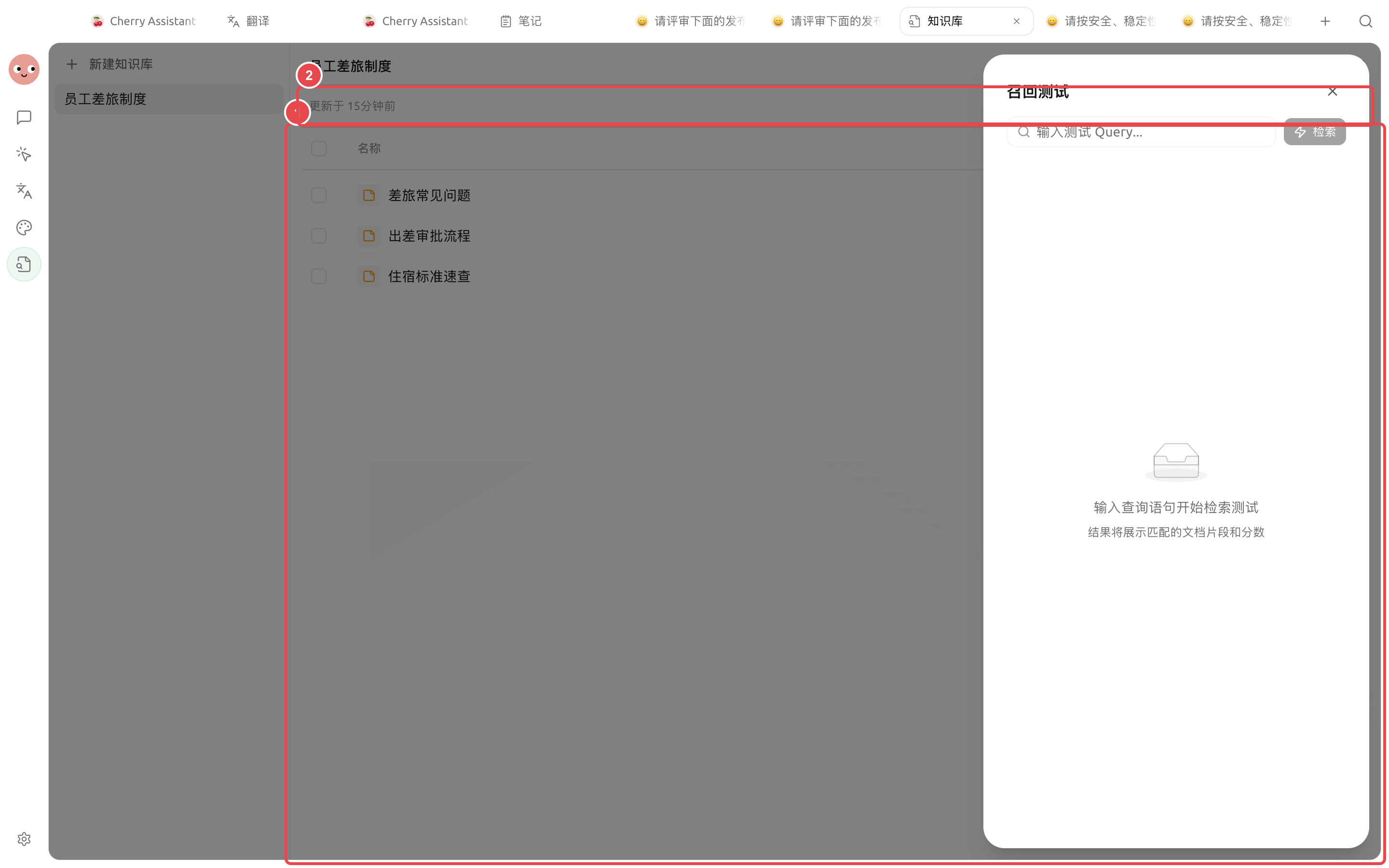
用真实用户会问的问题测试，不要只输入文件标题。检查返回片段是否相关、是否包含完整上下文，再决定是否绑定给 Agent。
{% endstep %}
{% endstepper %}

<figure><img src="/files/WBbS3eBWM1QiWGucWUCs" alt="新建知识库时的名称、嵌入模型和保存入口"><figcaption><p>新建知识库时先填写名称并选择可用的嵌入模型。</p></figcaption></figure>

<figure><img src="https://3562065924-files.gitbook.io/~/files/v0/b/gitbook-x-prod.appspot.com/o/spaces%2F0Ut5BptC3t8CtSU1UWpM%2Fuploads%2Fgit-blob-9b55e8bfc279019611a137d7667c91533e6684eb%2Fcherry-v2-guide-knowledge-sources.png?alt=media" alt="员工差旅制度知识库中已就绪的笔记来源与召回测试入口"><figcaption><p>① 三篇差旅资料均已就绪；② 点击顶部【召回测试】验证实际问题。</p></figcaption></figure>

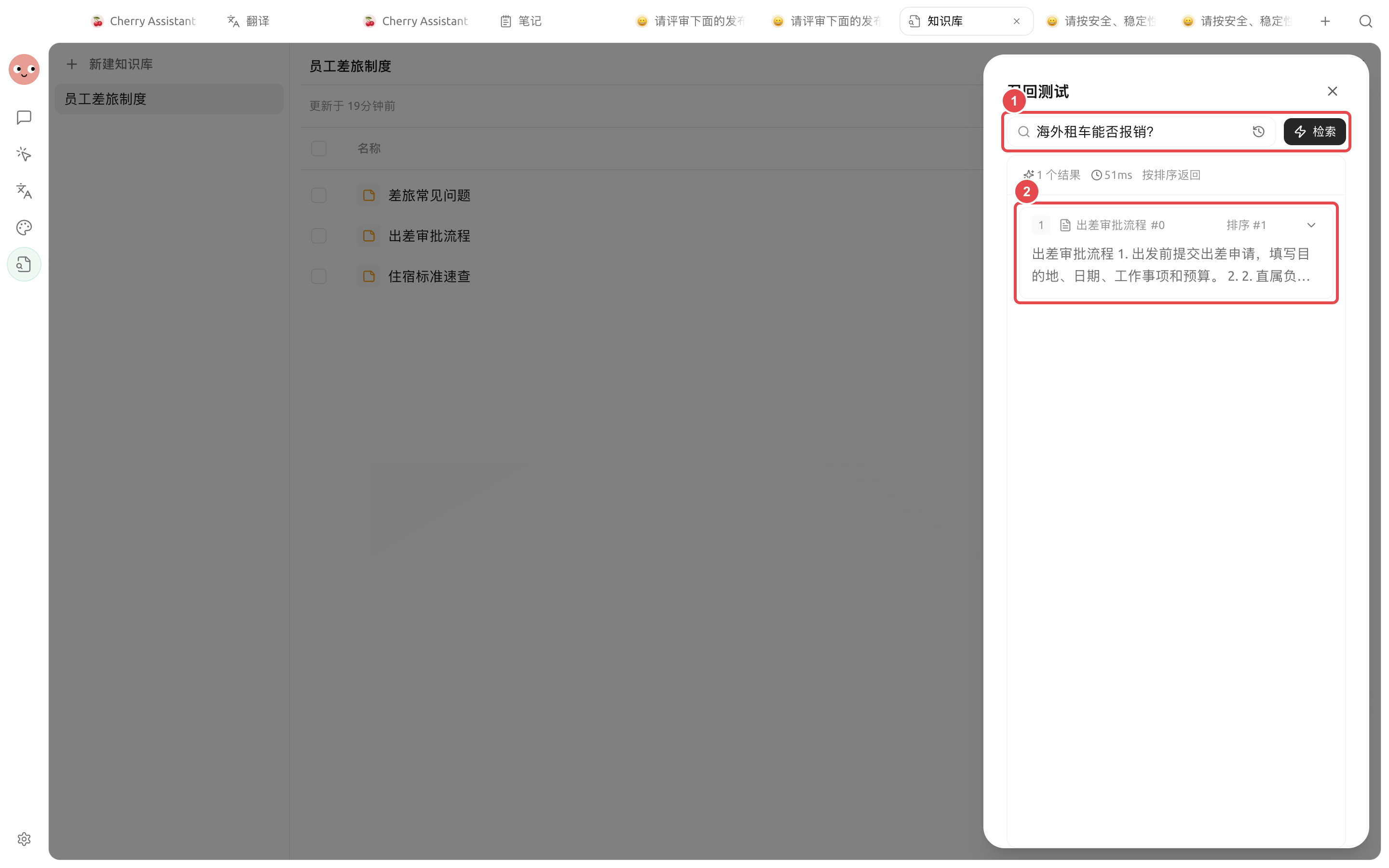
<figure><img src="https://3562065924-files.gitbook.io/~/files/v0/b/gitbook-x-prod.appspot.com/o/spaces%2F0Ut5BptC3t8CtSU1UWpM%2Fuploads%2Fgit-blob-413972fdce3631aee8d1619db3a9936b2dfc3774%2Fcherry-v2-guide-knowledge-recall.png?alt=media" alt="知识库对海外租车能否报销的召回测试结果"><figcaption><p>① 输入工作中真的会问到的问题；② 检查命中资料、片段内容和相关度。</p></figcaption></figure>

### 用真实问题验收召回结果

资料显示【就绪】后，用工作中真的会出现的问题测试一次。例如制度库可以问“海外租车能否报销？”，再检查返回内容是否来自正确资料，是否包含足够的上下文。

| 看到的结果           | 下一步                     |
| --------------- | ----------------------- |
| 命中正确资料，片段足以回答问题 | 可以绑定给 Agent 使用          |
| 命中资料正确，但片段被截断   | 先检查原文结构，再调整分段长度         |
| 命中旧制度或无关资料      | 清理过期资料，补充更明确的标题和内容      |
| 完全没有结果          | 检查资料状态和提问用词，不要先盲目增大返回数量 |

{% hint style="info" %}
召回测试通过后，再在 Agent 中验证完整问答。这样能分清是“没有找到资料”，还是“找到资料后回答得不好”。
{% endhint %}

## RAG 设置怎么理解

RAG 指“先检索资料，再让模型作答”。常见设置控制切分长度、重叠范围、返回数量和相关度门槛。

| 配置    | 作用             | 建议起点     | 什么时候调整              |
| ----- | -------------- | -------- | ------------------- |
| 分段长度  | 决定每个检索片段包含多少内容 | 先使用页面初始值 | 片段经常截断句子或混入太多主题时    |
| 分段重叠  | 保留相邻片段的衔接      | 保持少量重叠   | 条款跨段、上下文经常断开时       |
| 返回数量  | 一次提供多少候选片段     | 从少量结果开始  | 漏掉关键资料时增加，杂讯太多时减少   |
| 相关度门槛 | 过滤不相干内容        | 用召回测试决定  | 无关结果多时提高，正确片段被过滤时降低 |

<figure><img src="/files/GOHOKqcAMzi1ulVWNLr6" alt="知识库 RAG 的分段、返回和过滤设置"><figcaption><p>只有召回结果不稳定时，再按资料结构调整 RAG 设置。</p></figcaption></figure>

### 应用案例：建立内部制度问答库

把现行制度按部门整理，文件名包含主题和生效范围。导入后用“出差住宿超标怎么处理”“试用期请假需要谁批准”等真实问题做召回测试。确认片段准确后，只把这套知识库绑定给“制度问答”Agent，并要求回答时指出资料名称；遇到缺失内容则明确说未找到。

{% hint style="warning" %}
知识库不会自动判断文件是否过期。制度、价格和流程变化时，应更新或移除旧资料，并重新做召回测试。
{% endhint %}

<details>

<summary>为什么导入后一直没有结果？</summary>

检查文件处理状态、嵌入模型连接和文档预览。扫描版 PDF 如果没有可提取文字，需要先配置 OCR 或换成可搜索版本。

</details>


---

# Agent Instructions
This documentation is published with GitBook. GitBook is the documentation platform designed so that both humans and AI agents can read, navigate, and reason over technical content effectively. Learn more at gitbook.com.

## Querying This Documentation
If you need additional information that is not directly available in this page, you can query the documentation dynamically by asking a question.

Perform an HTTP GET request on the current page URL with the `ask` query parameter, and the optional `goal` query parameter:

```
GET https://docs.cherryai.com.cn/advanced-basic/knowledge-content/knowledge-base.md?ask=<question>&goal=<endgoal>
```

`ask` is the immediate question: it should be specific, self-contained, and written in natural language.
`goal` is optional and describes the broader end goal you are ultimately trying to accomplish on behalf of the user. GitBook uses it to tailor the answer towards what is most useful for that goal.

The response will contain a direct answer to the question and relevant excerpts and sources from the documentation.

Use this mechanism when the answer is not explicitly present in the current page, you need clarification or additional context, or you want to retrieve related documentation sections.