> For the complete documentation index, see [llms.txt](https://docs.cherryai.com.cn/llms.txt). Markdown versions of documentation pages are available by appending `.md` to page URLs; this page is available as [Markdown](https://docs.cherryai.com.cn/advanced-basic/chat/artifacts-export.md).
# 产物、引用与导出
一段回复里可能同时出现正文、代码、文件、图片、引用和可继续编辑的内容。先检查产物,再决定复制、下载、导出或交给 Agent 继续处理。
```mermaid
flowchart LR
A[在对话中说明产物格式] --> B[打开右侧预览]
B --> C{内容和布局是否完整}
C -- 否 --> D[回到对话补充修改要求]
D --> B
C -- 是 --> E[下载、复制或交给 Agent 保存]
```
预览的作用是提前发现缺项,而不是只确认“已经生成”。如果页面要交给同事使用,至少点开链接、按钮和下载文件各检查一次。
{% hint style="info" %}
如果结果只是代码块而没有出现预览,可在同一轮对话中补充“请输出一个完整、可直接预览的 HTML 产物”,并写清页面需要包含的区域。
{% endhint %}
#### 应用案例:发布前检查页
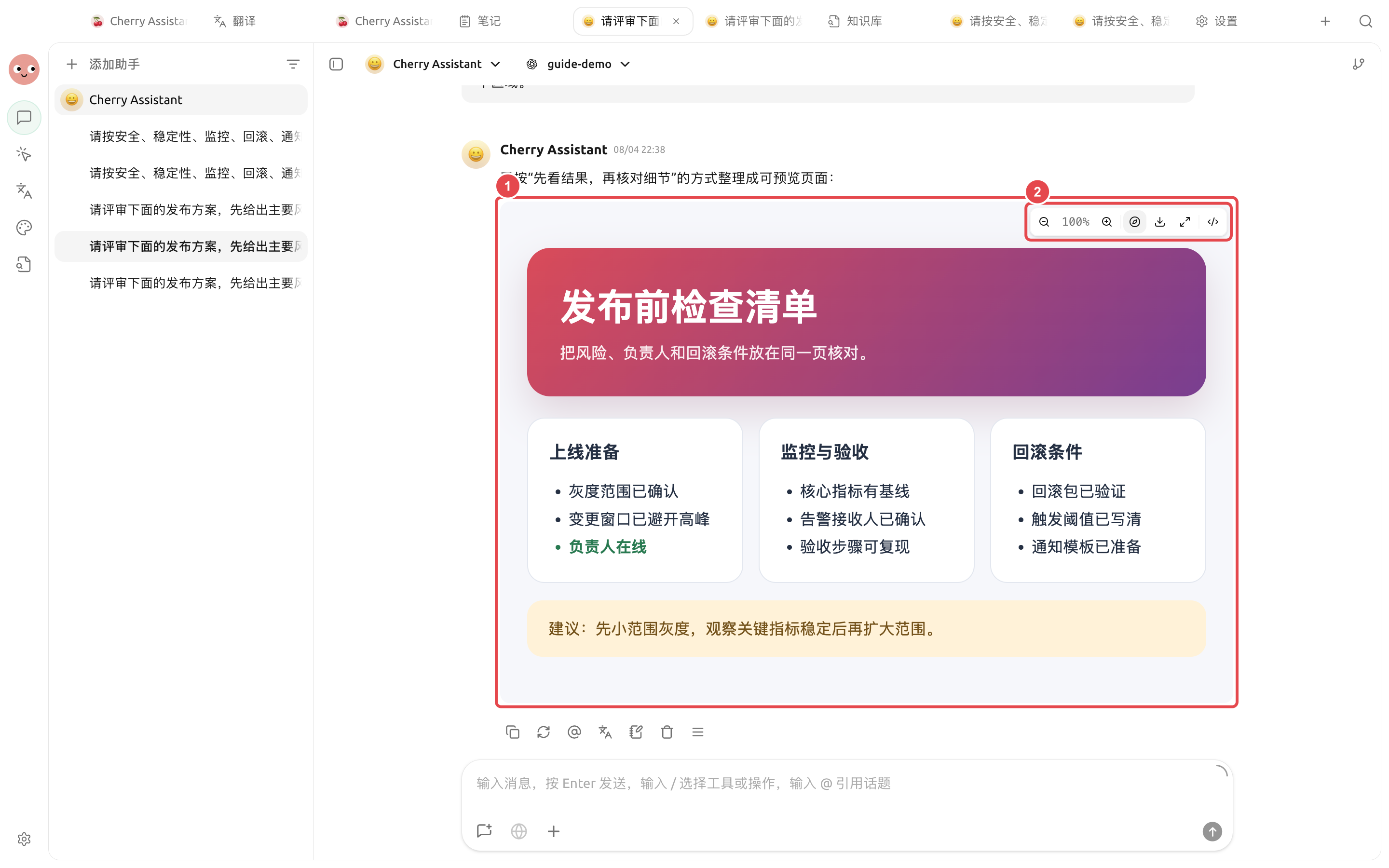
输入“把发布前检查清单做成一个可直接预览的完整 HTML 产物,包含上线准备、监控与验收、回滚条件三个区域”。预览打开后,先检查三部分是否完整,再下载或交给 Agent 保存到项目目录。
#### 应用案例:检查数据表
打开 Agent 生成的 `.xlsx` 预算表,先切换每个工作表,再检查合并标题、金额格式、公式结果和图表。单元格内容较长时点击展开;需要看清图片或图表时使用缩放。预览用于验收,不会替代 Excel 中的完整编辑和重算能力。
### 先做三项检查
1. **内容**:数字、日期、专有名词和结论是否与原资料一致。
2. **来源**:联网结果是否保留可打开的链接;引用是否真的支持对应说法。
3. **文件**:文件名、格式和内容是否能正常打开,是否包含不应分享的信息。
### 常见去向
| 结果 | 推荐做法 |
| ---------------- | ------------------------------------- |
| 一段定稿文字 | 复制到目标应用,或保存为笔记 |
| 需要持续修改的 Markdown | 放入 Agent 工作目录,在【文件】面板继续编辑 |
| 可复用的资料 | 整理后加入知识库,不要把临时讨论整段导入 |
| 图片 | 打开原图检查尺寸与细节,再下载使用 |
| `.xlsx` 表格 | 在内置预览中检查工作表、样式、公式结果、图片和图表,再用表格软件做最终编辑 |
| 代码或命令 | 先阅读并在可恢复环境验证,不直接运行未知命令 |
{% hint style="warning" %}
“生成成功”只说明模型返回了内容,不代表文件可直接发布。对外材料仍要检查事实、版权、隐私和品牌要求。
{% endhint %}
#### 应用案例:把讨论整理成可交付文档
团队先在【对话】中讨论活动方案,确认受众、时间和预算边界后,让模型输出结构化提纲。随后把提纲交给【工作】中的内容 Agent,在指定目录生成 `campaign-plan.md`。最终在右侧【文件】中修订,避免把几十轮讨论原样复制到正式文档。
为什么引用链接打不开?
链接可能失效、需要登录,或搜索结果只提供了摘要。换用原始来源重新核对;无法打开的来源不要作为关键结论的唯一支撑。
为什么引用链接打不开?
链接可能失效、需要登录,或搜索结果只提供了摘要。换用原始来源重新核对;无法打开的来源不要作为关键结论的唯一支撑。
---
# Agent Instructions
This documentation is published with GitBook. GitBook is the documentation platform designed so that both humans and AI agents can read, navigate, and reason over technical content effectively. Learn more at gitbook.com.
## Querying This Documentation
If you need additional information that is not directly available in this page, you can query the documentation by asking a question.
Perform an HTTP GET request on the following URL with the `ask` and `goal` query parameters:
```
GET https://docs.cherryai.com.cn/advanced-basic/chat/artifacts-export.md?ask=&goal=
```
`ask` is the immediate question: it should be specific, self-contained, and written in natural language.
`goal` is what the user is ultimately trying to achieve, the reason they need the answer. Sharing it helps GitBook give you a better, more relevant answer. A goal is most helpful when it describes the outcome the user wants rather than restating the question. For example, with `ask=how do I create an API token`, a goal like `automate deployments from our CI pipeline` lets GitBook tailor the answer to that use case.
The response will contain a direct answer to the question and relevant excerpts and sources from the documentation.
Use this mechanism when the answer is not explicitly present in the current page, you need clarification or additional context, or you want to retrieve related documentation sections.