> For the complete documentation index, see [llms.txt](https://docs.cherryai.com.cn/llms.txt). Markdown versions of documentation pages are available by appending `.md` to page URLs; this page is available as [Markdown](https://docs.cherryai.com.cn/advanced-basic/cases/notes-weekly-report.md).
# 笔记生成周报
项目负责人一周内积累了会议笔记、进度更新和零散待办,希望周五整理成结构稳定、事实可核对的周报。关键是先统一记录方式,再让 Agent 汇总,而不是让它猜测缺失状态。
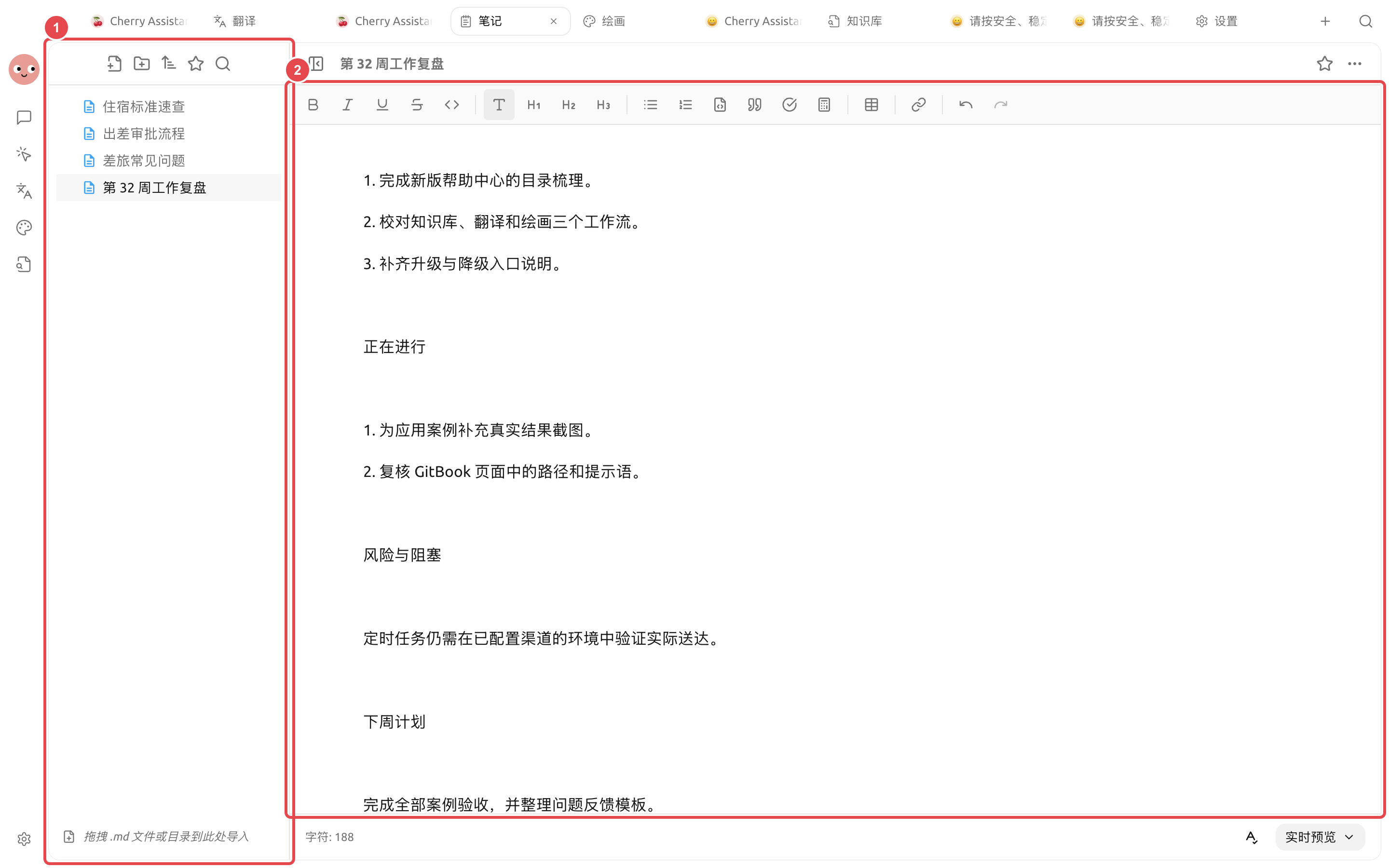
按同一结构持续记录,周末整理时更容易核对状态和负责人。
① 左侧保留原始记录和本周复盘;② 右侧周报已经有真实内容,可继续人工修改、预览和导出。
## 操作流程
{% stepper %}
{% step %}
### 1. 统一记录方式
每天在同一笔记文件夹记录事项,至少包含日期、结果、负责人和状态。未完成事项不要写成已经交付。
{% endstep %}
{% step %}
### 2. 周五先人工整理
合并重复事项,补齐关键数字和链接。长期背景放进知识库,本周变化留在当前笔记。
{% endstep %}
{% step %}
### 3. 交给 Agent 生成草稿
要求按“本周完成、进行中、风险、下周计划”输出,并在资料缺失时列出待补项。
{% endstep %}
{% step %}
### 4. 检查并导出
确认状态、数字和责任人,再在【笔记】中定稿并导出。稳定格式可以做成技能,下周继续复用。
{% endstep %}
{% endstepper %}
## 示例任务
```
读取本周笔记,生成周报草稿。合并同一事项,但保留不同日期的状态变化;不推测完成情况。缺少负责人、数字或下一步时列到“待补充”。
```
## 推荐组合与完成标准
| 项目 | 建议做法 |
| ----- | --------------------------------- |
| 日常输入 | 笔记按日期或项目记录,只写事实和待办 |
| Agent | 使用固定的周报结构,读取本周笔记后再生成 |
| 输出 | 周报写入独立文件,不覆盖原始笔记 |
| 完成标准 | 每条进展能回到原笔记;未完成事项有负责人或下一步;没有凭空增加数据 |
适合把已经记录的工作整理成周报,不适合让 Agent 根据零散记忆猜测一周成果。
{% hint style="info" %}
固定时间自动生成周报前,先手动运行几周。只有输入格式稳定、缺失信息处理可靠后,再创建定时任务。
{% endhint %}
---
# Agent Instructions
This documentation is published with GitBook. GitBook is the documentation platform designed so that both humans and AI agents can read, navigate, and reason over technical content effectively. Learn more at gitbook.com.
## Querying This Documentation
If you need additional information that is not directly available in this page, you can query the documentation by asking a question.
Perform an HTTP GET request on the following URL with the `ask` and `goal` query parameters:
```
GET https://docs.cherryai.com.cn/advanced-basic/cases/notes-weekly-report.md?ask=&goal=
```
`ask` is the immediate question: it should be specific, self-contained, and written in natural language.
`goal` is what the user is ultimately trying to achieve, the reason they need the answer. Sharing it helps GitBook give you a better, more relevant answer. A goal is most helpful when it describes the outcome the user wants rather than restating the question. For example, with `ask=how do I create an API token`, a goal like `automate deployments from our CI pipeline` lets GitBook tailor the answer to that use case.
The response will contain a direct answer to the question and relevant excerpts and sources from the documentation.
Use this mechanism when the answer is not explicitly present in the current page, you need clarification or additional context, or you want to retrieve related documentation sections.