> For the complete documentation index, see [llms.txt](https://docs.cherryai.com.cn/llms.txt). Markdown versions of documentation pages are available by appending `.md` to page URLs; this page is available as [Markdown](https://docs.cherryai.com.cn/advanced-basic/cases/long-document-review.md).
# 长文档审阅
产品经理收到一份篇幅较长的方案,需要找出事实问题、结构缺口和可执行修改,同时保留原稿和人工确认过程。下面的做法适合报告、制度、投标材料和产品方案。
## 推荐组合
* 【对话】:快速比较不同模型的审阅角度;
* 【工作】Agent:读取工作目录并生成修订稿;
* 知识库:提供制度、术语或历史资料;
* 右侧【文件】:检查原稿与产物。
制度、术语和历史资料可以作为知识库来源,原稿仍放在独立工作目录。
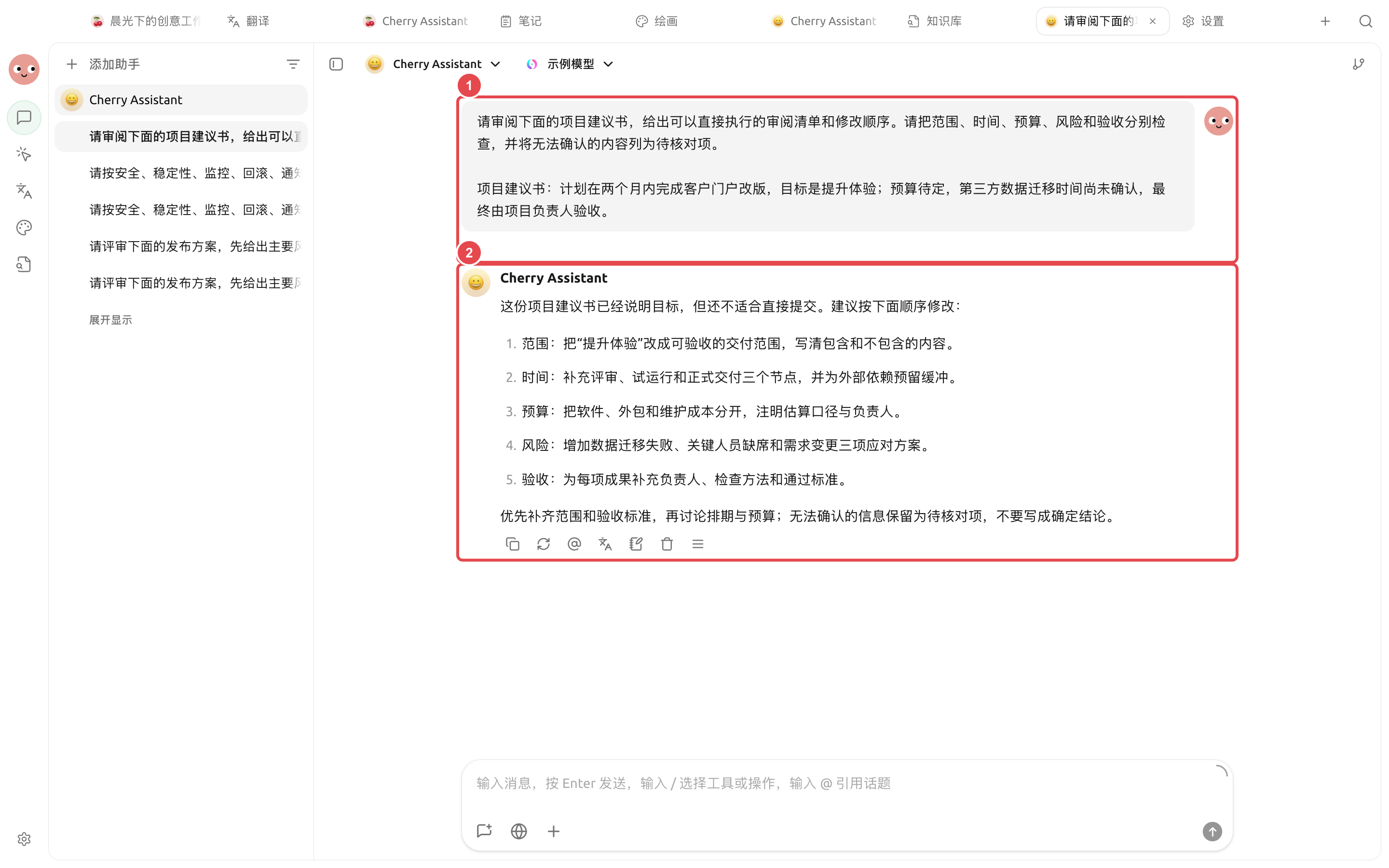
① 输入原文和审阅标准;② 实际结果逐项指出缺口,并把不能确认的信息保留为待核对项。
## 操作流程
{% stepper %}
{% step %}
### 1. 准备原稿和审阅标准
把原稿放入独立工作目录,另建一份简短的审阅说明,写清读者、目的、不能改动的事实和交付格式。
{% endstep %}
{% step %}
### 2. 先做小范围校准
选一个章节,让 Agent 按“问题、原文位置、影响、建议”输出。确认尺度合适后再处理全文。
{% endstep %}
{% step %}
### 3. 分开事实与表达
要求 Agent 把需要查证的事实单独列出,不用语言润色掩盖不确定内容。关键数字回到原资料核对。
{% endstep %}
{% step %}
### 4. 生成新文件并人工定稿
要求保留原文件,在 `review/` 下生成问题清单和修订稿。用右侧【文件】逐段检查,再导出或分享。
{% endstep %}
{% endstepper %}
## 示例任务
```
审阅当前目录中的 proposal.docx。先按章节列出事实问题、结构缺口和表达问题,注明原文位置。不要改动原文件;确认清单后,在 review/ 下生成修订稿和待核对事项。
```
## 使用前准备与完成标准
| 项目 | 建议准备 |
| ---- | -------------------------------- |
| 文件 | 原文、审阅要求和输出目录分开放置 |
| 推荐组合 | 专用 Agent + 只含本项目文件的工作目录 + 【逐次确认】 |
| 抽查方式 | 先抽查一章,确认引用格式和判断尺度 |
| 完成标准 | 每条意见带原文位置;未读取部分明确标记;原文件未被覆盖 |
适合合同、报告、论文或规范的结构化审阅;涉及法律、医疗、财务结论时,输出只能作为辅助材料。
{% hint style="info" %}
文档很长时,不要在一个对话里反复粘贴全文。让 Agent 直接读取工作目录,并按章节留下中间产物,更容易复核和恢复。
{% endhint %}
---
# Agent Instructions
This documentation is published with GitBook. GitBook is the documentation platform designed so that both humans and AI agents can read, navigate, and reason over technical content effectively. Learn more at gitbook.com.
## Querying This Documentation
If you need additional information that is not directly available in this page, you can query the documentation dynamically by asking a question.
Perform an HTTP GET request on the current page URL with the `ask` query parameter, and the optional `goal` query parameter:
```
GET https://docs.cherryai.com.cn/advanced-basic/cases/long-document-review.md?ask=&goal=
```
`ask` is the immediate question: it should be specific, self-contained, and written in natural language.
`goal` is optional and describes the broader end goal you are ultimately trying to accomplish on behalf of the user. GitBook uses it to tailor the answer towards what is most useful for that goal.
The response will contain a direct answer to the question and relevant excerpts and sources from the documentation.
Use this mechanism when the answer is not explicitly present in the current page, you need clarification or additional context, or you want to retrieve related documentation sections.